The short answer: a strong Discord bio template fits inside the 190 character About Me limit, uses four short lines (identity, vibe, signal, link), leans on the markdown that actually renders (bold, italic, strikethrough, inline code, spoiler), and skips the markdown that does not (headings, lists, block quotes, custom link text, underline). Open Discord, click the gear icon, pick Profiles, and paste the template into About Me. The same field doubles as a per-server bio when you switch the dropdown at the top of the Profiles screen to a specific server.
What the Discord bio is and where to set it
The Discord bio is the short text block, officially called About Me, that sits on your profile card. Click any user's avatar in a server, on a friends list, or in a DM, and the bio is the paragraph under the username. It is one of the few places on Discord that lets you say something about yourself in your own words, which is why a templated, deliberate bio outperforms an empty one or a wall of random emojis.
To edit it, open the Discord desktop or mobile app, click or tap the gear icon beside your username at the bottom of the channel list, then pick Profiles in the left rail. Scroll to the About Me field, paste or type your bio, and hit Save Changes. The change pushes live the moment you save; there is no review step. Discord's own Profile Customization help article documents the same flow and confirms the 190 character ceiling.
Server bio vs main profile bio
Discord ships two bio surfaces. The main bio appears in every server, every DM, and every group chat by default. A per-serverbio overrides it inside one specific server and is visible only to that server's members. Both share the same 190 character limit and the same markdown rules. Server bios are useful when you want a layered identity: a calm professional bio everywhere else, and a louder, in-jokey bio inside a gaming or fandom server.
The Discord bio character limit and what formatting works
Discord caps the About Me field at 190 characters. Line breaks count as one character each, and Unicode emojis count as one or two depending on the glyph. The character counter under the field updates live and turns red when you cross the cap. Plan the bio against the counter, not against a draft in another app that hides whitespace.
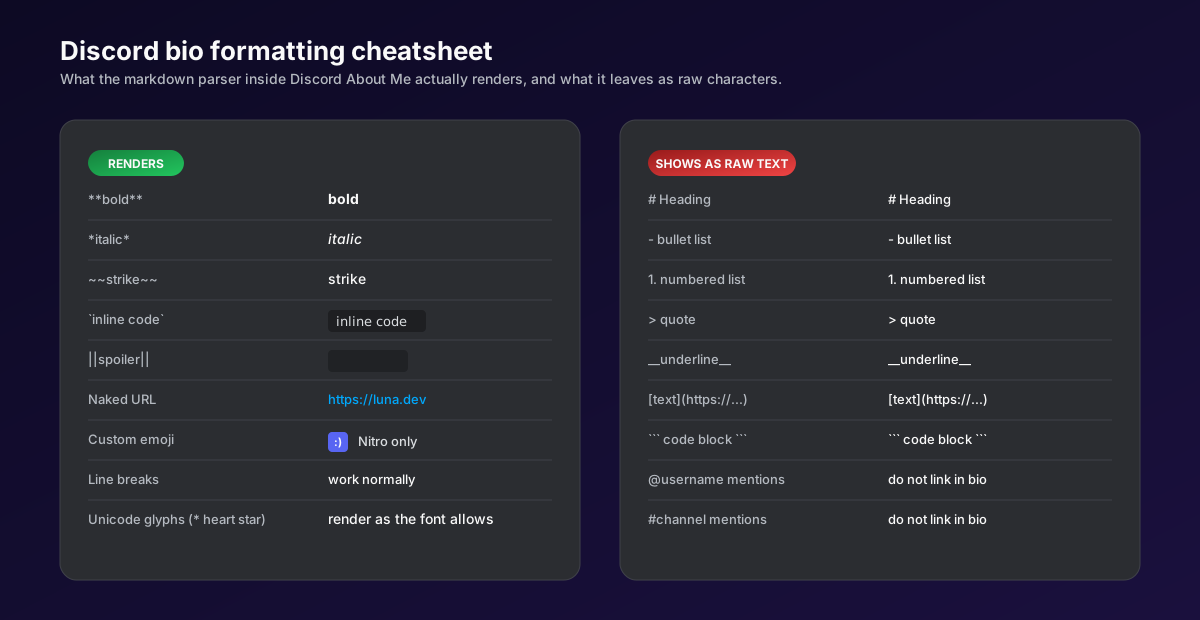
The hardest part of writing a Discord bio is knowing which formatting actually renders. The About Me parser is a stripped down version of Discord's chat parser. It keeps inline styles and drops block styles. Get this wrong and your bio shows raw hashtags, hyphens, and bracket syntax to every viewer.
- Bold (
**text**) and italic (*text*) render normally. Use them sparingly; bolding every line cancels itself out. - Strikethrough (
~~text~~) works. Common pattern: cross out an old status to signal a recent change. - Inline code (
`text`) and spoiler tags (||text||) both render. Spoiler is the only way to hide text inside a bio without trimming it. - Headings, bullets, block quotes, code fences, and
__underline__do not render. They show as raw markdown characters. The same goes for the[text](url)link syntax: the brackets and parentheses display verbatim. - Naked URLs auto-link. Anything that starts with
https://becomes clickable. Stick to one short URL or a link aggregator. - Custom and animated emojis need Nitro. Without a Nitro subscription, custom server emoji shortcodes show as plain text. Unicode emojis work for everyone.
For the deeper rules on what the Discord parser accepts in chat versus profile fields, see Discord's Markdown Text 101 guide. The bio parser is a subset: every chat-only feature gets stripped before the field renders.
The Discord bio template formula
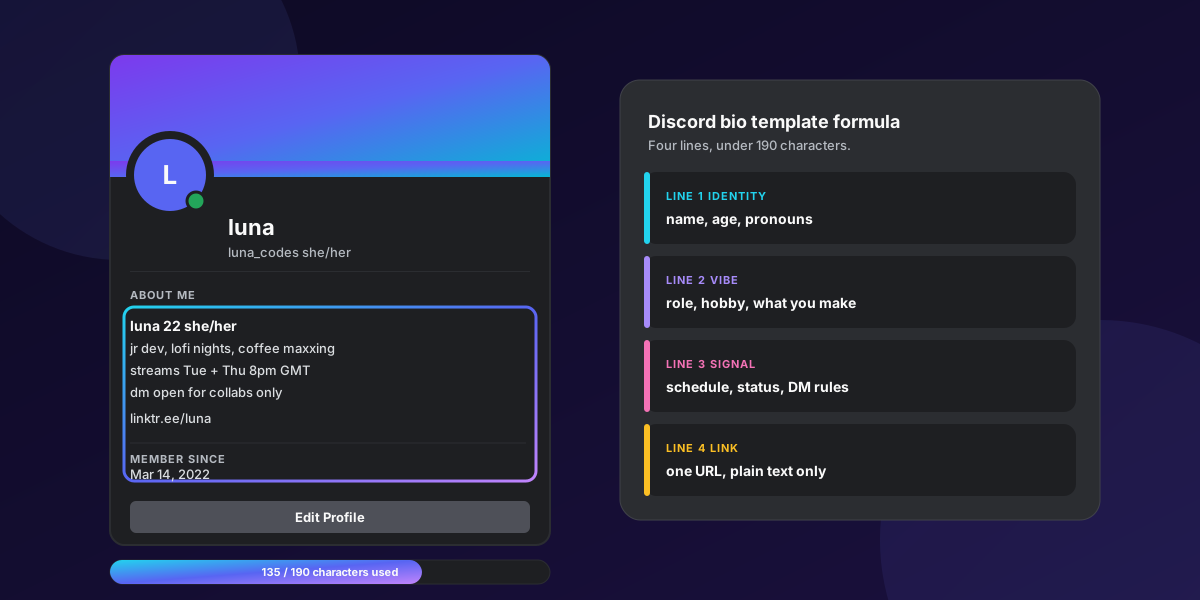
The cleanest Discord bio template is four lines, in this order: identity, vibe, signal, link. Each line answers one question a viewer is silently asking when they tap your avatar. Skipping a line is fine. Reordering is fine. Stuffing two lines onto one row is not, because mobile Discord wraps every line and a packed bio turns into a wall of text on a 360 pixel screen.
- Line 1, identity. Name (or handle), age (or age range), pronouns. Keep it under 35 characters so a long name does not blow the budget.
- Line 2, vibe.Your role, hobby, or what you make. This is the line that filters who pings you. "Junior dev, lofi nights" tells a viewer what to talk to you about without writing a paragraph.
- Line 3, signal. A live status the bio can carry: stream schedule, commission queue, time zone, DM rules, mute hours. This is the highest-leverage line because it changes how often people message you.
- Line 4, link. One naked URL. Carrd, Linktree, Twitch, Bluesky, portfolio, whichever surface you want a stranger landing on. Multiple URLs eat the character budget and confuse the call to action.
For inspiration on writing the identity and vibe lines in a confident voice, our guide to writing a bio for Instagram covers the same psychology: lead with who you are, not what you do for a living.
One-line, two-line, and four-line templates
Not every profile needs four lines. A throwaway gaming alt only needs identity. A creator account needs the full four. Pick the shape that matches the audience.
| Shape | Use case | Template | Character cost |
|---|---|---|---|
| One line | Alt or gaming-only account | name age pronouns | 20 to 35 |
| Two line | Casual community member | identity / vibe | 50 to 80 |
| Three line | Active member with a status | identity / vibe / signal | 90 to 130 |
| Four line | Creator, streamer, founder | identity / vibe / signal / link | 140 to 190 |
25 Discord bio templates, by vibe
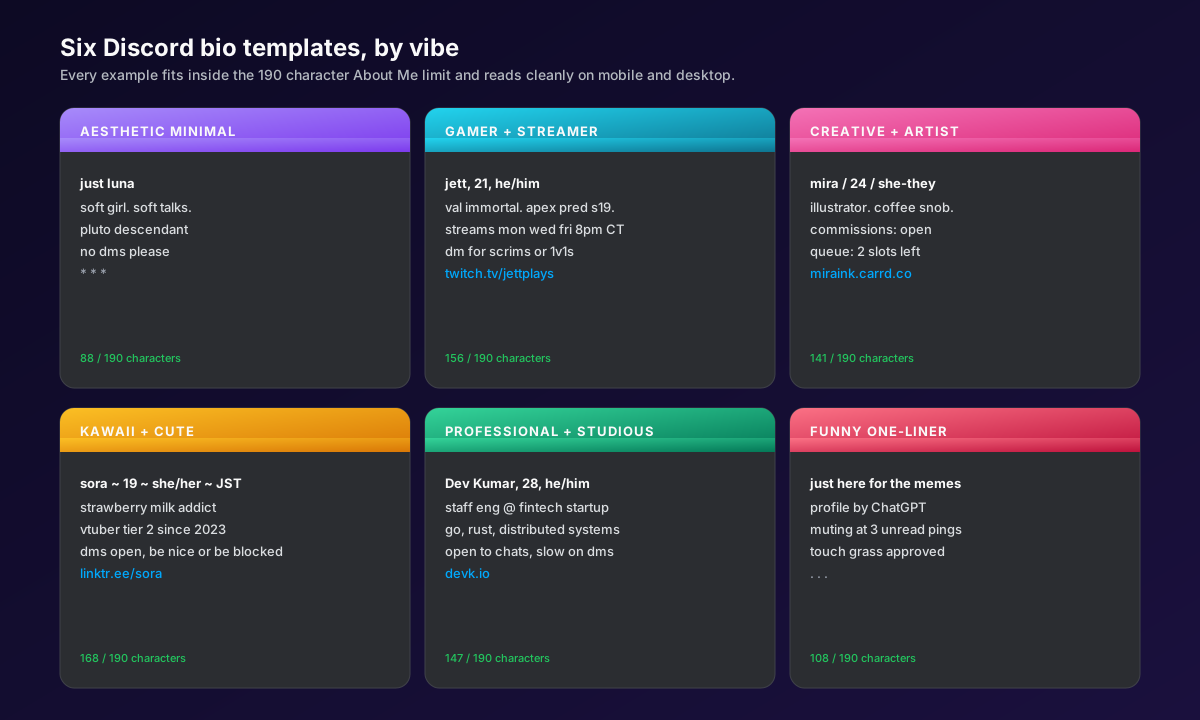
Every template below fits the 190 character limit, uses only markdown that renders, and slots into the four-line formula. Copy the one closest to your account, swap names and links, and you are done.
Aesthetic minimal Discord bio templates
- just luna
soft girl, soft talks
pluto descendant
no dms please - kai 19 they/them
overcast playlist on loop
reply when ready
kaiwrites.com - elle
reading more, scrolling less
mountain time
dms open between 5 and 9 pm - nox
quiet by default
moodboards and matcha
noxnotes.co
Gamer and streamer Discord bio templates
- jett, 21, he/him
val immortal, apex pred s19
streams mon wed fri 8 pm CT
dm for scrims or 1v1s
twitch.tv/jettplays - nova / 18 / she/her
osu! 5 digit
tournaments only, no casuals
twitch.tv/novaplays - rook
mw3 grinder, day-1 since cod4
looking for a 4-stack
dms open - kayo, 25, he/him
mid lane, masters s12
coach hours: tue + thu 7-10 pm
twitch.tv/kayocoaches
Creative and artist Discord bio templates
- mira / 24 / she-they
illustrator, coffee snob
commissions: open
queue: 2 slots left
miraink.carrd.co - theo
ux designer, sketchbook hoarder
portfolio: theo.design
dms slow, expect 48 hrs - iris, 26, she/her
motion designer, after effects
takes briefs over dms
irismotion.co - june 27 they/them
writer, slow web fan
newsletter once a month
junewrites.com
Kawaii and cute Discord bio templates
- sora ~ 19 ~ she/her ~ JST
strawberry milk addict
vtuber tier 2 since 2023
dms open, be nice or be blocked
linktr.ee/sora - peachy 22 she/her
bubble tea fund: stable
commissions: closed
peachy.shop - mochi / 17 / they/them
animal crossing mayor since 2020
friend code in pinned
dms ok! - yumi
art student, sleepy hours
comms open every 1st of the month
yumiart.carrd.co
Professional and studious Discord bio templates
- Dev Kumar, 28, he/him
staff eng at a fintech startup
go, rust, distributed systems
open to chats, slow on dms
devk.io - Ava Park, 32, she/her
pm at a series-b saas
roadmaps, retros, customer calls
avapark.co - Sam, MBA, he/him
b2b growth, paid search
office hours fri 3-5 pm
samgrowth.co - Lina, founder, she/her
bootstrapping a social tool
ama any time
socialcrm.org
Funny and meme Discord bio templates
- just here for the memes
profile by ChatGPT
muting at 3 unread pings
touch grass approved - bio under construction since 2019
- I read the rules. Maybe.
opinions loud, replies slow
dms taxed at 20% - professional lurker
1 emoji per day, rationed
dms only if it is funny - chronically online, certified
unranked at everything
will yap about anything
@ me, do not dm me
If you want to inject the same kind of voice into your IG bio, our caption ideas guide runs a similar template-first playbook for short-form copy.
Common mistakes when writing a Discord bio
The same five mistakes show up in almost every weak Discord bio. Each one costs profile clicks, DM conversions, or both. Fix any of them and the bio works harder.
- Stuffing the 190 limit with emojis. A row of 16 emojis eats 32 characters and tells a viewer nothing. Cap decorative emojis at three.
- Using markdown that does not render. If you paste a bio with
# headingsor- bullets, the bio shows the raw characters. Stick to bold, italic, strikethrough, inline code, and spoiler. - Wrapping links with
[text](url)syntax. Discord does not parse it in bios. The brackets and parentheses display verbatim and the link is not clickable. - Putting four URLs in the bio. Four URLs at 30 characters each leave 70 characters for everything else. Use one URL, ideally a link aggregator.
- Leaving signal lines stale.A bio that still reads "streams Mon Wed Fri" six months after the last stream actively hurts. If the signal line is not true this week, delete it.
Discord bio and SocialCRM
SocialCRM does not publish to Discord because Discord is not a feed-based social platform; it is a chat platform. What SocialCRM does do is keep the rest of your public surface in sync with the bio you write here. Drop the same four-line identity into your Instagram bio and your X profile from the SocialCRM composer, and a viewer who finds you on one platform recognises you on the next. If you are comparing schedulers for the platforms SocialCRM does cover, our Buffer comparison walks through the differences for solo founders.
FAQ
What is the Discord bio character limit?
The Discord bio (officially the About Me field) is capped at 190 characters on the main profile. Per-server bios share the same 190 character ceiling. Line breaks count as characters, so a four line bio loses three characters to the breaks alone. The character counter under the field updates live as you type.
Does Discord bio support markdown?
Partly. Bold (**text**), italic (*text*), strikethrough (~~text~~), inline code (`text`), and spoiler tags (||text||) all render in the About Me field. Headings, bullet lists, block quotes, code fences, underline, and the [text](link) link syntax do not render and show as raw characters, so avoid them in a bio.
Where do I edit my Discord bio?
Open Discord, click the gear icon next to your name to open User Settings, pick Profiles in the left rail, then scroll to the About Me field. The same screen lets you set a per-server bio by switching the dropdown at the top from User Profile to a server. The change saves automatically when you click Save Changes at the bottom.
Can I use custom emojis in my Discord bio?
Only with Nitro. Free accounts can use any Unicode emoji (the standard heart, star, sparkle, kaomoji), but custom server emojis and animated emojis require Discord Nitro on the account that owns the bio. Without Nitro, the colon shortcode renders as plain text. Unicode emojis count as one or two characters each toward the 190 character limit.
Does Discord bio show a clickable link?
Yes, but only as a naked URL. Discord auto-links any string that starts with https:// or http:// in the About Me field, and clicks open it in the default browser. The [text](url) markdown link syntax does not render in bios; it shows as raw text. Use a single URL or a link aggregator like linktr.ee to stay within the 190 character limit.
What is a server bio versus a main Discord bio?
The main Discord bio appears across every server you are in. A per-server bio overrides it inside one specific server and is visible only to that server's members. Server bios share the 190 character limit. They are useful for layered identity: a clean main bio for general use, a more specific server bio for a gaming, work, or fan community.
TL;DR
- The Discord About Me field caps at 190 characters across the main profile and every per-server bio.
- Five markdown styles render: bold, italic, strikethrough, inline code, spoiler. Headings, lists, block quotes, custom link text, and underline do not.
- The four-line template (identity, vibe, signal, link) reads cleanly on mobile and leaves room under the 190 character limit.
- Naked URLs auto-link in bios; the bracket-parentheses link syntax shows raw characters. Use one URL or a link aggregator.
- Server bios layer on top of the main bio inside one server. Use a calm main bio plus louder per-server bios for distinct communities.