The short answer:to half swipe on Snapchat, open the Chat tab, press and hold a friend's name or Bitmoji, then drag the row slowly to the right without lifting your finger. The conversation panel slides open under your thumb. As long as you do not let go, the chat stays in a preview state, your read receipt is never sent, and the typing bubble never appears for the other person. Slide back left and release to close the preview cleanly. Snapchat patched the original gesture in late 2022, then walked the fix back in 2023, so the half swipe works again in 2026 on the current iOS and Android builds with a tighter drag distance and a slightly higher chance of a misfired tap.
What the half swipe on Snapchat actually does
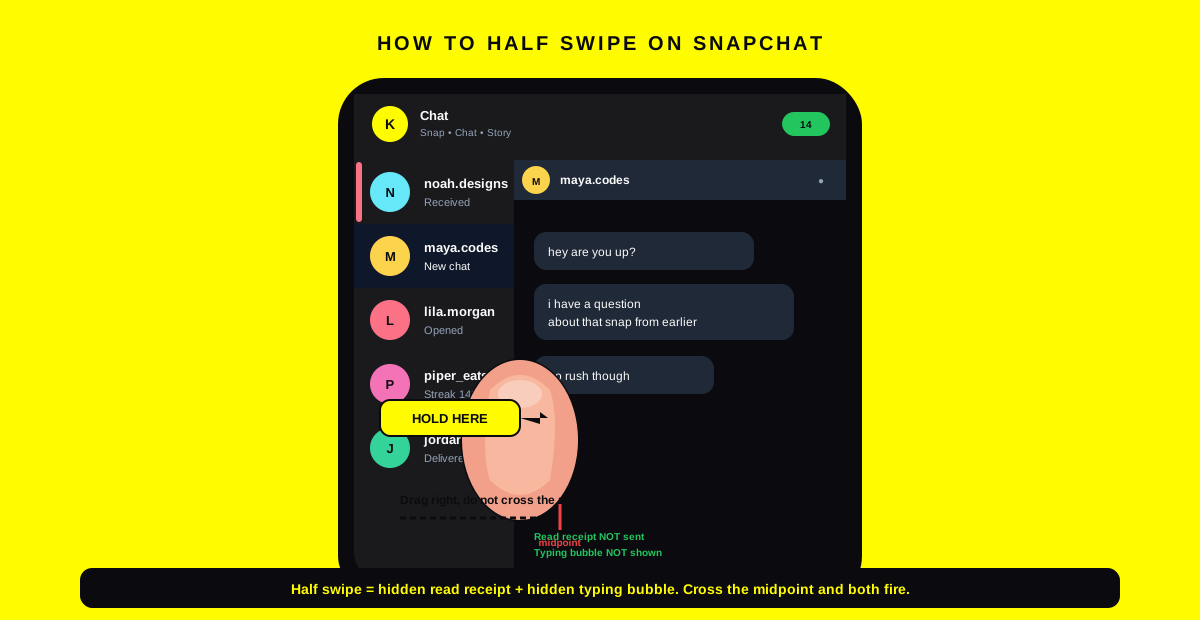
Half swipe on Snapchat is an undocumented gesture that opens a chat in a preview state instead of a normal one. When you slide the row partway and hold, the conversation renders under your finger, but Snapchat does not yet send the seen receipt, the keyboard does not slide up, and the typing bubble that normally appears the moment a thread is open never fires on the other person's screen. As long as you do not let go past the halfway mark, the chat behaves as if it is still closed.
The technique surfaced on Snapchat help forums in early 2021 and spread quickly because the read receipt on Snapchat is load bearing. Once a chat is marked Opened, the sender knows you saw the message in real time, and most friends expect a reply inside the hour. Half swiping buys time to think without lying about whether you read it.
Why this gesture exists at all
The half swipe is a side effect of the swipe to dismiss animation that Snapchat uses to close a chat. The same physics engine that lets you slide a conversation back to the list also lets you slide it open partway from the list view. Snapchat never built half swipe as a feature, which is why it does not appear in the official Snapchat Support center and why every patch since 2022 has tried to tighten the threshold that separates a peek from an open.
How to half swipe on Snapchat step by step
The gesture is identical on iOS and Android in 2026, with one small caveat for Snapchat Plus that we cover below. The flow assumes you are on Snapchat version 13.0 or newer, which rolled out the current chat preview engine.
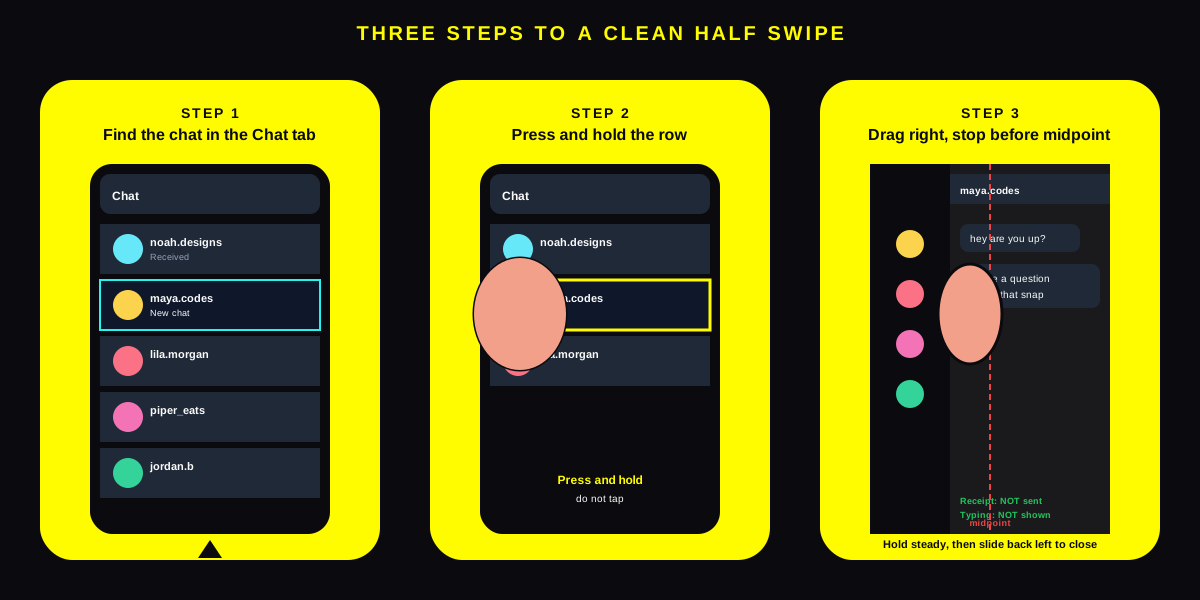
- Open the Chat tab. Tap the speech bubble icon at the bottom left of the Snapchat camera screen. The full chat list appears with your friends sorted by the most recent message at the top.
- Find the chat you want to peek at.The row shows the friend's Bitmoji, name, and a small icon telling you whether the last message was a snap, a chat, or an unopened photo.
- Press and hold the row. Plant your thumb firmly on the Bitmoji or the name. A short press is enough to engage the swipe handler. Do not tap, because a clean tap opens the chat in full and fires the read receipt instantly.
- Drag slowly to the right. Slide the row across the screen without lifting. The conversation panel slides into view from the left and the row you started on stays visible at the edge. Stop the drag before you cross the halfway line.
- Hold steady to read.Keep your thumb in place. Read what you need to read. The keyboard never appears, the typing bubble never appears on the other screen, and the chat icon on the sender's side stays unchanged.
- Slide back left to close. Drag in the opposite direction and lift only when the row snaps back into the list. The chat closes cleanly with no seen state and no typing notification.
On Snapchat Plus the new Peek a Peek feature flips the script and notifies you the moment a friend half swipes on your chat, which is the closest Snapchat has come to officially acknowledging the gesture. If your friend is on Snapchat Plus and has the toggle on, your peek leaks. Most friends do not have it on, but the risk is now real.
When the half swipe stops working
The half swipe fails for five reasons. Walking through the list in order clears most cases inside a minute. A failure usually means the seen state already fired, so check the sender's side before assuming the gesture is broken.
- You crossed the halfway line. The most common failure. Past roughly 30 percent of the screen width, Snapchat treats the gesture as a full chat open and fires the read receipt and typing bubble in the same frame.
- You lifted your finger. Releasing the press at any point past the first quarter of the drag counts as a commit. Hold until you have slid all the way back to the list, then release.
- The app is older than version 13. Builds before the late 2023 update use the patched gesture engine, which raises the threshold and shrinks the preview panel. Update from the App Store or Google Play before you try again.
- The chat is a Snap, not a text chat. Half swipe never hides a Snap open event. The preview frame for a photo or video Snap loads on first paint, which Snapchat counts as the official view.
- The friend turned on Peek a Peek. The Snapchat Plus subscriber toggle ships a notification to them the second your finger leaves the row mid drag. Your peek registers, just not as a normal Opened state.
If none of those apply and the gesture still fails, restart Snapchat. Long press the app icon, close it from the backgrounded apps tray, reopen, and try once more on a low stakes chat first. The cache and animation timers reset on relaunch.
What the half swipe hides and what it cannot
The technique only hides three specific signals. Knowing the exact list of what it covers keeps you from over trusting the gesture in chats where the other person might be reading a different signal entirely.
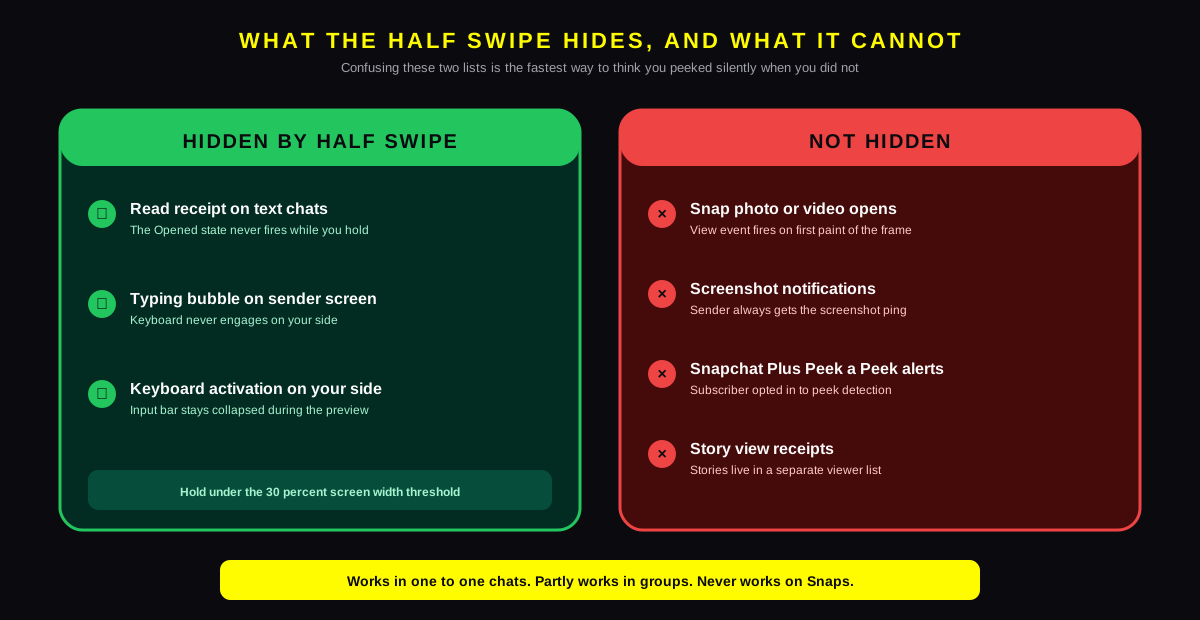
| Signal | Hidden by half swipe? | Note |
|---|---|---|
| Read receipt on text chats | Yes | The Opened state never fires |
| Typing bubble on sender screen | Yes | The keyboard never engages on your side |
| Snap photo or video opens | No | The preview frame counts as the view |
| Screenshot notifications | No | Screenshots always ping the sender |
| Story view receipts | No | Stories live in a separate viewer list |
| Snapchat Plus Peek a Peek alerts | No | Sender opted in to peek detection |
Why the gesture cannot save you from a Snap view
Snaps are loaded as full screen media the moment a chat opens, even partway. The decode for the photo or the first frame of the video fires the view event in the same network call that fetches the asset. Holding the chat half open does not delay the request, so the sender sees the Opened state the moment your preview panel renders. The same logic applies inside group threads, where any media view counts instantly. If you want a quiet way to manage your own activity surface, the cleaner move is to follow the path in our guide to turning off active status on Instagram and apply the equivalent privacy hygiene on Snapchat from Settings, Who Can, See My Location.
Half swipe in group chats and friend specific quirks
Group chats use the same swipe engine, but the consequences differ. The read receipt in a Snapchat group only fires when you open the chat in full, so half swiping does hide your seen state from every other member of the group. The catch is the typing bubble. Snapchat groups have a known quirk where a partial drag that brushes the bottom edge can activate the input field for a single frame, which is enough to fire a Typing notification to the rest of the group. Keep your thumb on the upper half of the screen and you avoid the bug.
Best friends and number one friends do not get extra notification rights when you half swipe. The Bitmoji positions and friend emojis stay the same. The only friend specific case is the Snapchat Plus Peek a Peek toggle, which is per friend on the subscriber's side. They choose who gets peek tracked, so it is possible that one friend notices your half swipes while another stays oblivious.
How the half swipe compares to a regular peek
Snapchat's own Press to See My Snap interaction inside a thread is a different beast. That gesture forces you to hold to view a snap that has been sent inside a chat, and the moment you press, the view fires. The half swipe is the opposite. It uses the inverse of the same press to keep the chat in a holding pattern. Both gestures share the long press as the trigger, which is part of why new Snapchat users confuse them.
What changed in the 2026 build
The half swipe on Snapchat has been through three engine rewrites since 2021. The original gesture was wide and forgiving and let you read entire conversations one frame at a time. The October 2022 patch shrunk the preview window to a sliver and bumped the threshold to about 20 percent of the screen, which broke the workflow for most users. In 2023 Snapchat reverted the threshold to roughly 30 percent and restored the conversation panel to its current readable size, which is what the gesture looks like today. The timeline is documented in TechCrunch's coverage of the 2023 restoration and aligns with the dates listed in Snapchat's public changelog.
The 2026 build added two small wrinkles. The first is a haptic tick that fires when you cross the safe threshold, giving you a physical signal that one more millimetre of drag commits the open. The second is the Snapchat Plus Peek a Peek toggle, which made peek detection a feature rather than an undocumented side channel. Neither change broke the gesture. Both make it easier to use intentionally and harder to abuse for surveillance.
FAQ
Does the half swipe on Snapchat still work in 2026?
Yes. The gesture works on iOS and Android in the latest Snapchat build as long as you do not pass the 30 percent screen width threshold and do not lift your finger mid drag. The 2022 patch tightened the window but the 2023 restoration brought back a workable preview, and the 2026 build did not break it. Treat any failure as user error first and a patch second.
Can the other person tell I half swiped on Snapchat?
Normally no. The read receipt does not fire and the typing bubble never appears, so the chat looks unopened on the sender's side. The one exception is Snapchat Plus subscribers with the Peek a Peek toggle on, who get a notification when a friend half swipes their chat. The feature is opt in and most subscribers leave it off.
Why does the half swipe close my chat instead of previewing?
You probably dragged past the halfway line or lifted your finger before sliding back. Both actions commit the open and close the preview state at the same time. Start with a slower drag, stop earlier in the swipe arc, and only lift once the row has fully snapped back to the list.
Does half swipe work on Snapchat Snaps?
No. Snaps fire the view event the moment the media frame loads, even partway through the swipe animation. The half swipe trick only hides text chat read receipts. Use the gesture for chats and accept that any Snap inside a thread will register as Opened the second you peek at it.
Is the half swipe against Snapchat's terms of service?
No. The gesture uses native Snapchat input handling, not a third party app, jailbreak, or modified APK. Snapchat has patched the threshold twice but has never disabled the underlying swipe interaction, which is also how you close chats. The Snap Inc. terms of service prohibit modified clients, not gestures.
Does half swiping turn off typing notifications for the whole chat?
Only for the time you are holding the preview. The moment you open the chat in full and start typing, the typing bubble appears on the sender's side as normal. Snapchat does not let you suppress typing notifications on a per chat basis, which is a frequent feature request in the Snapchat Community feature ideas board.
TL;DR
- Press, hold, drag halfway, do not lift. That is the entire half swipe on Snapchat gesture. Cross the midpoint or release early and the read receipt fires.
- Works on text chats only. Snaps trigger a view on first paint, so the half swipe never hides a photo or video open from the sender.
- Three signals hidden, four not. Read receipt, typing bubble, and keyboard stay quiet. Screenshots, story views, Snap opens, and Peek a Peek alerts still fire.
- 2023 restoration is what you see in 2026. Snapchat reverted the 2022 patch, so the gesture works again. The 30 percent screen width threshold is the new limit and a haptic tick warns you when you near it.
- Snapchat Plus Peek a Peek can break it. Subscribers can opt in to peek notifications per friend. Assume any friend on Snapchat Plus might see your half swipes.
- Plan replies, do not just peek forever by drafting Snapchat captions and follow up DMs inside SocialCRM, which queues content for Snapchat alongside Instagram, X, and LinkedIn from one composer.