The short answer:to post a TikTok comment picture, open the video, tap the speech bubble on the right rail, tap inside the Add comment box at the bottom, then tap the small gallery icon that appears to the right of the text field. Pick a single image from your camera roll, add an optional caption, and tap Post. The image attaches to your comment and renders as a rounded thumbnail above your text in the thread. TikTok allows one picture per comment, accepts JPG, PNG, and WEBP up to 15 MB, and respects the creator's per video setting that can switch off image comments entirely. If the gallery icon is missing, the creator turned off photo replies for that post, your app is older than version 31, or the feature has not rolled out in your region yet.
What TikTok comment pictures actually are
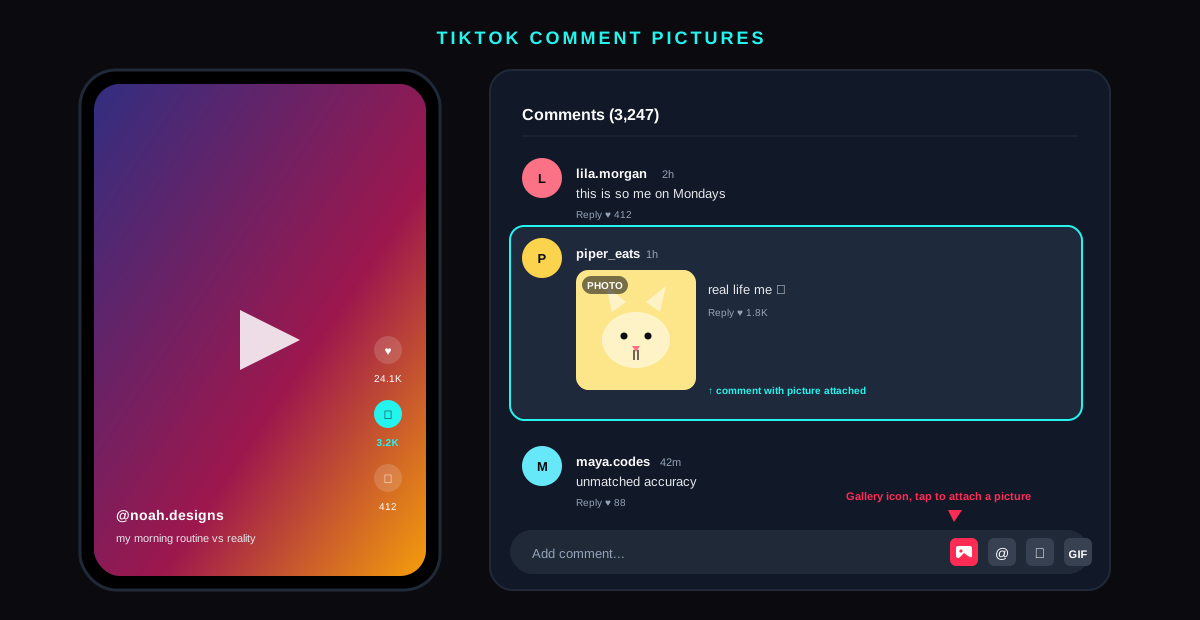
TikTok comment pictures are still images attached to a comment instead of being posted as a full video reply. The format launched in late 2023 after a long internal test, rolled out to all major regions through 2024, and now sits next to the GIF button as the third native attachment type the comment composer supports. The feature was announced on the TikTok newsroom as part of a broader push to make comments feel more like a modern chat surface, where text, GIFs, and photos all coexist in the same thread.
The thumbnail in the thread is small by design, roughly the size of a Bitmoji on Snapchat, but a tap expands it to the full image with pinch to zoom and a download button if the original poster allowed saves. The image and any text caption you add count as a single comment for ranking and reply threading. Likes, replies, and pins all apply to the picture comment the same way they apply to a text only one.
Why people use photo comments
Three patterns dominate. Reaction memes are the biggest, and the same screenshots get reposted under every viral clip within hours. Outfit and pet pics come second, because a comment that says my cat watching this with a real picture attached gets multiples of the engagement a plain text reply sees. Receipts come third, and Reddit style screenshots get used to back up claims in long argument threads. TikTok's own creator data brief from early 2025 noted that comments with a picture see roughly 2.3 times the like rate of text only comments on the same post, although the picture itself is most of the lift.
How to add a picture to a TikTok comment step by step
The path is identical on iOS, Android, and the TikTok web app, with one caveat for desktop noted below. The sequence assumes you are on TikTok version 31.0 or newer. Open a video, tap the comment bubble on the right rail, and follow the three steps in the diagram.
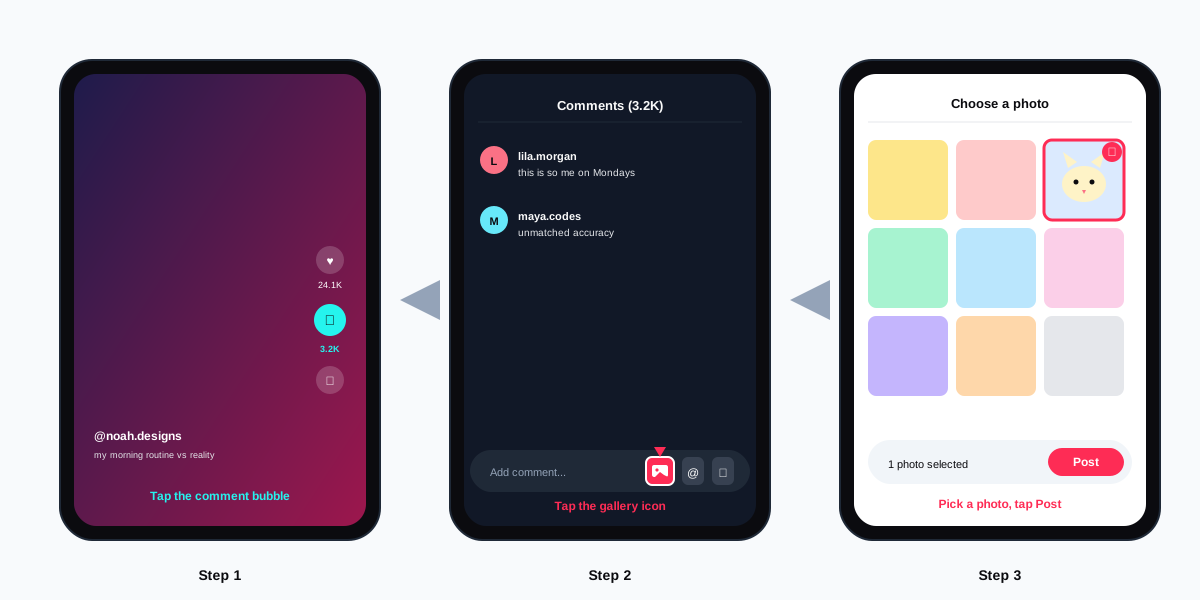
- Open the video and tap the comment bubble. The speech bubble icon sits on the right rail of every public TikTok video, just below the heart icon. Tapping it slides up the comments panel from the bottom of the screen.
- Tap inside the Add comment field. The composer expands and three or four icons appear to the right of the text box: a gallery icon, an at sign for mentions, an emoji keyboard, and on most builds a GIF button.
- Tap the gallery icon. The icon looks like a small image with a mountain inside it. On the first tap TikTok asks for permission to read your photo library. Grant full access or selected photo access. Limited access works but you have to re grant per picker.
- Pick one photo from the camera roll. A checkmark badge appears on the selected image. To swap choices, tap a different photo. There is no multi select for picture comments.
- Add an optional caption and tap Post. The comment text field still works under the photo preview. Tap Post and the comment uploads. The thumbnail renders in the thread within a few seconds.
On the TikTok web app the same flow works once you click into the comments rail and then click the gallery icon. The web version uses a file picker dialog instead of an in app sheet, and it lags about a release behind the mobile labelling. If you compose a lot of replies, the mobile flow is faster. Either way, drop the image and post.
Why the picture button might be missing from your comment box
The gallery icon disappears for four reasons. Walking each one in order saves a support ticket and clears most cases in under a minute.
- The creator switched it off. Photo replies are a per video setting under Privacy, Comments, Allow image comments inside the post composer. If the creator flipped it off before publishing, the gallery icon is gone for everyone on that video.
- Your app is older than version 31. The gallery icon shipped in TikTok 31.0. Update from the App Store or Google Play and reopen the app. The new icon appears the next time you tap into a comment composer.
- Your region is still on rollout. Photo comments are global as of mid 2024, but a handful of smaller markets and most TikTok Lite installs still wait their turn. A paid VPN does not unblock the feature because TikTok keys on account region, not network.
- The account type is restricted. Government and political accounts have most chat surfaces locked off by policy, including image comments. Business accounts under 14 also fall under tighter comment rules that strip the icon by default.
If none of the four applies and the icon is still missing, clear the TikTok cache and restart. Our walkthrough of clearing app cache cleanly works the same way on TikTok: long press the app icon, App info, Storage, Clear cache.
Image rules, formats, and the moderation layer
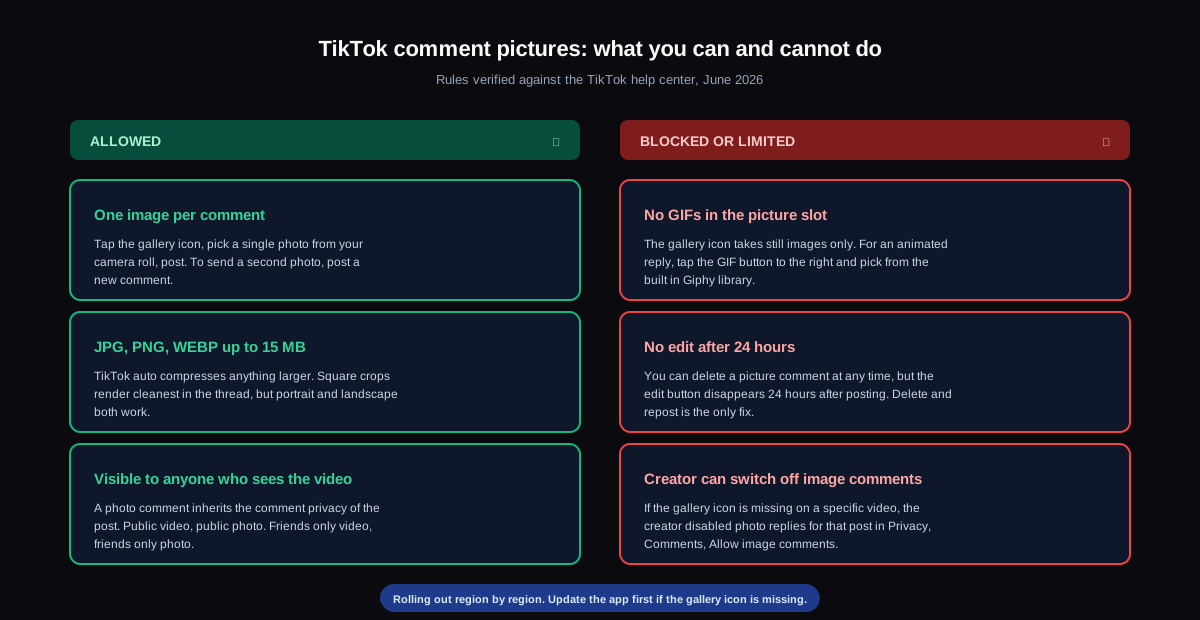
TikTok runs every picture comment through the same moderation pipeline that filters videos, captions, and DMs. Nudity, graphic violence, hate symbols, and self harm imagery are blocked at upload. Borderline cases are queued for human review and may post first then be removed within minutes. The full rules sit in the TikTok Community Guidelines and apply identically to photo and video content.
| Rule | Limit | Workaround |
|---|---|---|
| Images per comment | 1 | Post a second comment for a second image |
| File size | 15 MB | TikTok compresses larger files on upload |
| Formats | JPG, PNG, WEBP | Convert HEIC and AVIF in your gallery app first |
| Aspect ratio | Any | Square crops render cleanest in the thread |
| Edit window | 24 hours | Delete and repost a corrected version |
| Creator opt out | Per video | None, the creator decides |
Where photo comments inherit privacy from the video
A TikTok comment picture is visible to whoever can see the comments on the video itself. A public video means a public photo. A friends only video means a friends only photo. A private video that allows comments means only your approved followers see the image. The privacy stack is the same one that covers profile views, so the equivalent moves on the creator side mirror what we covered in turning off profile views on TikTok.
How creators control TikTok comment pictures on their videos
Photo replies are a per video toggle. Creators set it during the upload flow, but they can also flip it after the post is live. The on screen path takes four taps and applies only to the selected video.
- Tap the three dots on your published video. From your profile, open the video and tap the three dots stacked vertically on the right side under the comment bubble.
- Tap Privacy settings. The sheet that appears includes the comment and duet permissions for that one video.
- Tap Comments. Two toggles surface: Allow comments and Allow image comments. The second only matters when the first is on.
- Toggle Allow image comments off. Existing photo comments stay published but new ones cannot be added. The gallery icon disappears from the composer for everyone on that video instantly.
Account level controls for image comments are different from the per video toggle. Inside Settings, Privacy, Comments, there is also a Filter all comments switch and a keyword block list. The image comment toggle in account settings is the default that applies to every new upload, while the per video toggle overrides the default for one specific post. Both settings reach the same field in TikTok's database, per the Electronic Frontier Foundation's review of TikTok comment controls, so they cannot drift out of sync.
Why a small creator might want to turn it off
Image comments are a moderation magnet. The bigger your audience, the more your photo thread fills with reaction memes, brand spam, and the occasional bait image. Turning the toggle off for a single sensitive video, like a personal story or a serious how to, keeps the thread on topic. The same pattern of locking down comments selectively is well established on Meta surfaces, where many creators apply a similar gate using the steps from our guide to managing visibility settings on Instagram.
Editing, deleting, and reporting picture comments
You can delete your own picture comment at any time. Long press the comment in the thread, tap the trash icon, and confirm. The comment, the photo, and any nested replies under it disappear from the thread immediately. The 24 hour edit window from text comments does not extend to the photo, so a cropped or wrong file means delete and repost.
Reporting works the same way as reporting any comment. Long press, tap the flag icon, pick a reason, and submit. TikTok runs the picture through its automated review queue first. Photo reports flagged as nudity, self harm, or hate content get faster human review under the timelines published in the TikTok Transparency Report. If you posted the picture and want to recover it after deletion, the answer is no, TikTok does not keep a recycle bin for comment images.
FAQ
Can you add multiple pictures to one TikTok comment?
No. TikTok allows exactly one image per comment. To send a carousel of three reaction pics, post three separate comments. The threading model favours quick fire short comments over a long combined reply, so a chain often gets more replies than a single packed comment would have.
Can I post a GIF instead of a still picture?
The gallery icon takes still images only. For an animated reply, tap the GIF button to the right of the gallery icon. That opens the built in Giphy library where you can search, preview, and post a GIF. The two attachment types are separate by design and the GIF picker has been part of TikTok comments since 2021.
Will the creator be notified that I posted a photo?
Yes, with the same notification logic as a text comment. The creator gets a single comment notification with your handle, your text caption, and a tiny thumbnail of the attached image. There is no separate alert for the photo, and there is no way to send a silent picture comment without the creator receiving the standard ping.
Why does the gallery icon look greyed out on some videos?
A greyed icon means the creator left comments on but switched off image comments. Tapping it brings up a message that says The creator turned off image comments on this video. Text and GIF replies still work, only the photo attachment is locked.
Can I save a picture from a TikTok comment?
Sometimes. Tap the picture to expand it. If the comment author allows downloads on their own account, a save icon appears in the corner. If not, screen capture is the only path. TikTok also adds an invisible watermark to comment photos to deter reposts as original content, so a screengrabbed image can be traced back to the original comment thread.
Does posting a picture comment hurt my reach or ranking?
No. Picture comments earn the same ranking signals as text comments and there is no reach penalty for the commenter. For the creator, image comments tend to lift the comment count and the average time on post, both of which feed the For You ranking model. The lift is small but measurable for accounts with engaged audiences.
TL;DR
- Three taps to add a TikTok comment picture. Tap the comment bubble, tap inside the Add comment field, tap the gallery icon, pick a photo, tap Post.
- One image per comment, 15 MB cap. JPG, PNG, and WEBP supported. For a second image, post a second comment.
- Creators decide per video. If the gallery icon is missing, the creator turned image comments off on that post or your app is older than version 31.
- Photo comments inherit video privacy. Public video, public picture. Friends only video, friends only picture.
- Delete is allowed any time, edit only inside 24 hours. Long press, trash, confirm. There is no recycle bin.
- Schedule TikTok content without leaving your composer by drafting from SocialCRM, which queues videos and photos to TikTok alongside Instagram, X, and LinkedIn.
![TikTok comment showing the typed shortcode [loveface] rendering as the hidden in-app heart-eyes emoji](/_next/image?url=%2Fblog%2Ftiktok-emoji-codes%2Ftiktok-emoji-codes-hero.svg&w=3840&q=75)