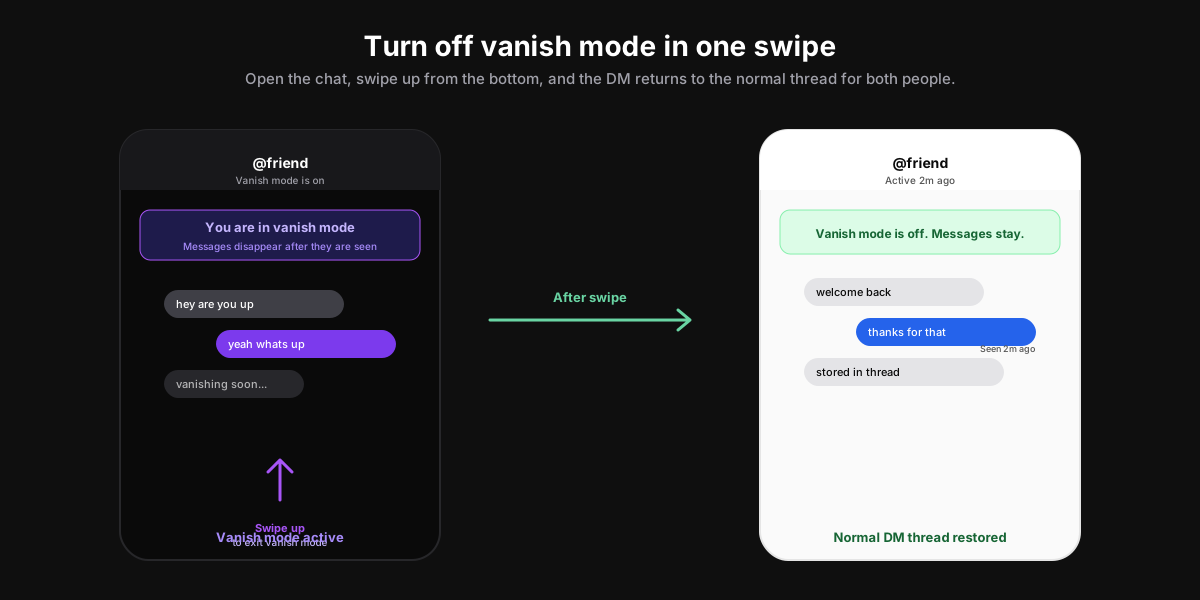
The short answer: to turn off vanish mode on Instagram in 2026, open the DM thread that is currently in vanish mode and swipe up from the bottom of the chat, or tap the small Turn off vanish mode banner that hovers above the keyboard. The chat instantly returns to the normal Instagram DM view for both people. New messages save to the thread again, and old vanish mode messages stay gone forever.
How to turn off vanish mode on Instagram: the one-swipe path
Vanish mode on Instagram is a per-chat state, not an account-wide setting. Either person in the DM can flip it off, and the change applies to both sides of the thread within the same second. That is by design: vanish mode is mutual by definition, so leaving the mode has to be mutual too. The exit gesture works the same on iOS, Android, and the Instagram mobile web.
The two-second mobile gesture
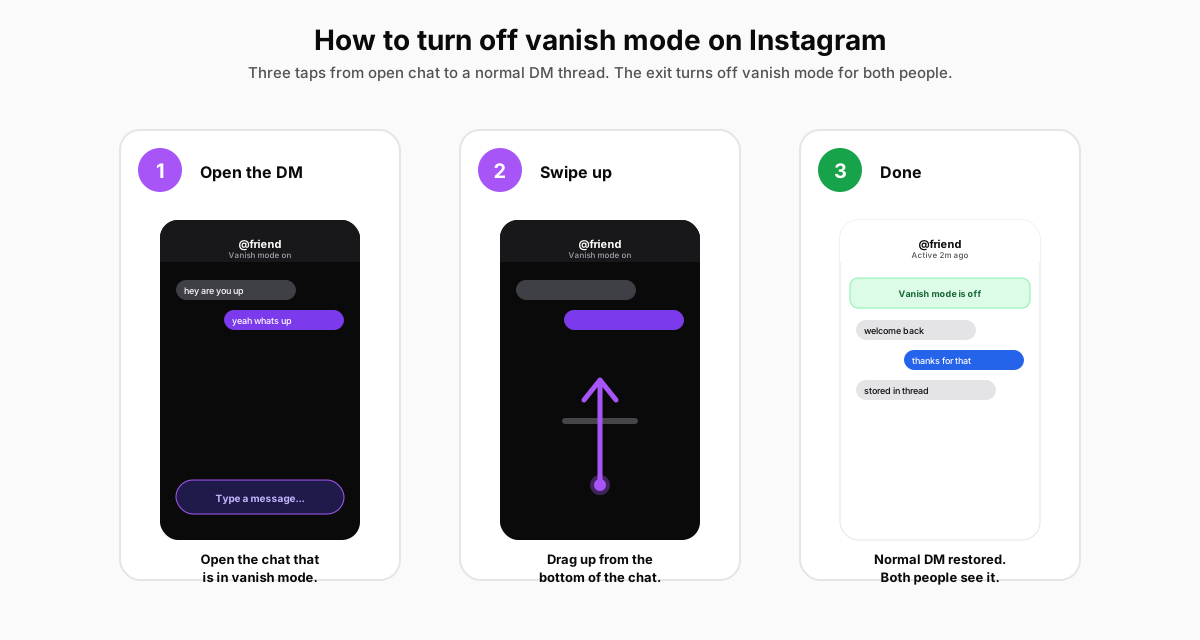
- Open the DM threadthat is currently in vanish mode. The header shows the friend's username with a small Vanish mode is on subtitle. The background turns dark and a purple shimmer runs across the message area.
- Place your finger near the bottom of the chat (anywhere below the message input bar) and drag it upward in a single smooth motion. The same gesture you used to enter vanish mode reverses it. Instagram shows a Vanish mode is off confirmation as soon as you lift your finger.
- Alternative: tap the Turn off vanish mode banner that floats above the keyboard inside the chat. The banner appears in some app builds as a one-tap shortcut when vanish mode has been active for more than 30 seconds. Either gesture has the same effect.
What changes when you exit vanish mode
The moment you turn off vanish mode, the chat header drops the Vanish mode is on label, the message area shifts back to the usual white or system-theme background, and every message you send from that point on stays in the thread permanently (or until you unsend it). The other person sees the same change in real time, often with a small toast that reads You ended vanish mode or Your friend ended vanish mode, depending on who pulled the trigger. Instagram does not push a separate notification to either device; the change is silent outside the chat itself, per Instagram's Help Center page on vanish mode.
Why is vanish mode on in the first place?
Vanish mode does not turn itself on. Somebody (you or the other person) had to enter it by swiping up from the bottom of an existing chat, and the other side accepted the invite by sending a message inside the mode. If you open a DM and find yourself unexpectedly in vanish mode, the most common explanation is that the other person swiped up on their device, and the next message you type lands as a vanish mode message until one of you exits.
The mutual opt-in rule
Instagram requires both people to be inside vanish mode for it to actually disappear messages. Practically, the rule plays out in two ways. First, if a friend invites you and you never send a message in reply, nothing vanishes; the invite quietly times out and the chat returns to normal on its own. Second, if you swipe up and the friend never sends a reply, your own messages still vanish on send, because you are the one who committed to the mode. That asymmetry trips up first-time users, so most people who Google how to turn off vanish mode on Instagram are dealing with a chat where they did not realise they were the one who started it.
Who can pull you into vanish mode
Only an account that can already send you a direct message can enter vanish mode with you. That means the gate sits one step earlier than vanish mode itself: it sits in your message-controls settings. If a stranger cannot DM you in the first place, they cannot invite you into vanish mode either. The same logic applies to group chats; vanish mode is one-to-one only and does not work inside a group thread of three or more people. For the broader picture of which DM features alert which people, our piece on whether Instagram notifies on screenshots covers the rules for every other private surface in the app.
How to stop people from inviting you to vanish mode
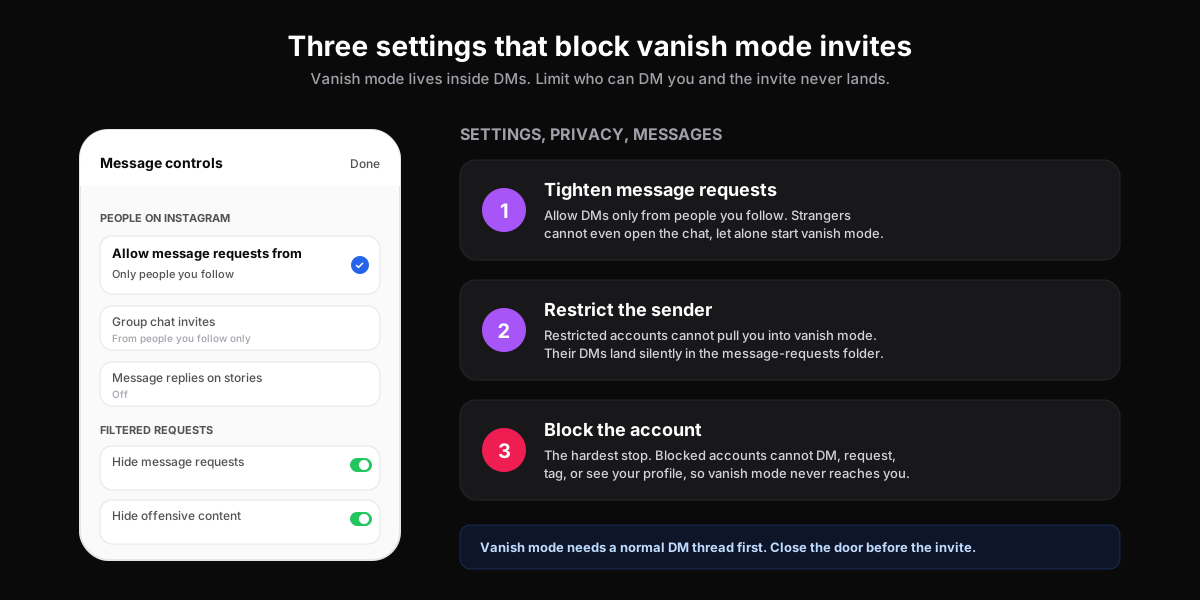
If a single account keeps pulling you into vanish mode and you are tired of swiping out every time, the real fix is to close the door upstream. Vanish mode runs on top of normal DMs, so any control that limits who can DM you also limits who can invite you. There are three levels of escalation, and they map to three different Instagram settings.
The three controls, from softest to hardest
- Tighten message requests. Settings, Privacy, Messages, then Allow message requests from set to Only people you follow. Anyone outside that set lands in the message-requests folder with no ability to start a chat (or vanish mode) until you accept.
- Restrict the sender.Open their profile, tap the three-dot menu, pick Restrict. Restricted accounts cannot start vanish mode with you. Their DMs go to a hidden requests folder, they cannot see when you are online, and they cannot tell when you have read a message. Per Instagram's documentation on Restrict, the restricted account is not notified that they were restricted, which makes this the polite option for low-grade nuisances.
- Block the account. The hard stop. Blocked accounts cannot DM you, see your profile, tag you, or invite you into anything. Use this when Restrict was not enough and you want the door welded shut. Pairs well with the broader privacy tightening covered in our walkthrough on how to hide followers on Instagram.
Vanish mode vs disappearing photos vs close friends
Three different Instagram features get confused with vanish mode. They each disappear something, but they disappear different things in different places, and confusing them is the second-most-common reason readers end up on this page. The matrix below clears it up.
| Feature | Where it lives | What disappears | Mutual? |
|---|---|---|---|
| Vanish mode | Inside a one-to-one DM thread | Every message sent while the mode is active, after the recipient views it and closes the chat | Yes, both people are inside the mode |
| Disappearing photos and videos | Inside any DM thread, sent via the camera icon | The single photo or video after view-once, replay, or keep-in-chat option chosen by the sender | No, the sender picks the rule per message |
| Close Friends stories | Stories tab and the green-ring profile preview | The story after 24 hours, visible only to the Close Friends list | No, the story owner picks the list one-sided |
Vanish mode is the only one of the three that requires the other person to opt in by sending a message inside it. The other two are sender-controlled. If you wanted to send a disappearing photo without the rest of the chat going dark, the camera icon and view-once flag are the right path, not vanish mode.
Screenshots and vanish mode safety
Vanish mode is the loudest screenshot surface Instagram has. The instant anyone takes a screenshot or screen recording inside a vanish mode chat, the sender gets a push notification and a small camera icon appears next to the captured message in the thread. The notification cannot be turned off. This is the inverse of regular Instagram DMs, where screenshots are silent on every surface except vanish mode and view-once. Turning off vanish mode does not cancel a screenshot already captured. If a message you regret has been screenshotted, exiting the mode does not pull the file off the other person's camera roll.
That asymmetry is the whole reason vanish mode exists. It is the one corner of Instagram where the platform actively penalises lurking. Treat it as a one-time conversation, not a private archive; nothing typed in vanish mode is recoverable later, including by Instagram itself, per their original 2020 launch post and Meta's 2021 vanish mode expansion announcement.
When vanish mode is the wrong call
We have walked enough creators and founders through this feature to spot the regret patterns. Three scenarios come up again and again. First, sharing time-sensitive information (an event invite, a phone number, an address) inside vanish mode means the recipient cannot scroll back to it twenty minutes later. They will ask again, you will retype it, and the disappearing magic just cost both of you time. Second, ranting about a third party inside vanish mode does not stop screenshots, it broadcasts them: the other person knows the message was meant to disappear, and the screenshot becomes more interesting, not less. Third, business conversations inside vanish mode are unrecoverable for compliance, and most platforms treat the disappearing record as a red flag rather than a feature.
If the goal is genuine privacy, vanish mode is the wrong tool for almost every job that is not a one-off personal chat. Use the camera-icon view-once for a single sensitive photo, use Close Friends for a quiet broadcast, and use Restrict or Block for accounts you want at arm's length. The matrix above maps each goal to the right feature.
How SocialCRM keeps DMs out of the chaos
Vanish mode is a feature you reach for in personal chats, not in business DMs. If you run a creator account or a founder account that gets pulled into vanish mode as a soft sales tactic by prospects, the cleanest fix is to route inbound conversations through a published link in your bio rather than through cold DMs. The SocialCRM composer ships with a bio-link generator that captures emails and Calendly bookings without ever opening an Instagram thread, and the broader SocialCRM walkthrough covers the rest of the workflow. For the parallel problem on the inbound side, our guide to writing an Instagram bio that earns the follow explains the link placement that pulls conversations out of vanish mode in the first place.
FAQ
Does turning off vanish mode bring back the messages?
No. Exiting vanish mode stops new messages from disappearing, but every message already sent inside the mode is gone the moment the recipient viewed it and closed the chat. Instagram does not store the content on the server in a retrievable form. Treat vanish mode messages as spoken words: out of reach the second they land.
Can the other person tell that I turned off vanish mode?
Yes. As soon as either person ends vanish mode, both sides see a small toast in the chat that reads You ended vanish mode or Your friend ended vanish mode. Instagram does not push a separate notification to the device, so the other person only learns about the change if they have the chat open or open it later.
How do I permanently disable vanish mode on Instagram?
Instagram does not offer a global off switch for vanish mode in 2026. The mode is per-chat by design. The closest thing to permanent disabling is tightening message controls so that nobody outside your follower list can DM you at all, which blocks the invite at the source. Open Settings, Privacy, Messages, then Allow message requests from set to Only people you follow.
Does Instagram notify the sender if I screenshot in vanish mode?
Yes. Vanish mode is the loudest screenshot surface in Instagram. The sender gets a push notification the second a screenshot or screen recording is captured, and a small camera icon appears next to the captured message inside the thread. The notification cannot be turned off and is consistent across iOS and Android.
Why does vanish mode keep turning itself on?
Vanish mode never turns itself on automatically. The most common cause is an accidental swipe-up gesture on your own device when scrolling fast inside a DM. The second most common cause is the other person flipping it on, then sending you a one-line message that pulls you into the mode the moment you reply. If it keeps happening with the same account, restrict or block them.
Can I turn off vanish mode from Instagram on the web?
Vanish mode is mobile-first. The desktop site at instagram.com supports reading existing DMs in normal mode but does not expose the swipe-up gesture or the vanish mode toggle. To exit the mode on a desktop, open the chat on the iOS or Android app and swipe up there. The exit propagates to every device signed into the account within seconds.
TL;DR
- One swipe ends it: open the chat, drag up from the bottom, and vanish mode turns off for both people in the same second.
- The toggle lives inside the DM, not in Settings. Instagram does not expose a global vanish-mode off switch in 2026.
- Old vanish messages stay gone after you exit. Turning the mode off only restores normal messaging going forward.
- Screenshots still notify the sender, even after vanish mode ends. The captured file lives on the other camera roll regardless.
- Close the door upstream to stop repeat invites: tighten message requests to Only people you follow, Restrict the sender, or block the account outright.