The short answer: to turn off active status on Instagram in 2026, open the app, tap your profile, hit the three-line menu, pick Settings and activity, scroll to How others can interact with you, tap Show activity status, and flip the toggle off. The green dot, the "Active 5 minutes ago" label, and the typing dots in DMs disappear from every account that could previously see them. The catch: Instagram pairs the switch, so you also lose the ability to see anyone else's status. Read receipts, recently posted Stories, Notes, and Live broadcasts still leak that you are online, and each one has its own setting.
How to turn off active status on Instagram (step by step)
The flow is identical on iOS, Android, and the mobile web, and it has stayed stable through the last three app redesigns. The only quirk is the section name: Meta renamed the parent menu from Privacy to How others can interact with you in 2024, so older tutorials send you to a dead path. Use the route below.
- Open Instagram and tap your profile picture in the bottom-right corner.
- Tap the three-line menu in the top-right of your profile.
- Pick Settings and activity at the top of the sheet.
- Scroll to the How others can interact with you section and tap Messages and story replies on some app versions, or Show activity status directly. Both routes land on the same toggle.
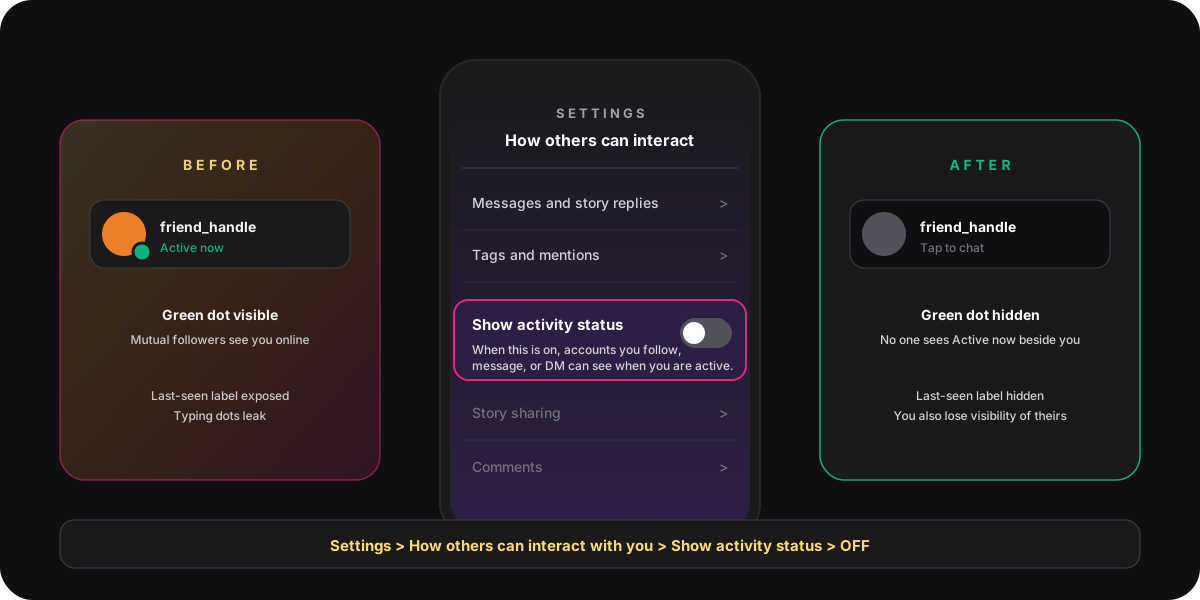
- Find the row labelled Show activity status. The subtitle reads "When this is on, accounts you follow, message, or DM can see when you are active or recently active on Instagram."
- Tap the toggle. It slides from green to grey. Instagram saves the change instantly; there is no confirmation prompt and no banner.
The change applies globally the moment you tap. Every chat thread, profile, and Send To sheet refreshes within seconds. If you want to verify, ask a friend on Instagram to check whether the green dot is still visible beside your bitmoji. The same toggle also controls what Messenger contacts can see, because Meta cross-merged the two messaging stacks starting in 2020, so a single privacy switch covers both.
What the toggle actually hides
Active status is shorthand for three separate presence signals Instagram broadcasts to people who could otherwise see you online. Flipping the toggle off retires all three at the same time, which is why this single setting carries more privacy weight than its modest label suggests.

The green dot beside your bitmoji
The green dot is the most visible piece. It appears next to your avatar in the chat list, on DM threads, on the Send To sheet, and on the Notes row above the inbox. It signals that you are inside the Instagram app right now, with a precision of about 60 seconds. We cover the matching mechanic on Snapchat in our green-dot guide; Instagram's version follows the same logic but with a different visibility window.
The last-seen timestamp
When you are not actively in the app, Instagram replaces the dot with a recency label: Active 5 minutes ago, Active 30 minutes ago, Active today, Active yesterday. The label rounds down so it does not pin you to the minute, but it is still enough to give away your sleep schedule, your work pattern, or whether you opened the app right after a conversation ended.
The typing dots inside DMs
The animated three-dot bubble that shows when you are composing a reply is part of the same presence service. It ships only when activity status is on. Turning the toggle off means you can draft a message, delete it, redraft it, and walk away without the other side ever knowing you were on the keyboard. That alone is worth the setting for anyone who hates the awkward "they were typing and then stopped" pattern.
Why you also lose visibility of your friends
Instagram pairs the activity status setting on both ends. The moment you hide your dot from others, Instagram hides their dot from you too, even if their own setting is still on. This is not a bug; it is a design choice meant to keep the feature reciprocal so it cannot become a one-way surveillance tool.
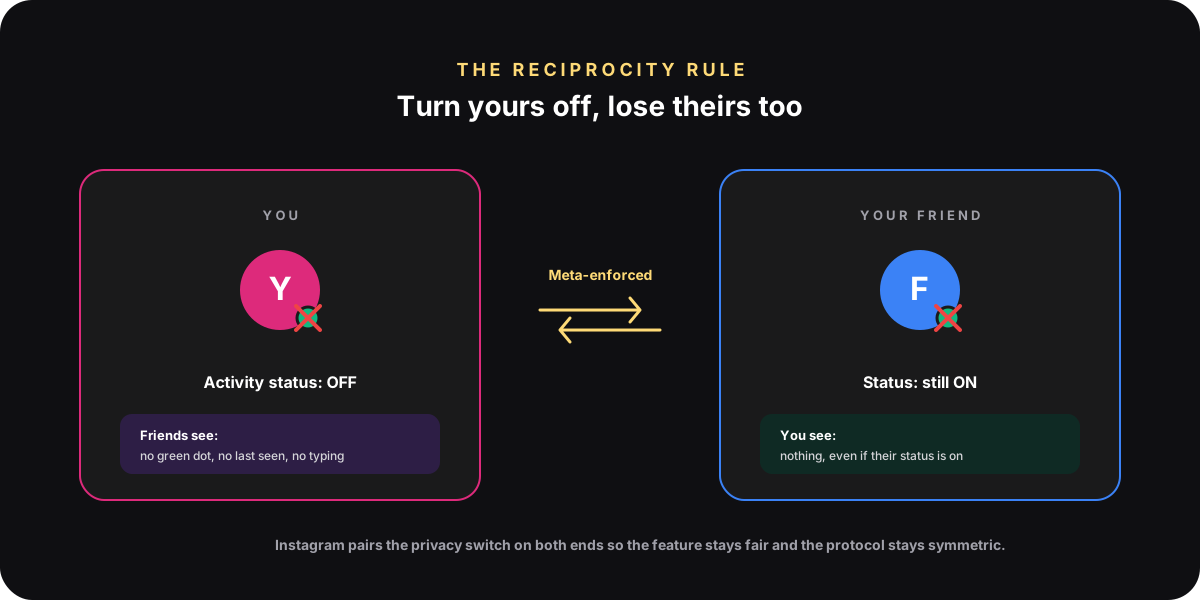
Meta's own activity status help article spells out the rule in one line: turn the setting off and you also will not be able to see the activity status of other accounts. There is no granular per-friend control and no way to keep one-way visibility, even on the Creator and Business profile tiers. If you need to monitor a specific friend's online window, leave the toggle on and treat the small leak as the cost of admission.
The signals that still leak when you are online
Hiding active status removes the three green-dot signals, not the eight other ways Instagram quietly broadcasts that you opened the app. Each of these has a separate setting, and treating the activity toggle as a one-shot privacy fix is a common mistake. Pew Research's 2024 social media use survey found Instagram is the second-most used platform among US adults, which means the reach of every secondary signal is wide enough to matter.
- Read receipts in DMs. The Seen 7:14 PM tag under a message still ships unless you mute the thread. There is no global read-receipts toggle on Instagram in 2026; you control it chat by chat.
- Recently posted Stories.A Story with a 5-minute-old timestamp at the top of someone's feed gives away the same online window the dot did. Use Close Friends or delay posting if Story timestamps are the leak you care about.
- Live broadcasts. Starting a Live pushes a notification to every follower with notifications enabled. There is no way to start a Live silently.
- Instagram Notes. Notes appear above the inbox with a relative timestamp; refreshing a Note logs activity even when the green dot is hidden.
- Following, liking, and commenting. Any public engagement timestamp tells a determined viewer when you were on. Use the five privacy controls we cover for hiding followers if you want a tighter lockdown.
How to turn active status back on
The reverse is the same route. Open Instagram, tap your profile, three-line menu, Settings and activity, How others can interact with you, Show activity status, toggle on. The change is instant and the green dot reappears for every mutual within about 60 seconds.
Two notes on the switch back. First, Instagram does not send any notification when you re-enable the status, so nobody gets pinged that you came back online. Second, the last-seen label backfills from the moment you toggle on; friends will not see the gap window, only Active now once you are in the app. Many people toggle status off during a heads-down workday and back on in the evening for casual chat; the setting is built for that rhythm.
Troubleshooting when the toggle does nothing
Most reports of "I turned it off and friends still see me online" come down to one of four causes. Walk through them in order before assuming the setting is broken.
- Cache lag.Other people's app sessions can show a stale presence for up to a minute after you flip the toggle. Wait 60 seconds and ask them to pull-to-refresh the inbox.
- Wrong toggle on a multi-account login. Settings apply per account. If you run two profiles in the same app and only flipped the toggle on one, activity status is still on for the other.
- Outdated app build. Older app versions shipped the toggle in a different menu path. Update to the current build from the App Store or Play Store, then force-quit and reopen.
- A different signal is leaking.If your friend is "sure you are online", ask which surface they are looking at. Recently posted Stories, read receipts, and Notes are common false positives that look like the green dot but come from a different system.
If none of the four fixes apply, the safest reset is to toggle the switch on, force-quit Instagram, reopen, and toggle it back off. That hard-resets the presence service on your account. The Meta community standards and privacy policy do not allow third-party tools to read or override the status setting, so any app claiming to hide the dot from a single friend is either lying or breaking terms.
FAQ
Does turning off active status hide me from everyone on Instagram?
Yes. The toggle is global. Once it is off, every account on Instagram and Messenger that could previously see your green dot, last-seen label, or typing dots loses access. There is no per-friend exception and no way to keep the dot visible to a specific contact while hiding it from others.
Can I see other people's active status if mine is off?
No. Instagram pairs the setting both ways. Turning your own active status off automatically hides every other account's status from you, even when their toggle is on. The only workaround is to toggle yours back on, which re-exposes your own dot in the same moment.
Will my friends get a notification when I turn it off?
No. Instagram never sends a notification about an activity status change. The green dot simply disappears from their view, and the last-seen label stops updating. Most people will not notice unless they look for it, and even then Instagram does not distinguish a hidden status from an account that has been offline for a long time.
Does turning off active status hide read receipts in DMs?
No. Read receipts are a separate signal. The Seen 7:14 PM label under a message still ships even with activity status off. To stop read receipts, the only built-in option is to leave the DM in your inbox unread or to mute the chat, which prevents Instagram from logging the open.
Why is the active status toggle missing from my Settings?
Almost always an outdated app build. Meta moved the setting under How others can interact with you in 2024; older installs still show the legacy Privacy path. Update Instagram from the App Store or Play Store, force-quit, and the toggle will reappear. Business and Creator accounts share the same setting in the same place as personal accounts.
Does the toggle also affect Messenger chats?
Yes. After Meta merged the Instagram and Messenger messaging stacks, a single presence service feeds both apps. Turning off activity status on Instagram hides the green dot from Messenger contacts too, and vice versa. There is no separate Instagram-only toggle.
TL;DR
- To turn off active status on Instagram in 2026: profile, three-line menu, Settings and activity, How others can interact with you, Show activity status, toggle off.
- The single switch hides the green dot, the Active 5 minutes ago label, and the typing dots in DMs across both Instagram and Messenger.
- Instagram applies reciprocity: you hide yours, you lose theirs. There is no per-friend exception and no one-way option.
- Read receipts, recent Stories, Notes, and Live broadcasts still leak that you are online. Each one has a separate toggle or workflow.
- Toggle back on by walking the same path; the green dot returns within 60 seconds and Instagram never notifies anyone of the change.