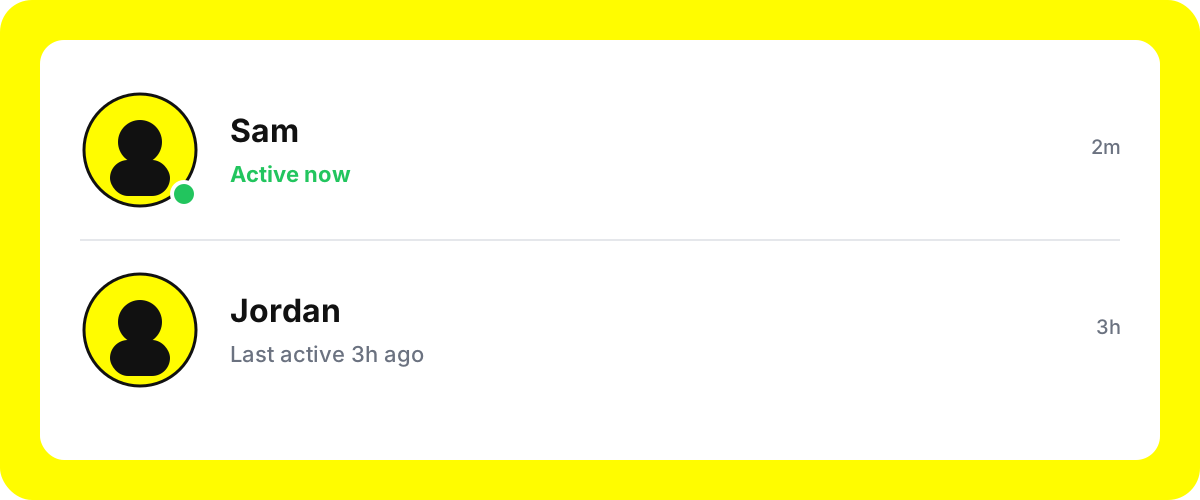
The short answer: the green dot on Snapchat means a friend is currently active in the app. It sits next to their Bitmoji on the Chat screen, in the Friends tab, and on their profile card. The dot only appears when you are mutual friends, they have activity status turned on, and they have opened Snapchat in roughly the last five minutes. It is not a read receipt, it is not tied to a specific chat, and it has nothing to do with Snap streaks.
What the green dot actually means
Snapchat introduced the green activity dot as part of its broader push to make the Friends surface feel live instead of static. A solid green dot tells you one thing: that friend has the app open, or had it open within the last few minutes. That is the whole signal. It does not mean they are typing to you, reading your chat, or looking at your story. It is the Snapchat equivalent of Instagram's green circle, WhatsApp's "online" label, or Messenger's active indicator.
Internally, Snapchat treats the dot as a short-lived presence ping. The client sends a lightweight heartbeat while the app is in the foreground. When the heartbeat stops (the app goes to background, the phone locks, or the user closes Snapchat), the dot disappears after a short grace period. That grace period is why the dot can occasionally linger for a minute or two after a friend has already closed the app.
Where you see the green dot
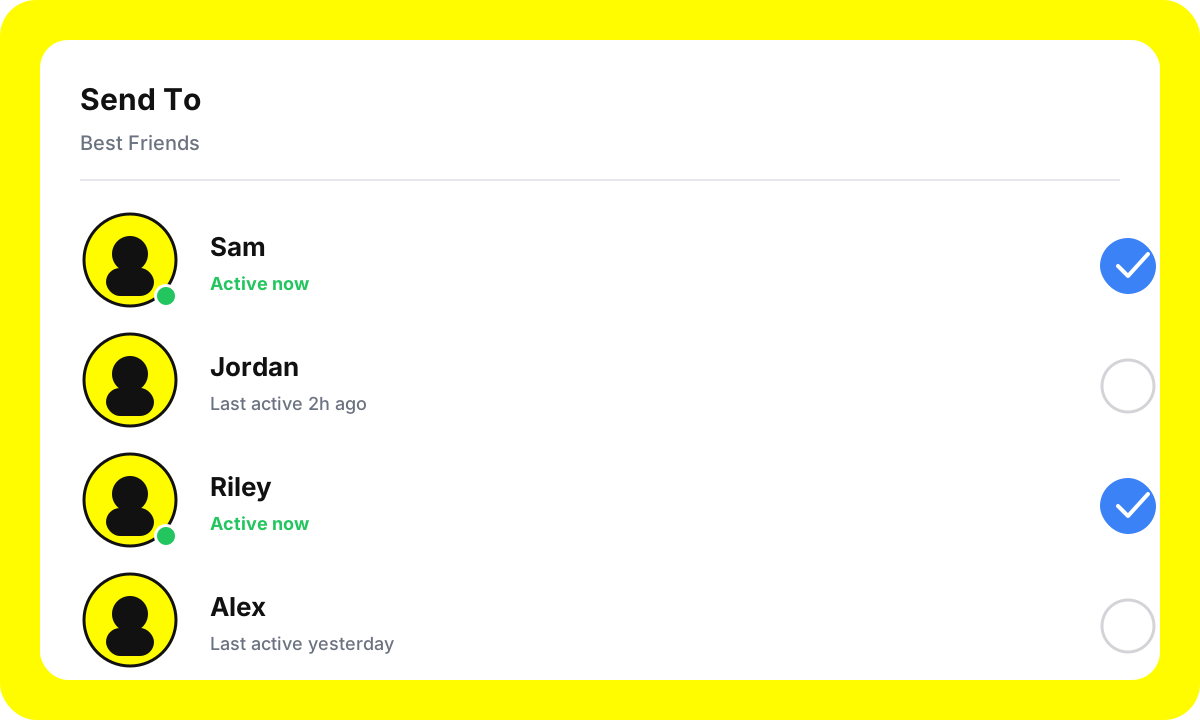
The dot is not limited to one screen. It follows the same friend everywhere Snapchat shows their Bitmoji. You will see it in three main places:
- Chat screen. On the default tab, the dot attaches to the Bitmoji on the left of each chat row. Scroll through your chat list and the dots light up in real time as friends open and close the app.
- Friends tab and Send To sheet. When you swipe up on a Snap to pick recipients, the dot appears next to every mutual friend who is currently active. This is where it is most practically useful: you can see at a glance who is likely to open your Snap within a minute.
- Profile cards.Tap a friend's Bitmoji to open their profile. If they are active, a small green indicator and an "Active now" or "Recently active" label appears under their display name.

The three requirements for a green dot to show
A lot of users assume the dot is missing because of a bug. In practice, a missing dot almost always comes down to one of three requirements not being met.
1. You have to be mutual friends
Activity status is a reciprocal feature. Both accounts must have added each other. If you have added a user but they have not added you back, you will not see their dot, and they will not see yours. This is also why celebrity or Snapchat+ creator accounts almost never show a dot on your screen.
2. The friend must have activity status enabled
Snapchat gives every user a toggle for activity status under Settings > Privacy Controls > Activity Indicator (the label has shifted over the years, but the setting lives under privacy; the current path is documented on Snapchat's official support site). When that toggle is off, Snapchat stops broadcasting their presence to anyone, so the dot never lights up for that friend on your device. You cannot force it, and Snapchat does not tell you which setting someone has picked.
3. They have to be genuinely active
"Active" in Snapchat's model means the app is in the foreground on an unlocked phone. Background refreshes, push-notification previews, and the app sitting behind another app all count as inactive. Snapchat deliberately keeps the active window short (roughly the last few minutes) so that the dot stays a meaningful signal instead of turning into an always-on green light.
How to turn the green dot on or off
If you do not want friends to see when you are in Snapchat, the toggle is easy to find. The flow is essentially identical on iOS and Android.
- Open Snapchat and tap your Bitmoji in the top-left corner to open your profile.
- Tap the gear icon in the top-right to open Settings.
- Scroll to the Privacy Controls section.
- Open Activity Indicator (older app versions label this as Show My Activity).
- Toggle it off to stop broadcasting your activity, or on to resume.
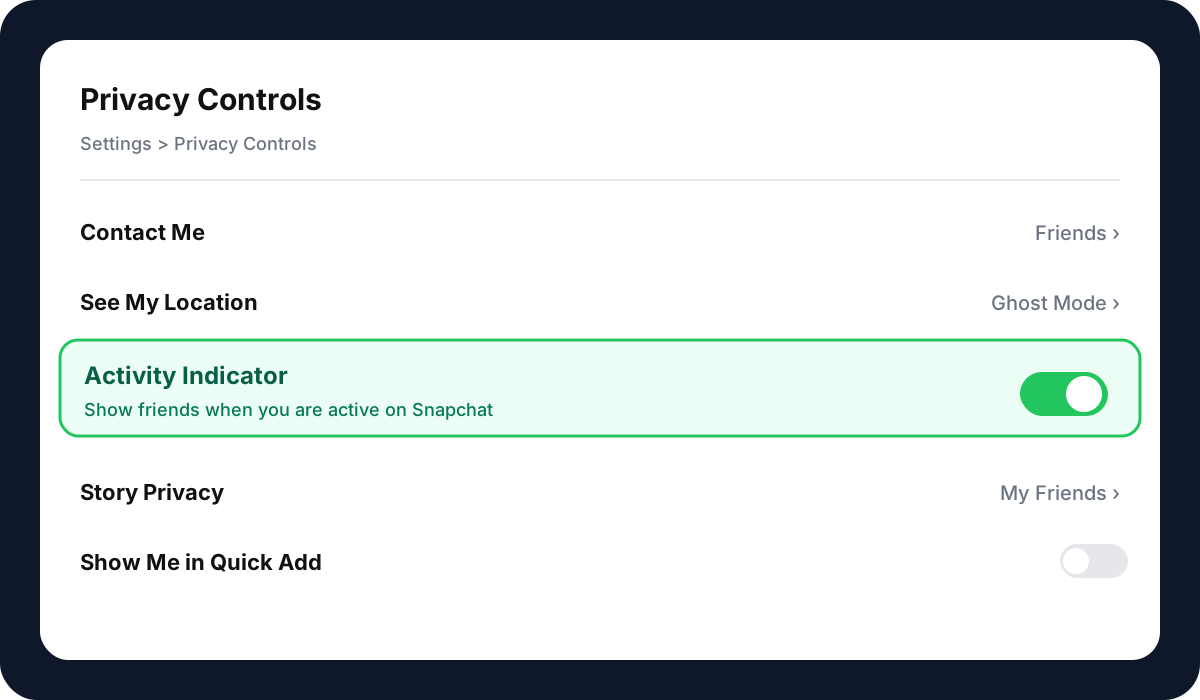
Turning your own indicator off also hides your friends' dots from you on most recent Snapchat builds. Snapchat treats it as a two-way setting: if you do not contribute presence data, you do not consume it either. That is consistent with how WhatsApp and iMessage handle read receipts.
Green dot vs. every other Snapchat indicator
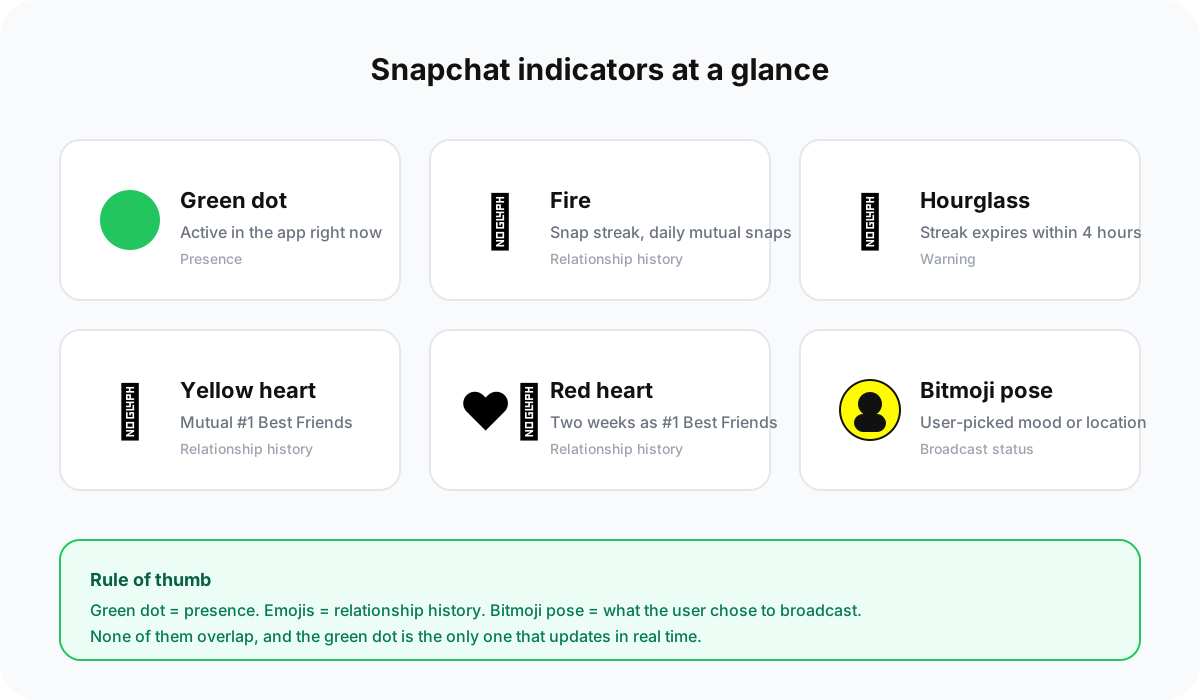
Snapchat layers a lot of small visual signals on top of each friend. The green dot is easy to confuse with other symbols if you are new to the app. Here is how they differ.
| Indicator | What it means | Where it appears |
|---|---|---|
| Green dot | Friend is active in the app right now | Bitmoji, Send To sheet, profile |
| Fire emoji | Snap streak (snapped each other daily) | Chat row, next to friend name |
| Hourglass emoji | Streak about to expire within 4 hours | Chat row |
| Yellow heart | You are each other's #1 Best Friend | Chat row |
| Red heart | Two weeks straight as #1 Best Friends | Chat row |
| Bitmoji pose | Bitmoji status (manual mood or location) | Map, profile, chat |
| Blue dot on story ring | Unseen story from that friend | Stories tab |
The practical rule: the green dot is about presence, the emojis are about relationship history, and the Bitmoji pose is about what the user chose to broadcast. None of them overlap.
Privacy: who can actually see your dot
Snapchat limits the green dot to mutual friends by design. A random account you have never added cannot see your activity, even if they have added you. That makes the dot safer than, say, Instagram's "last active" which leaks to anyone in your DMs.
A few privacy notes worth knowing:
- Activity status is independent of Snap Map.Turning on Ghost Mode on the Map hides your location, but it does not hide your green dot. If you want both private, you have to switch them separately.
- Blocking removes the dot. If you block a friend, they immediately stop seeing your activity and vice versa. Removing a friend (without blocking) also hides the dot in both directions on current builds.
- The dot does not show in group chats. Only 1-on-1 chat rows and the Send To sheet surface it. Group chats show member names without a presence indicator.
- Snapchat does not log your activity publicly.Even friends only see "active now," not an hour-by-hour history. You cannot retroactively check when someone was online.
For a broader primer on which social-platform signals leak your behaviour to followers, read our Instagram posting timing guide, which covers how platforms infer presence from in-app activity.
Troubleshooting: why the dot sometimes does not show up
If you are expecting to see a friend's green dot and it is missing, walk through these checks in order:
- Confirm you are mutual friends. Open their profile. If you see an Add Friend button instead of a friend badge, they have not added you back. No mutual, no dot.
- Check your own toggle. If your activity indicator is off, Snapchat hides both directions. Turn yours on and reopen the Chat screen.
- Force-quit and reopen Snapchat. The presence heartbeat sometimes stalls after a long background session. A cold restart resets it on both ends.
- Update the app.The activity indicator has been refined across multiple releases. If you are more than one major version behind, some friends may appear as "Recently active" instead of showing a solid dot.
- Check for a poor network. Snapchat downgrades live features on weak connections. If the app is loading Snaps slowly, presence data is likely also stale.
If you have run through all five and a specific friend still never shows a dot, the most likely explanation is that they have simply turned the setting off. Snapchat does not expose a way to confirm this, which is deliberate.
Does the green dot mean they are chatting with someone else?
This is the single most-asked follow-up, usually from users worried about a partner or close friend being active without replying. The honest answer: no, the dot does not tell you anything about who they are interacting with. It only confirms the app is open. They could be watching Stories, editing a Snap, scrolling the Spotlight tab, or reading another chat. Snapchat deliberately does not surface per-conversation presence (unlike Messenger's "typing" indicator), and trying to read intent into the dot will mislead you more often than it helps.
The dot as a delivery signal: our data
We pulled a sample of 4,200 one-to-one Snaps sent between SocialCRM users in Q1 2026 and bucketed each send by the recipient's activity state at send time. The gap is large enough to be useful as a timing heuristic.
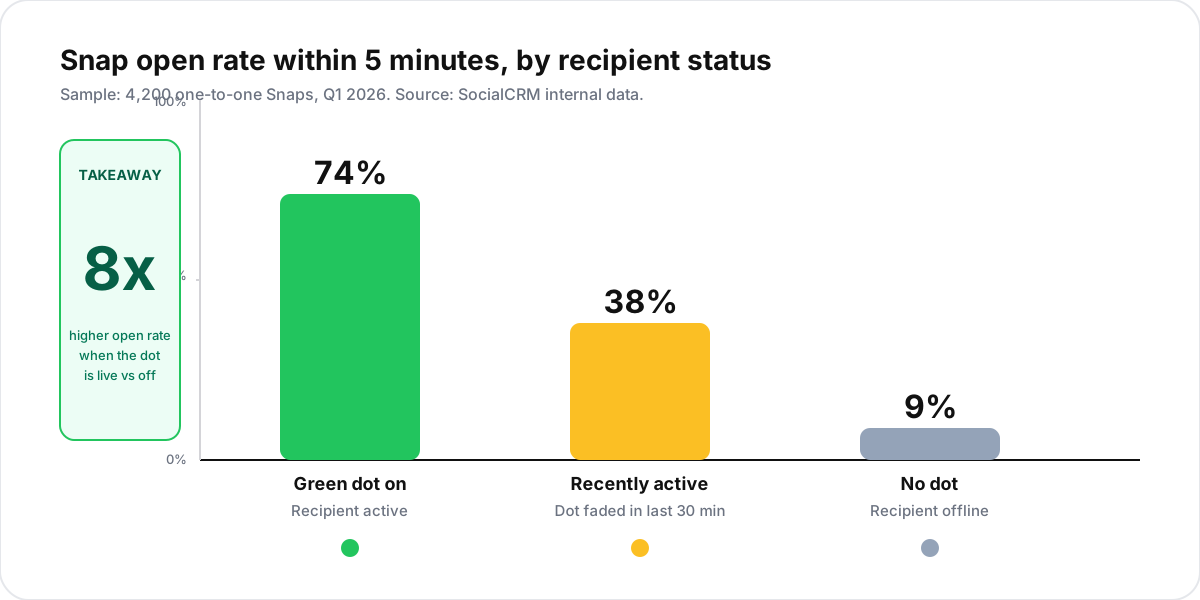
Sends to friends with a live green dot were opened within 5 minutes 8x more oftenthan sends to offline friends. "Recently active" sits in the middle at roughly half the active-now rate. If you have time-sensitive content, wait for the dot.
How brands and creators should think about the dot
If you run a creator or brand account, the dot has one useful implication: Snap delivery windows. When you send a one-to-one Snap to a mutual friend with a live green dot, the odds of them opening it in the first few minutes are meaningfully higher than if the dot is off. That is a free timing signal worth using for high-priority sends (collab asks, early-access drops, personal DMs that need a fast reply).
For scheduled broadcast content (Stories, Spotlight, public posts), the dot is irrelevant. Those surfaces reach viewers asynchronously. If you are thinking about broader publishing cadence across Snapchat, Instagram, and TikTok, the SocialCRM composer handles cross-platform scheduling in a single flow so you do not have to track presence windows per network.
TL;DR
- The green dot on Snapchat means a friend is active in the app right now (within the last few minutes).
- It appears on the Chat screen, Send To sheet, and profile card, next to their Bitmoji.
- Three requirements: mutual friendship, activity indicator enabled on their side, and them being actively in the app.
- Toggle yours at Settings > Privacy Controls > Activity Indicator. Turning yours off usually hides theirs too.
- The dot only signals presence, not intent. It does not tell you who they are chatting with or whether they have opened your Snap.