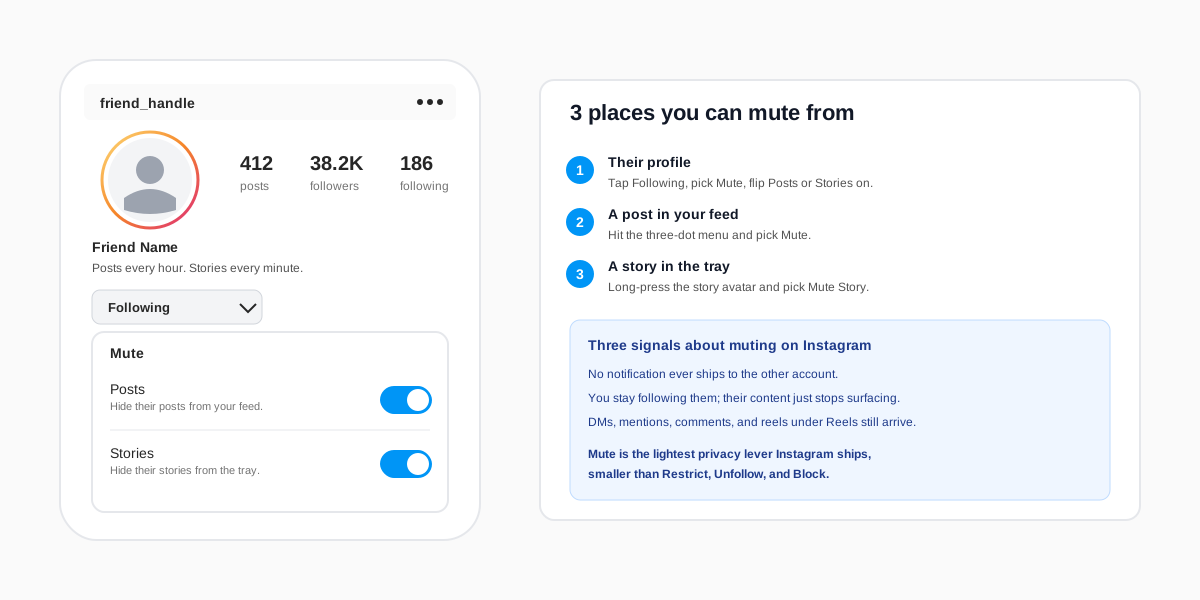
The short answer: to mute someone on Instagram in 2026, open their profile, tap the Following button under their bio, pick Mute, and flip the toggle for Posts, Stories, or both. The change is instant, no notification ever ships to the other account, and you stay following them so your follow count and their follower count do not move. Their feed posts, story circle, or both disappear from your tray and your feed for as long as the toggle stays on. DMs, mentions, comments, and tags still arrive; mute is the lightest privacy lever Instagram offers, smaller than Restrict, Unfollow, and Block.
How to mute someone on Instagram (step by step)
The shortest path runs through the other account's profile. The flow is identical on iOS, Android, and the mobile web, and Meta has kept the menu in the same place since the 2018 launch of Story mute. The only thing that moved recently is the parent button label: Following replaced the older Friends tag in 2023.
- Open the Instagram app and tap the search icon at the bottom. Type the handle you want to mute and tap their profile in the results.
- On their profile, look for the Following button under the bio. Tap it once. A dropdown opens with options like Add to Close Friends, Add to Favorites, Notifications, Mute, and Restrict.
- Tap Mute. A submenu opens with two toggles: Posts (and reels) and Stories. The subtitle under each reads "Hide their content from your feed."
- Flip the toggle that matches what you want hidden. Both can be on at once. Instagram saves the change instantly; there is no confirmation prompt and no banner.
- Tap outside the menu to close it. Pull-to-refresh your feed and the story tray to see the change take effect; on older builds you may need to scroll once for the cached post to drop off.
The change is account-level. If you run two profiles in the same app via Add account, each one carries its own mute list, so you have to repeat the flow on the second profile if you want it muted there too. The same toggles also apply when you sign in to the mobile web at instagram.com; the mute list syncs across every signed-in client.
The three Instagram mute scopes
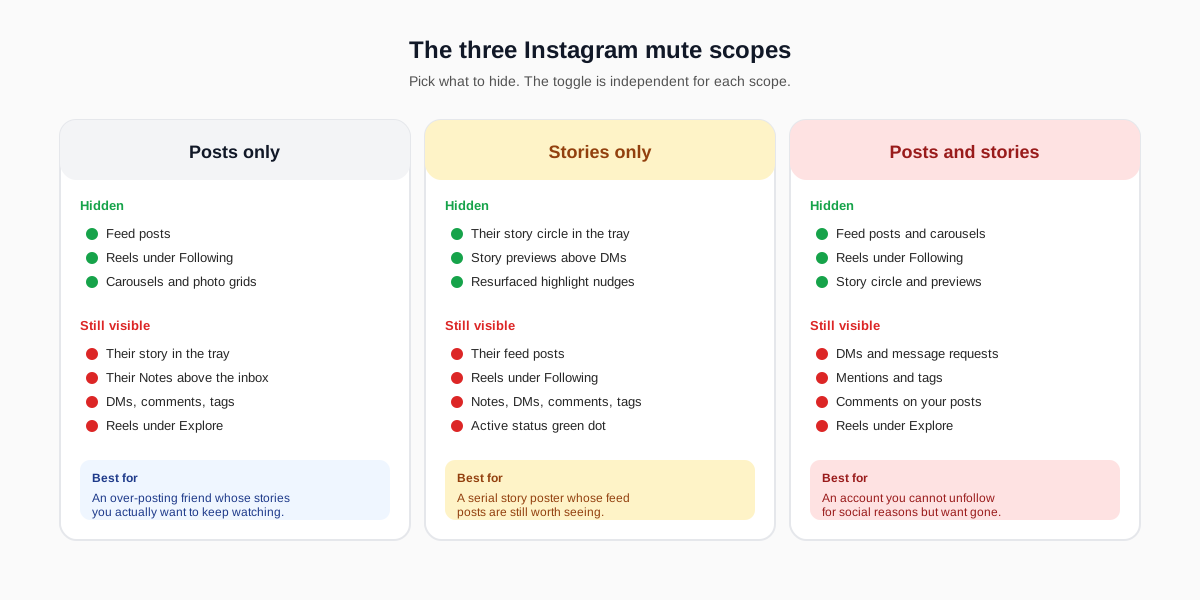
Instagram splits muting into two independent toggles, which gives you three meaningful scopes. The split exists because Story posting and feed posting tend to drift on different cadences. A friend who posts a careful feed grid once a month often runs a stream of forty stories a day, and the product team recognised that the right answer to one is rarely the right answer to the other.
Posts only
With Posts toggled on and Storiesoff, the account's feed posts, carousels, and the reels that show up under Following stop landing in your feed. Their story circle still appears at the top of your tray and their Notes still surface above the inbox. This is the right scope for the over-posting friend whose stories you actually want to keep watching. It is also the most reversible: a feed mute leaves no observable surface for the other person to notice.
Stories only
With Stories on and Posts off, their story circle drops off the tray and the small story previews above DM threads disappear. Their feed posts, reels, and Notes continue to flow. This scope shines for accounts that ship rapid-fire story chains (gym selfies on the hour, food progress shots, tour-bus minutiae) where the volume is the problem and the feed grid is fine.
Posts and stories
Both toggles on is the closest thing Instagram offers to a silent unfollow. The account effectively vanishes from your algorithmic surfaces while you stay technically following. Use this when an unfollow is socially complicated (a coworker, a family member, an ex-collaborator) and you just want the noise gone. Their DMs, mentions, and tags still arrive, so the connection is not severed; only the passive scroll is cleaned.
Three places you can launch the mute flow from
The profile route is the canonical one, but Instagram sprinkles the same mute toggle into two other surfaces so you can act on whichever piece of content triggered the urge to mute. All three land on the same per-account toggle, so muting from a story and muting from a feed post both flip the same setting.
- Their profile. The route covered above. Following, Mute, flip the toggle.
- A post in your feed. Tap the three-dot menu in the top-right of any post and pick Mute. Instagram offers Mute posts and Mute story in the same sheet, with the option to mute only this account or every account in the post (for collab posts).
- A story in the tray. Long-press the story circle at the top of your home feed. A popover opens with Mute story, Mute posts, and View profile. Tap the option you want.
Long-press the story circle is the fastest path when a specific story is what made you reach for the toggle. The flow does not interrupt the story you were already watching and the popover dismisses cleanly. Meta's own Help Center article on muting documents all three entry points and confirms there is no fourth.
How muting differs from Restrict, Unfollow, and Block
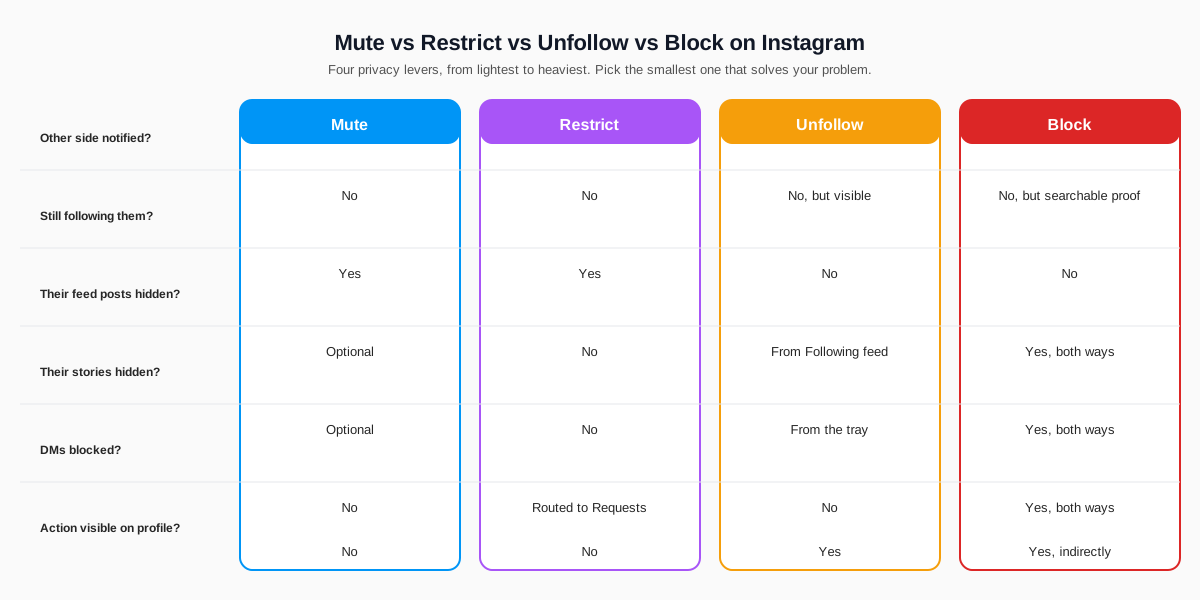
Mute is one of four Instagram privacy actions that get confused with each other. They share the property that none of them notify the other side, but the side-effects on visibility, messages, and your profile diverge sharply. Instagram documents each control separately in the official Help Center; pick the lightest action that actually solves the problem.
Mute vs Restrict
Mute hides their content from you. Restrict hides their interactions from everyone else and adds a messaging cordon. With Restrict, their comments on your posts only show to them and you, their DMs land in a Requests folder, and they lose access to your activity status. Restrict is the right call when the issue is someone's behaviour on your content; mute is the right call when the issue is the volume of theirs in your feed. Many people stack the two when an account is both noisy and invasive.
Mute vs Unfollow
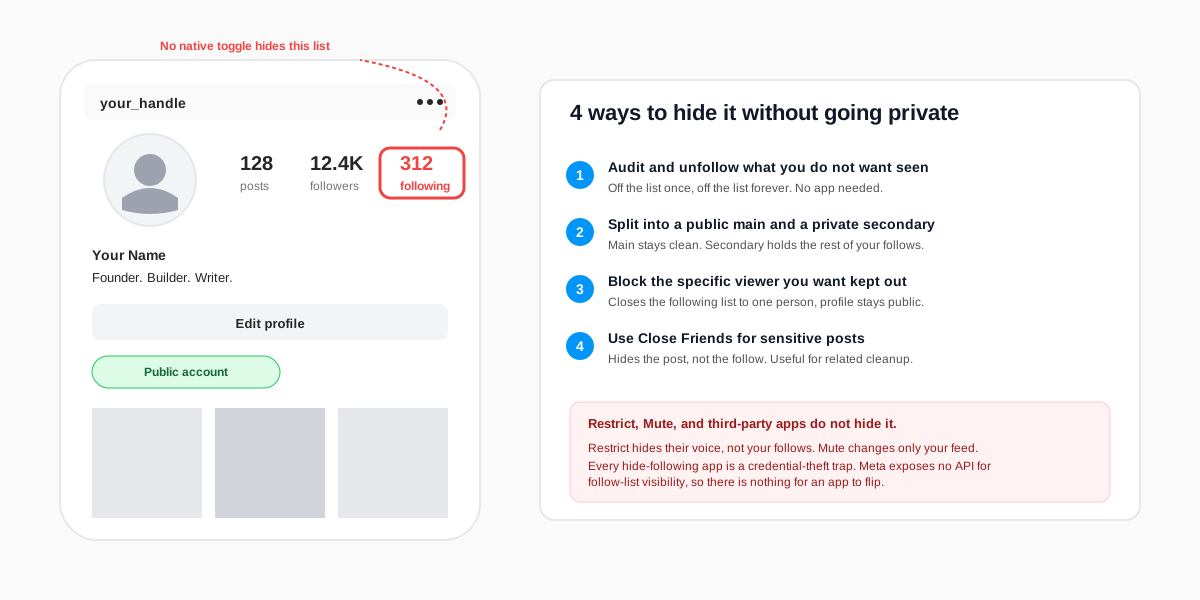
Unfollow removes the follow. Their follower count drops by one and the absence is observable from your public following list. Mute leaves the follow in place. If the account is a coworker, an ex, or a relative who would notice the unfollow, mute is the politer tool. If you genuinely never want to see their content again and do not care who notices, unfollow is simpler. The following-list privacy guide covers the surfaces an unfollow becomes visible on.
Mute vs Block
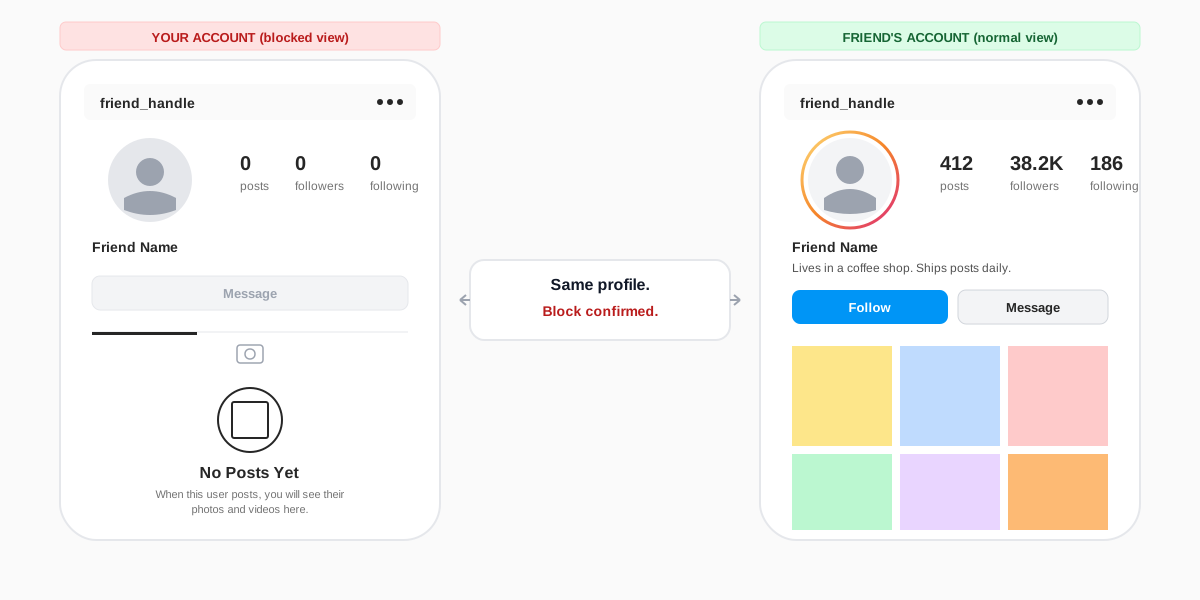
Block is the heaviest setting. It removes the connection in both directions, hides every interaction past and future, and makes your profile invisible to the blocked account in search. Mute is silent and one-directional. Block is the right call for harassment and impersonation; mute is the right call for noise. The two are not interchangeable, and treating mute as a quiet block leaves DMs flowing that you might have wanted to stop.
How to mute DMs and message threads
The profile mute toggle does not touch DMs. To silence a message thread without blocking the sender, you mute the thread itself from the inbox. Open the DM, tap the account's name at the top to open the chat details, and use the three settings under Messages: Mute messages, Mute calls, and Mute video calls. Each one is independent, and each one can be set to 15 minutes, 1 hour, 8 hours, 24 hours, or Until I turn it on again.
Muting a DM thread only stops the push notifications and the in-app badge. The messages still land in your inbox and the sender still sees a Senttick the moment the message ships. There is no way to make a DM disappear without blocking or restricting; mute is a quiet-only setting. Pew Research's 2024 social media use survey found that messaging is one of the top three reasons US adults open Instagram daily, which is why the DM mute controls are the most-used silencing option in the app.
How to unmute someone on Instagram
The reverse is the same path. Open their profile, tap Following, pick Mute, and flip the toggle back off. Instagram saves the change instantly and the next story or feed post they ship starts surfacing again. If you forgot which accounts you muted, there is a centralised list: open your profile, tap the three-line menu, Settings and activity, then Muted accounts under How others can interact with you. Every muted account shows up there with the scope (posts, stories, or both) listed alongside the handle.
The unmute is just as silent as the mute. There is no notification, no profile badge, and no way for the other person to find out you ever muted them. Their content simply reappears in your feed within seconds of the toggle flipping off, with one quirk: the algorithm needs about a day to recalibrate which of their old posts to surface, so do not expect to see everything you missed in the meantime.
Troubleshooting when mute does nothing
Most reports of "I muted them and still see their stuff" trace back to one of four causes. Walk through them in order before assuming the toggle is broken.
- The wrong toggle is on. Posts and Stories are independent. Muting only Posts will not remove their stories from the tray, and vice versa. Open the profile and confirm both toggles match what you want hidden.
- You muted on the wrong account. Multi-account installs keep separate mute lists per profile. Switch profiles via the bottom-bar avatar and check the muted list on each one.
- The content is reaching you sideways. Mute hides their posts from Following, but Explore, Reels under For You, and Suggested for you can still surface their content algorithmically. Tap the three-dot menu on a surfaced post and pick Not interested; the system needs that feedback to stop boosting it.
- They are reposting via a collab tag or another account.A muted account's posts can still land in your feed if a friend you follow co-authored the post or reshared it to a Story. Mute the second account too if the bleed-through is a pattern.
If none of the four fixes apply, force-quit Instagram and reopen. Cached feed pages from before the mute occasionally survive in memory; a hard relaunch flushes them. The Meta community standards do not allow third-party tools to override the mute list, so any extension that claims to silence accounts in bulk is either fake or breaking terms.
FAQ
Does Instagram notify someone when I mute them?
No. Instagram has never sent a notification for a mute, and the muted account cannot see any badge or label on your profile that signals the action. The only way for them to find out is if they ask and you tell them. The mute is invisible from every public surface.
If I mute someone, am I still following them?
Yes. Muting does not touch the follow itself. The other account still shows up on your following list, your DMs still arrive, and their follower count does not move. Only the algorithmic visibility of their content in your feed and your story tray changes.
Can muted accounts still send me DMs?
Yes. Mute on the profile is a feed-and-story setting; it does not stop messages. If you want to silence the inbox too, mute the DM thread itself by opening the chat, tapping the account name, and turning on Mute messages. You can also restrict the account to push their DMs to a Requests folder.
Will the muted account still see my posts and stories?
Yes. Mute is one-directional. The muted account can still see everything you post, comment on it, react to your stories, and DM you. To hide your content from them without blocking, use Restrict on their profile or add them to a Hide Story From list under your story privacy settings.
Where do I find the list of accounts I muted?
Open your profile, tap the three-line menu, pick Settings and activity, scroll to How others can interact with you, and tap Muted accounts. The list shows every account you have muted with the scope (posts, stories, or both) listed next to each handle. You can unmute from this screen without visiting the profile.
Can I mute someone who does not follow me?
Yes. The mute toggle works whether or not the account follows you back. The only requirement is that you follow them, since the toggle lives behind the Following button on their profile. Public accounts you do not follow can also be muted from the three-dot menu on any of their posts.
TL;DR
- To mute someone on Instagram in 2026: open their profile, tap Following, pick Mute, and flip the toggle for Posts, Stories, or both.
- The three scopes are independent. Posts hides feed content and Reels under Following; Stories hides the story circle and previews; both hides everything passive.
- Mute is the lightest privacy lever. No notification ever ships, you stay following them, and DMs, mentions, and tags still arrive normally.
- For DM noise, mute the thread itself by tapping the account name inside the chat. Independent mute timers for messages, calls, and video calls.
- Unmute is the same path; the central list lives underSettings and activity, How others can interact with you, Muted accounts.