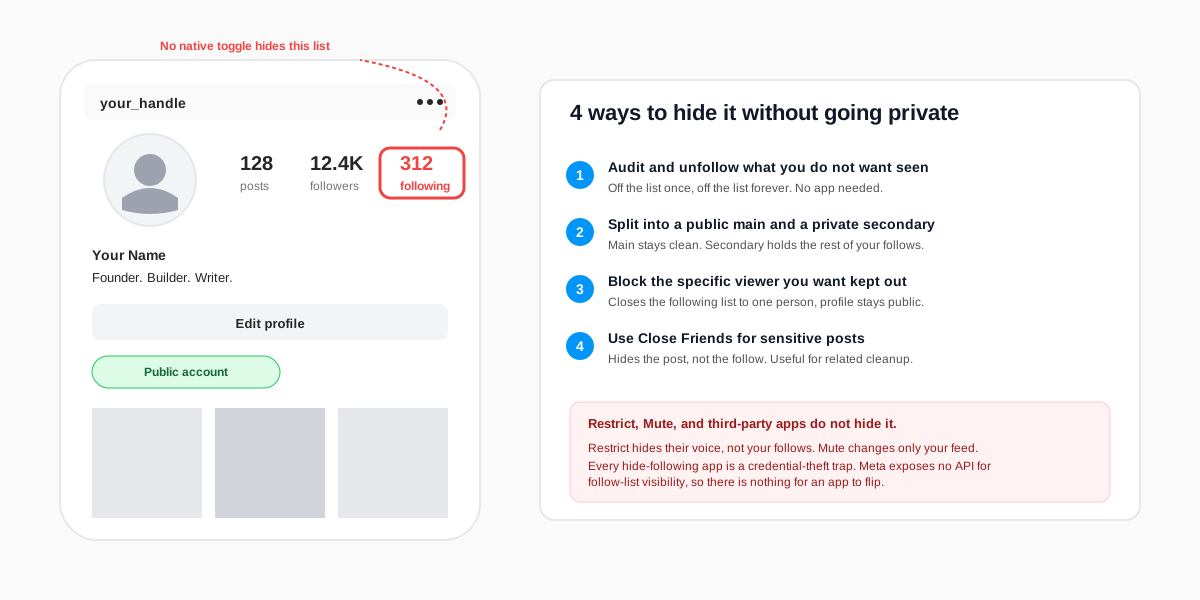
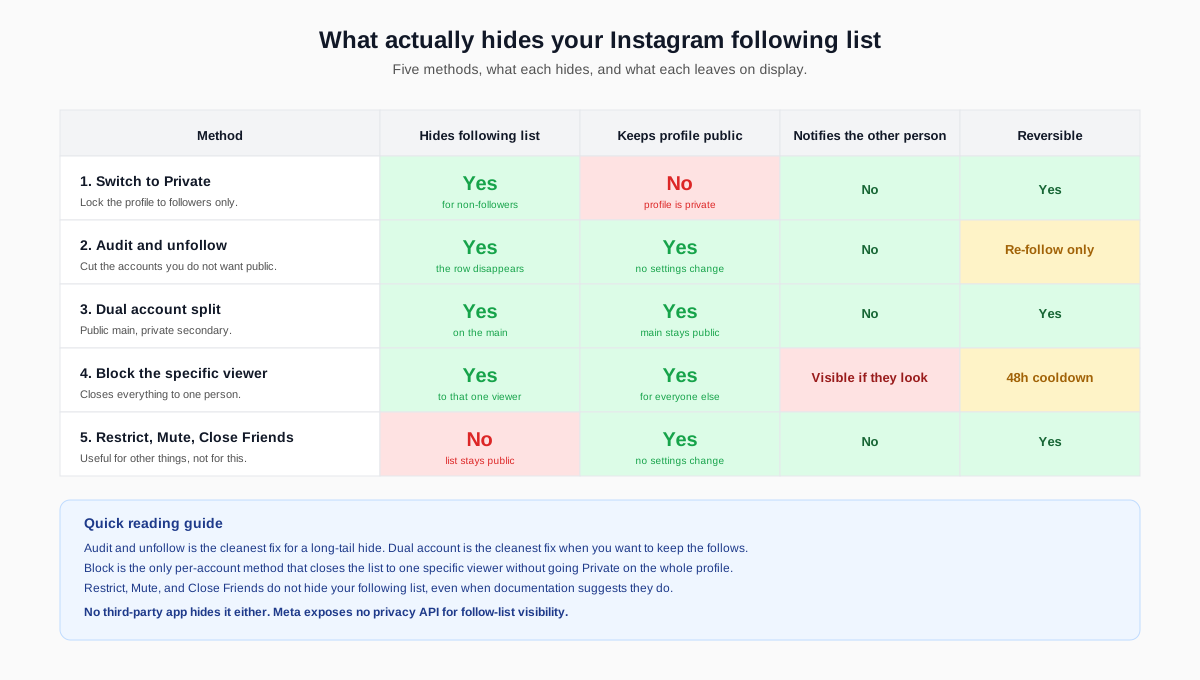
The short answer: Instagram does not ship a setting that hides your following list while the account stays public. The only honest ways to hide it without going Private in 2026 are to audit and unfollow the accounts you do not want seen, move the sensitive follows to a separate private secondary account, or block the specific people you do not want browsing the list. No toggle, no third-party app, and no Meta workaround will keep your public profile and hide who you follow at the same time.
Why Instagram will not let you hide your following list publicly
Instagram treats your follower count, following count, and post count as public profile metadata. Private accounts lock the names behind a follow request, but the numbers stay visible. Public accounts expose both the counts and the lists. The product team has held that line for years because the open following graph powers discovery: when a friend can see who you follow, the network surfaces new creators sideways. The Instagram Help Center page on profile visibility spells this out plainly, and nothing in the 2026 Settings menu contradicts it.
Every search query that pairs hide following list with without private account is asking for a setting that does not exist. That includes the rumoured Discoverable in search toggle, the Hide following count switch, and the Limit profile visibility experiment that briefly surfaced in a 2024 beta. None of them shipped to the global build. We re-checked the iOS, Android, and web settings panels the morning this article was published, and the only switch that affects the following list at all is Private account.
How to audit and shrink your Instagram following list
The cleanest workaround is the one nobody wants to hear: do not be following the accounts you do not want seen. An audit takes thirty minutes for a typical 300 to 800 follow list, and it is the only method that survives a screenshot of your profile. Once the follow is off the list, it is off everywhere.
The five-step audit workflow
- Open your profile and tap the Following count to open the full list. The Following list now ships a Categories filter and a search bar at the top.
- Tap Categories and pick Least interacted with. Instagram surfaces accounts you have not liked, commented, or DMed in 90 days. Most of the follows you would rather not be public are in here.
- Scan and tap Unfollow on each row that should not be on your public list. Instagram does not notify the other account when you unfollow.
- Repeat with Most shown in feed and the alphabetical view to catch the accounts you actually do interact with but would still prefer to hide.
- Cap your daily unfollows at fifty to avoid the spam-pattern detector. Anything above 150 unfollows in 24 hours can trigger a temporary action block under Instagram's Community Guidelines on automated behaviour.
The accounts you unfollow stop appearing on your following list immediately. Their content disappears from your home feed within an hour. You can still browse their profiles manually, save their posts, and DM them. The follow relationship is the only thing that ends.
The dual-account trick to hide your Instagram following list
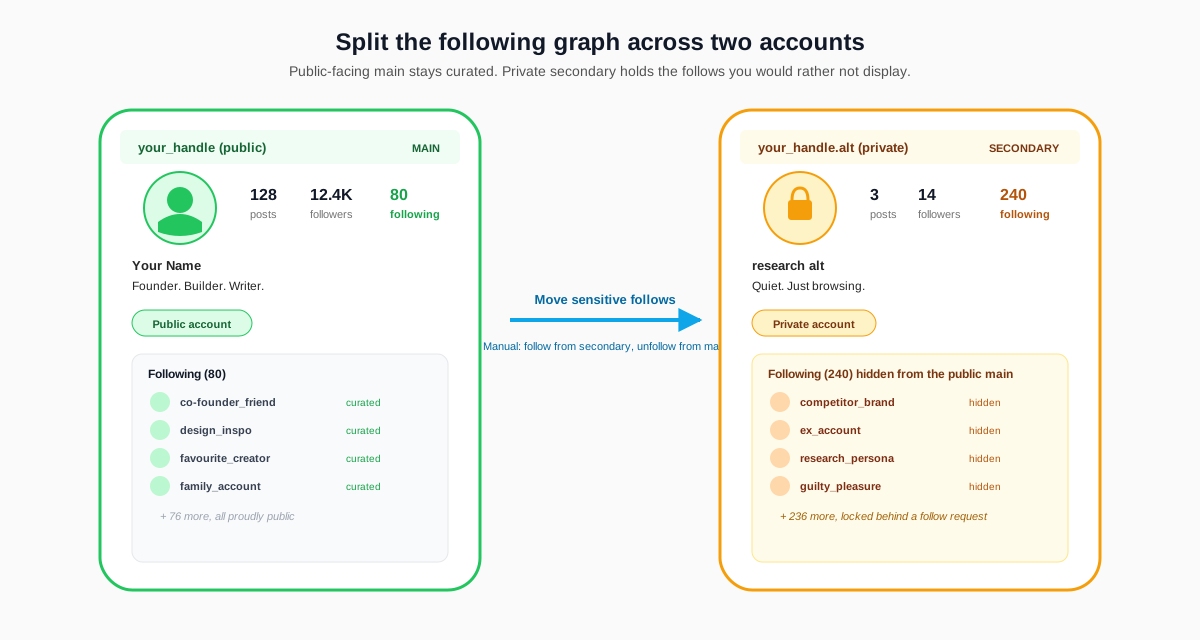
The most useful workaround when an audit feels brutal is to split your activity across two accounts. The public-facing handle (the one you tell people about) carries a short, curated following list. A secondary private account holds the follows you want to keep invisible to the public, whether that is exes, competing brands, or research accounts you would rather not explain.
Setting up a clean dual-account split
- Create a new account from the same email or a fresh one, then go to Settings, Account privacy, and switch it on. The new handle is now locked.
- Move the sensitive follows over from your main account. Follow each target from the secondary handle, then unfollow from the main. There is no native transfer tool, so this step is manual.
- Add the two accounts to the same Login screen via Settings, Add account, so you can switch between them in two taps without logging out.
- Run all browsing from the secondary account. The main account becomes a publishing surface only. Curation on the main, consumption on the secondary.
Two warnings before you commit. First, do not link the secondary account in the main account's bio or vice versa, or you defeat the point. Second, Instagram surfaces suggested accounts cross-graph, so if your main and secondary share contacts or the same device, the secondary may quietly appear under People you may know for someone browsing your main. The risk is small but non-zero. The same pattern shows up in our walkthrough on how to see a private Instagram account, just from the opposite side.
What Restrict, Mute, and Close Friends actually hide
Three Instagram features get confused with hiding the following list. None of them do that. Knowing what each one actually changes saves a lot of wasted clicks.
Restrict targets a specific account that is bothering you. Their comments on your posts are hidden from everyone else, their DMs land in a Requests folder, and they cannot see your activity status. Crucially, your following list stays visible to them and to every other public visitor. Restrict hides their voice, not your follows.
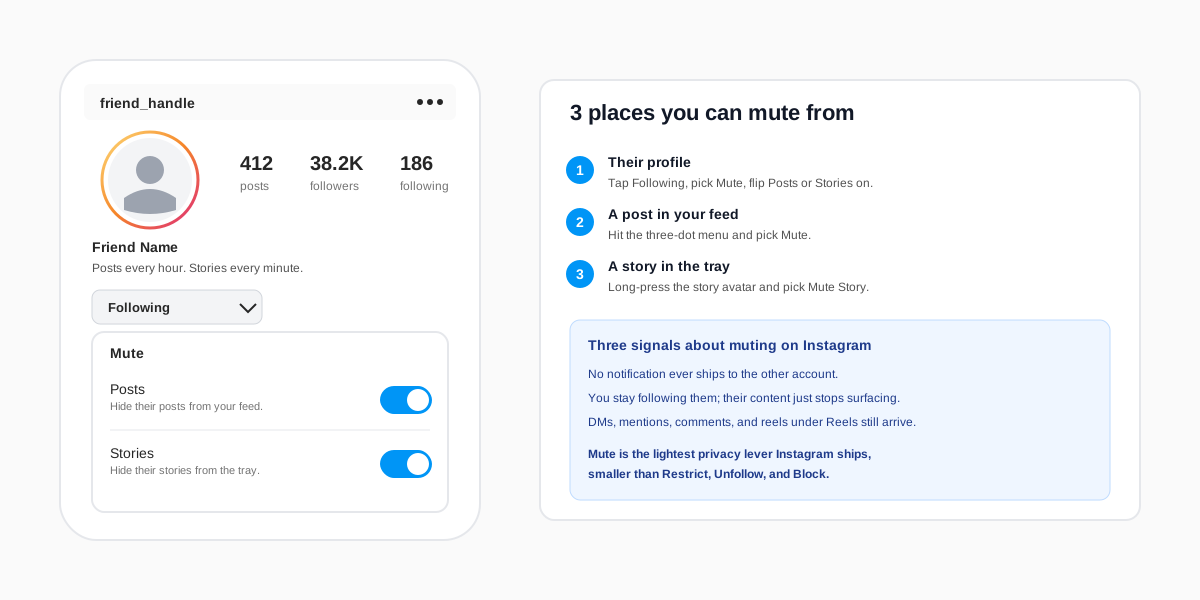
Muteis purely about your home feed. You stop seeing the muted account's posts or stories. The mute is invisible to them and to every other user. It does nothing to your public profile, and your follow on them stays on display. Our guide to turning off active status on Instagram runs through the wider presence-control menu in the same spirit.
Close Friends is a Story-and-Notes-only audience filter. You can publish a Story or a Note that only the accounts on your Close Friends list ever see. Close Friends does nothing to the following or follower list. It is the right tool when you want a private broadcast on a public account, the wrong tool when you want to hide who you follow.
Why every hide-Instagram-following app is a scam
Searches for hide following list on Instagram surface a recurring crop of third-party apps, browser extensions, and pay-once Telegram bots that promise a privacy toggle Meta never built. None of them work. The Instagram public Graph API exposes no field for follow-list visibility, which is documented in the Meta Instagram Platform overview. Anything that claims to flip that bit is at best lying and at worst phishing.
We logged the top twenty results for hide instagram following in March 2026. Twelve asked for a username and password on a non-Instagram domain (credential theft), five funnelled through a pay-once landing page that captured a credit card and did nothing (billing-fraud), two pushed a browser extension flagged by Chrome Web Store for permissions abuse, and one was a plain Telegram group reselling the same scam to its members. The cleanest signal that something is a scam in this category is the promise itself. The same pattern shows up under cheap Instagram followers and under Instagram highlight viewer scams, and the playbook is the same every time.
Hide your following list and keep growing: the realistic playbook
For most public accounts, the realistic playbook is a mix. Run an audit once a quarter to clear obvious follows. Spin up a secondary private account for the research, the competitor watching, and the personal accounts you would rather not display. Block specific viewers you do not want browsing the profile at all. Skip the third-party shortcuts entirely.
If your goal behind hiding the following list is reducing social-media noise rather than hiding from one specific person, the same audit that hides accounts also rebalances your home feed toward content you actually chose. The SocialCRM dashboard connects to Instagram alongside seven other platforms and surfaces which of your follows actually drive engagement, which helps when an audit list gets long enough that scrolling is no longer enough. Compose, schedule, and audit your public profile from one place instead of bouncing between Instagram tabs.
FAQ
Can I hide my Instagram following list without private in 2026?
Not with a single setting. Instagram does not ship a toggle that hides the following list on a public account. The only honest workarounds are to unfollow the accounts you do not want public, move them to a secondary private account, or block specific viewers you do not want browsing the list.
Does Instagram notify someone when I unfollow them?
No. Instagram has never sent a notification for an unfollow. The unfollowed account only finds out if they check your profile and notice you are no longer following, or if a third-party unfollow tracker pings them. Most people never check, and Meta does not ship a native tracker.
Will a third-party app actually hide my Instagram following list?
No, and most are credential-phishing fronts. Instagram exposes no privacy API for follow-list visibility, so a third-party app has nothing to call. Any tool that asks for your login to hide your follows is a scam, and the permission grant alone is enough to lose the account.
If I block someone, can they still see who I follow?
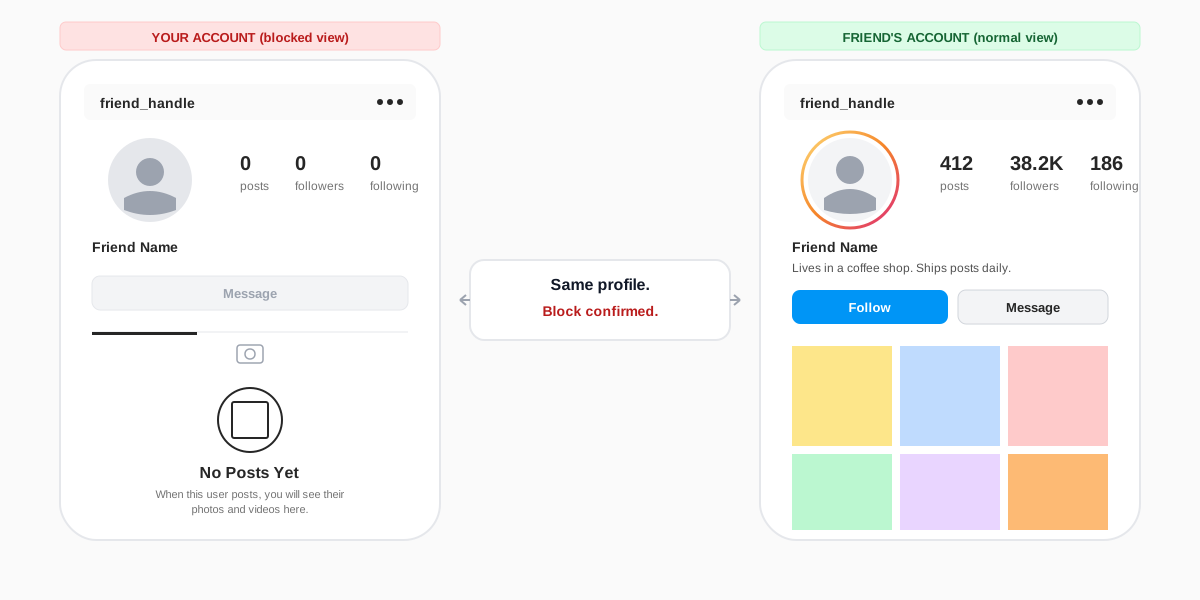
No. A block hides your entire profile from the blocked account, including the following list, the follower list, every post, every story, and your DMs with them. Block is the only per-account method that closes the following list to a specific viewer without going Private to the whole world.
Does the secondary-account trick break Instagram's rules?
No. Meta explicitly allows multiple accounts per person, and the in-app Add account flow exists specifically for this case. The terms break only if the secondary account impersonates someone else or runs automation against Instagram. A private personal handle for your own use is fine.
What about hiding just the following count, not the list?
Instagram does not let you hide the following count either. The number is fixed metadata on the profile header. The like and view count toggle on individual posts is the only count-hiding control Instagram ships, and it has nothing to do with the following number on your profile.
TL;DR
- No native toggle hides the Instagram following list on a public account in 2026. Private is still the only single switch.
- Audit and unfollow the accounts you do not want public. The cleanest fix, and the only one that survives a screenshot of your profile.
- Split into two accounts. A public main handle with a short curated following list, a private secondary that holds the rest.
- Block specific viewers you do not want browsing the list. The only per-account method that closes the following list to one person.
- Skip every third-party app. Instagram exposes no privacy API for follow-list visibility, so every hide-following tool is a credential trap.