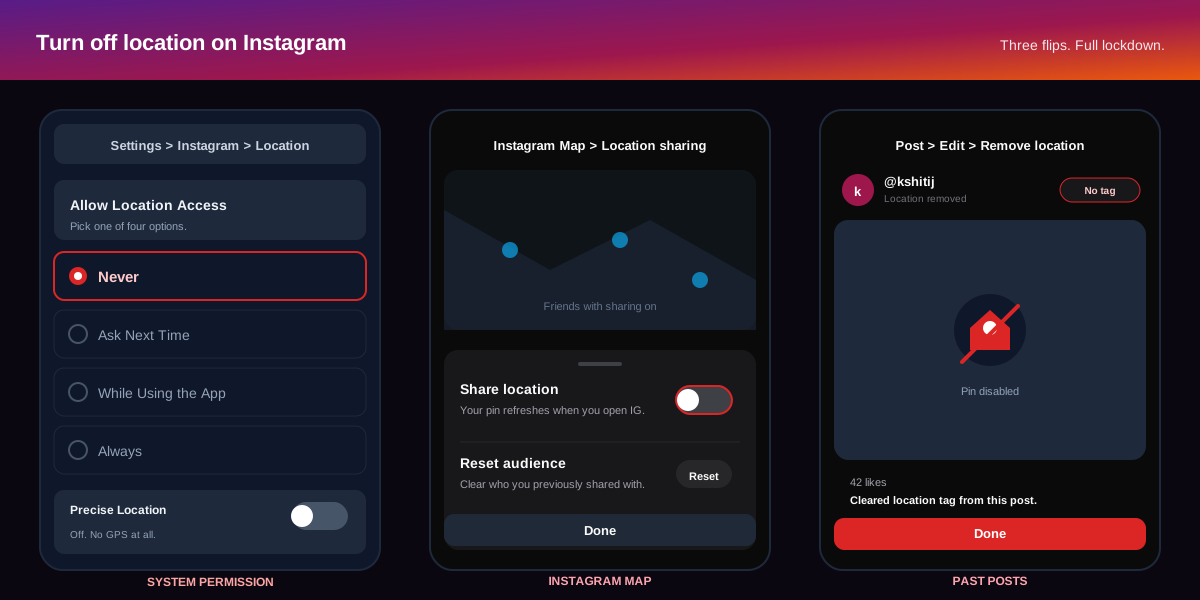
The short answer:to turn off location on Instagram in 2026, revoke the app permission in your phone settings, hide your pin on the Instagram Map, and remove location tags from existing posts, reels, and stories. On iOS, open Settings, Instagram, Location, and pick Never. On Android, open Settings, Apps, Instagram, Permissions, Location, Don't allow. Then open Instagram, tap the Map icon at the top of Inbox, hit the gear, and switch off location sharing. Together those three flips kill every outbound location signal Instagram ships in your name.
How to turn off Instagram location permission on iOS and Android
The Instagram app itself cannot block the operating system from handing over your coordinates. Every location signal Instagram uses (post tagging, Map sharing, nearby Reels, location-based ads) starts at the OS permission layer. The cleanest first move is to revoke that permission entirely, which the official Instagram Help Center page on location services documents as the canonical kill switch.
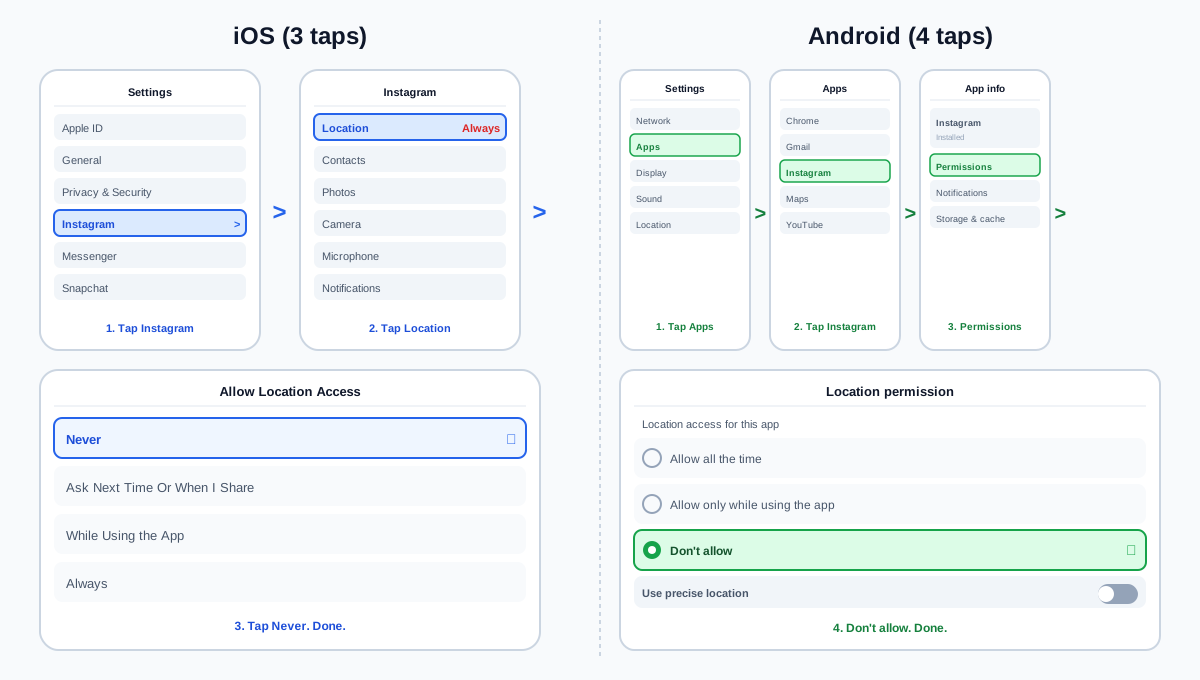
iOS: three taps to Never
- Open the iOS Settings app and scroll to the alphabetical list of installed apps near the bottom. Tap Instagram.
- Tap Location. The screen shows four options: Never, Ask Next Time Or When I Share, While Using the App, and Always. The current state has a blue check next to it.
- Tap Never. Toggle Precise Location off in the same screen for good measure. Even when Instagram asks for location later (the Add location sticker, for example), iOS will silently deny without prompting.
Android: four taps to Don't allow
- Open the Android Settings app and tap Apps (sometimes Application manager on older shells).
- Tap Instagram in the app list. If your phone hides system apps, type Instagram into the search field at the top.
- Tap Permissions, then Location.Three radio options load: Allow all the time, Allow only while using the app, and Don't allow.
- Tap Don't allow. Switch Use precise location off in the same screen. Android 13 and newer remember the choice across app updates.
Revoking the permission breaks one feature Instagram does not surface clearly: the Add location pill that auto-suggests a nearby venue when you compose a post. The pill still appears, but the auto-suggested list is empty. You can still type a venue name manually and Instagram will tag the post with that string. The same rule applies to story location stickers and the location filter in Search. None of those leak your real position; they just let you label a post with a known place.
How to turn off the Instagram Map and stop sharing live location
The Instagram Map shipped to the global app in 2025 and is now the highest-leverage location surface to lock down. The Map lets the friends you pick see a pin of where you were last active, refreshing every time you open Instagram and keeping the pin live for 24 hours. By default Map sharing is off for new accounts, but the onboarding prompt during the 2025 rollout flipped it on for a meaningful share of existing users, so it is worth a check even if you do not remember opting in.
The five-tap path to hide your Map pin
- Open Instagram and tap the paper-plane icon (top right of the feed) to open Inbox.
- Tap the Map icon at the top of the Inbox screen. It sits to the left of the search bar and shows a small pin on a globe.
- Tap the gear in the top-right corner of the Map screen. A sheet slides up titled Location sharing.
- Toggle Share location off. The pin disappears for every friend in the same second. There is no notification on their end; the Map simply stops showing you.
- Tap Done. Optionally tap Reset audience to clear the friend list you previously shared with, so a future toggle-on does not silently re-share.
Map sharing vs Add Yours stickers vs Reels Map
Instagram ships three Map-adjacent surfaces and the terminology blurs them. Map sharing is your live pin to chosen friends. Add Yours location stickers are public posts threaded together by venue (a tag, not a live signal). The Reels Map shows public reels tagged at a place; turning your own Map sharing off does not hide your old reel tags from that surface. To pull a reel off the Reels Map, edit the reel and remove the location tag, which we cover next.
What happens when you turn off location on Instagram?
Turning off location on Instagram stops the app from receiving your coordinates and hides your Map pin from friends. Existing location tags on past posts, reels, and stories stay attached until you edit each one. Instagram keeps using rough IP-based region for ad delivery, but the precise GPS pipeline is fully closed.
How to remove location tags from old Instagram posts, reels, and stories
Revoking the permission and hiding the Map handles the present and the future. The past is the third front. Every post, reel, or story you ever tagged with a location keeps that tag indefinitely, and it shows in Search, on the location's own results page, and on the Explore Map. Instagram does not ship a bulk strip, so the cleanup is manual, but each removal takes about ten seconds.
Strip a location tag from a feed post or reel
- Open the post or reel from your profile grid. Sort the grid by tagged-content to find tagged items faster.
- Tap the three-dot menu at the top right, then tap Edit. The composer reopens with the original caption and the location pill at the top.
- Tap the location pill, then tap Remove location. The pill disappears. Tap Done in the top right to save.
For a faster audit of which posts carry tags, our piece on Instagram search queries optimization walks through the indexing signals Instagram surfaces from location tags, which is the same signal that lets a curious stranger reverse-search your last venue.
Strip a location sticker from a Story
Active Stories cannot be edited. Once a Story is live, the only way to remove a location sticker is to delete the Story, then repost the same media without the sticker. Archived Stories can have their location stickers stripped through the Highlight editor: open the Highlight, tap the three-dot menu on the slide, tap Edit, drag the sticker off the canvas, and save. Stories not promoted to a Highlight stay private after 24 hours by default and are not a search risk unless you have public archives turned on.
How to strip GPS metadata from photos before you post
The least-known location leak is EXIF metadata embedded in every photo your camera captures. EXIF travels with the file and includes the GPS coordinates of the exact spot where the photo was taken. Instagram strips EXIF from public posts on upload, according to the Electronic Frontier Foundation breakdown of social-network metadata handling, but the metadata still sits inside your camera roll and any backup service the photo syncs to. The safer move is to stop the camera from recording GPS at capture time.
- iOS:Settings, Privacy & Security, Location Services, Camera, Never. The Camera app stops recording GPS inside the EXIF block for every new shot. Existing photos keep their original metadata.
- Android: open the Camera app, tap the gear icon, scroll to Location tags, and switch it off. The path differs slightly across Samsung, Pixel, and Xiaomi builds; on Pixel, the toggle is labeled Save location.
- Strip EXIF from existing photos before posting with a tool like ImageOptim on macOS, the Photos app on iOS (Share, Options, toggle Location off), or Google Photos on Android (three-dot menu, Remove geolocation).
Privacy hygiene for the photos themselves matters even when Instagram strips EXIF at upload. The same camera roll often feeds Snapchat, Telegram, WhatsApp Status, and email attachments, and most of those do not strip metadata. Lock the leak at the source.
How to turn off location-based ads and audience targeting
Even with location services off, Instagram still infers a rough region from your IP address and uses that to serve location-based ads (the Sponsored slot tagged with a nearby venue). The IP-region inference is harder to disable because it is a server-side signal, but you can switch off location-based ads in the Accounts Center.
- Open Settings and activity from your profile menu.
- Tap Accounts Center at the top of the screen, then tap Ad preferences.
- Tap Manage info, then Activity information from ad partners. Turn off Use info from partners. Scroll to Ad topics and add Location-based ads to your See less list.
For a deeper walkthrough of the privacy toggles that share a screen with this one, our guide to turning off active status on Instagram covers the green-dot toggle that lives a few rows above the ad preferences. Pair the two flips for the cleanest privacy baseline.
How to use SocialCRM to audit location-tagged posts
If you publish on Instagram through a scheduling tool, the location-tag audit is faster than the native flow because the tool already indexes every queued and historical post. The SocialCRM composer connects to your Instagram account, surfaces a location-tag column in the post library, and lets you batch-flag tagged posts for manual cleanup. We built it for solo founders who scheduled venue-tagged restaurant content for three months and then decided to lock down their footprint; the audit cuts a ninety-minute cleanup to under fifteen.
The same audit pairs well with our piece on hiding your Instagram following list without going private, which is the other half of the privacy hardening pass most users want once they realise how much profile metadata Instagram surfaces publicly by default.
FAQ
Does turning off location on Instagram stop the app from tracking me?
Turning off the system location permission stops Instagram from receiving GPS coordinates. The app still infers a rough region from your IP address for ad delivery and compliance with regional content rules. To shrink the IP signal further, use a VPN with a fixed exit region and turn off location-based ads in Accounts Center as a second layer.
Can someone find my home from an old Instagram post?
Possibly. Posts tagged with a precise location (a coffee shop on your block, the park across the street, a frequent gym) form a pattern that triangulates a home address. Strip location tags from any post taken within walking distance of your home before you worry about anything else. The National Cybersecurity Alliance guide to location privacy on social media covers the de-anonymisation patterns in detail.
Does the Instagram Map share my live location with everyone?
No. The Map shares your pin only with the friends you explicitly pick during onboarding or in the Map gear sheet. Strangers, followers you have not added to the Map list, and public Explore viewers cannot see the pin. The Map pin refreshes when you open Instagram and stays live for 24 hours per refresh.
Will removing location tags hurt my reach?
Slightly, but rarely enough to matter for a personal account. Location tags surface posts in venue-specific search results and on the location page itself, which adds a small discovery channel. For a creator targeting a local audience (restaurant, salon, gym, real estate), location tags are worth keeping on business posts and stripping only from personal ones. For a private personal account, the reach hit is negligible.
Does Instagram still use my location after I turn it off?
Not for GPS-precise features. Instagram keeps using a coarse, IP-derived region for ad delivery and to comply with regional content laws (the Reels carousel in India versus the United States, for example). The precise pipeline that powers the Map, nearby Reels suggestions, and the Add Location sticker is fully closed when the system permission is set to Never.
How do I check what location data Instagram has on me?
Request a full data export from Settings and activity, Accounts Center, Your information and permissions, Download your information. Pick HTML format and select Location history. Meta delivers a ZIP archive within 48 hours with every coordinate Instagram has logged against your account. The export is the only honest way to see your history; the in-app surfaces only show recent activity.
TL;DR
- System permission:iOS Settings, Instagram, Location, Never. Android Settings, Apps, Instagram, Permissions, Location, Don't allow. This is the load-bearing flip.
- Instagram Map: Inbox, Map icon, gear, Share location off. Hides your live pin from every friend in the same second.
- Past posts: open each tagged post, three dots, Edit, tap the location pill, Remove location, Done. No bulk strip, so audit the last 90 days at a minimum.
- EXIF metadata: turn off Location Services for the Camera app. Strip GPS from existing photos before you upload them anywhere, not just Instagram.
- Ads: Accounts Center, Ad preferences, Activity information from ad partners off. Cuts the location-tagged Sponsored slot to a generic regional targeting only.