The short answer: a nudge on TikTok is a one-tap request you send to a creator you follow, asking them to start a LIVE stream. It sits behind the small bell icon in the top-right of any creator profile. When you tap Nudge, TikTok sends the creator a push saying a follower wants them to go LIVE, and if they do, you get a follow-up notification so you can jump in. Nudge is not a chat message, not anonymous, and not available on creators you do not follow. Creators can switch the whole feature off from Settings, Creator tools, Nudge.
What nudge actually does on TikTok
TikTok introduced the Nudge feature in 2022 to bridge a small but real gap in the LIVE experience: viewers wanted a way to tell a creator they were online and ready to watch, without writing a comment under an old video and hoping the creator scrolled back to read it. The Nudge button collapses that whole flow into a single tap. When you nudge a creator, TikTok delivers a push notification to the creator's device that reads, in effect, your followers want you to go LIVE right now, and surfaces a small nudge count inside their activity inbox. The creator can ignore it, dismiss it, or open the LIVE composer and start streaming. If they do start a LIVE within a short window after your nudge, you receive a notification telling you the creator is broadcasting, which is the payoff the feature is built around.
The intent is simple, but the framing matters. Nudge is not a Facebook poke, not a Snapchat wave, and not a DM. It is a typed gesture with one outcome: opening a LIVE session. Treating it as a generic ping is the most common reason new TikTok users get confused by the feature. The bell icon, the LIVE settings sheet, and the wording inside the sheet all point at the same goal.
Where the Nudge button lives on TikTok
The Nudge control is tucked inside the LIVE notification settings sheet, which is itself behind the bell icon on a creator's profile. TikTok does not surface Nudge on the home feed, inside the For You page, or in the messages tab, which is the second most common source of confusion. If you cannot find a nudge option in any other surface, that is by design.
The bell icon on a creator profile
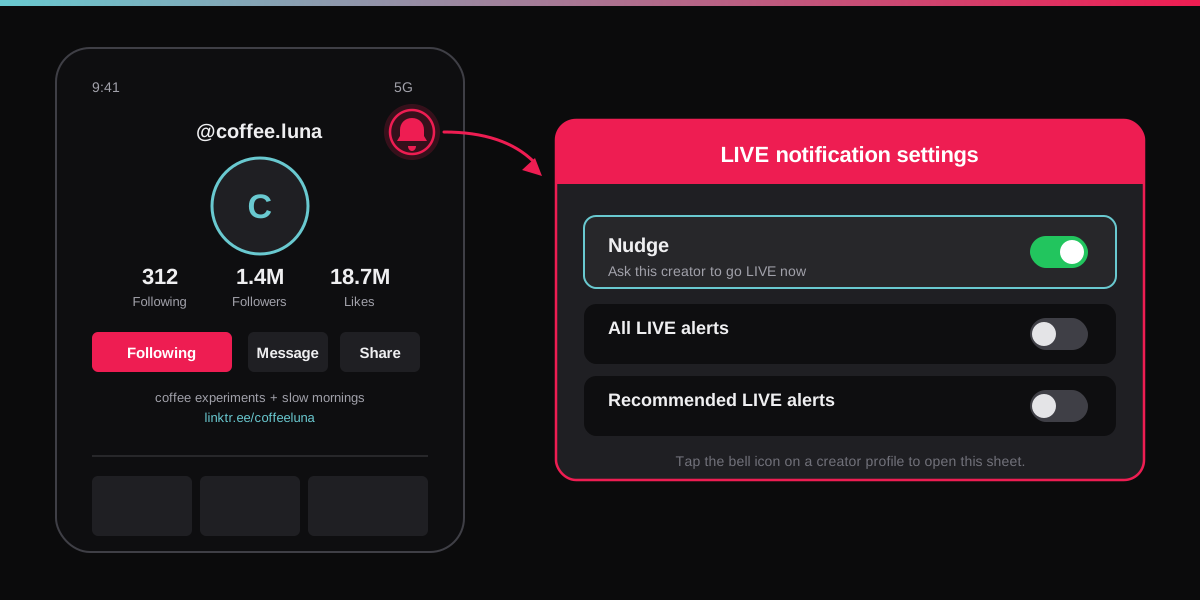
Open any creator's profile and look at the top-right corner of the screen. Sitting next to the share arrow there is a small outline bell. TikTok uses the same icon for video notifications on individual posts, but at the profile level the bell controls LIVE alerts and the Nudge button. The icon turns solid red when notifications are enabled and outlined when they are not, which gives you a quick read on whether you have already opted into a creator's LIVE alerts.
The LIVE notification settings sheet
Tapping the bell pulls up a bottom sheet titled LIVE notification settings. The Nudge row is the first item in that sheet, sitting above All LIVE alerts and Recommended LIVE alerts. The three rows are independent: turning on All LIVE alerts does not send a nudge, and tapping Nudge does not also subscribe you to every future LIVE the creator runs. If you want both, flip both. If you want the one-time nudge without the long-term alert load, leave the alerts row off.
How to nudge a creator on TikTok in three taps
The flow is identical on iOS, Android, and the mobile web client. Desktop TikTok does not expose the Nudge button at all, so you have to be on a phone or tablet.
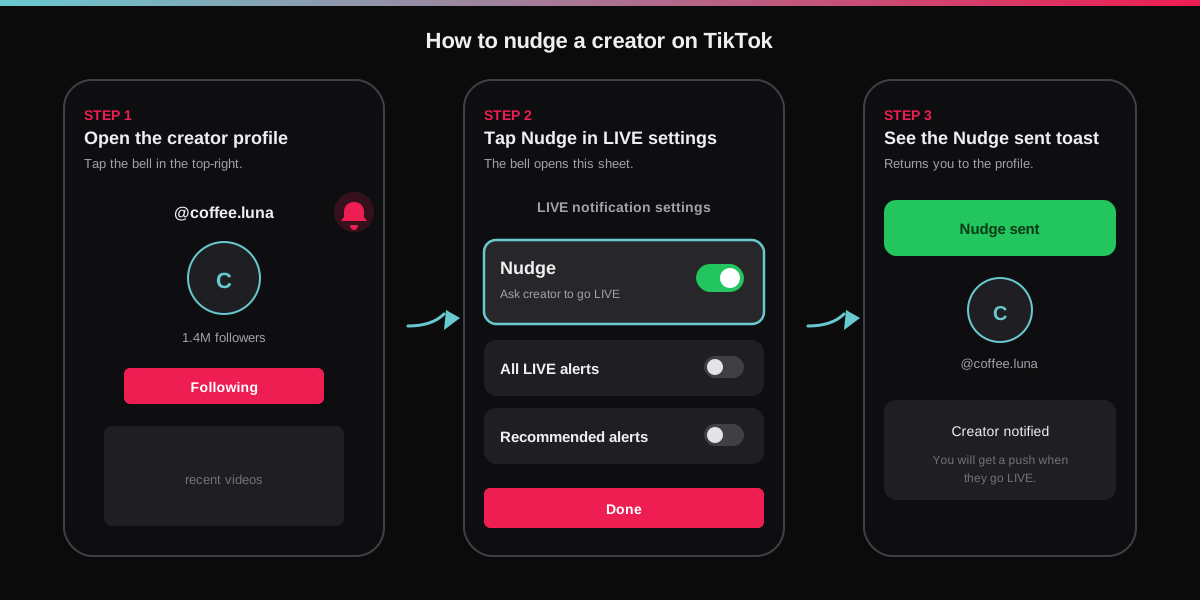
- Open the creator's profile. You can get there from any of their videos by tapping the avatar in the right-rail or by searching the handle in the discover tab.
- Tap the bell icon in the top-right. If you do not yet follow the creator, TikTok asks you to follow first. The Nudge button is gated behind a follow on every account.
- Tap Nudge in the LIVE notification settings sheet. TikTok shows a green Nudge sent toast at the top of the screen and dismisses the sheet. The creator receives the push within a few seconds.
TikTok rolled out the Nudge feature gradually beginning in 2022 and continued the rollout through 2023, which is why some accounts still report not seeing the button at all. The most common reason is regional: TikTok turns the feature on per region, and a small number of markets still lack it. The second most common reason is account type: brand and creator marketplace accounts sometimes see a different LIVE settings sheet that hides the Nudge row.
Who can nudge whom on TikTok
The eligibility rules around Nudge are tight on purpose. The feature is built to encourage real LIVE viewership, not to give spam farms a new pressure tool. Three rules apply on every nudge.
- The sender must follow the creator. If you have not yet followed, the bell prompts you to follow before the LIVE settings sheet opens. There is no exception for mutual friends, friends from your contacts list, or fellow creators.
- The creator must be LIVE-eligible. TikTok gates LIVE access behind a follower threshold (commonly cited around 1,000 followers) and a minimum account age of 16 or 18 depending on the market, as outlined in TikTok's official LIVE guidance. An account that cannot go LIVE cannot receive a nudge, because the request has nowhere to land.
- The creator must not have nudges switched off. If a creator has flipped Allow viewers to nudge you off in Creator tools, the Nudge row no longer appears in the bell sheet for any follower.
TikTok does not publicly document an exact rate limit per follower, but the in-app behaviour treats Nudge as a soft once per session control: after you nudge a creator, the row dims and you have to wait before the option reactivates. Coordinated nudge spam is also covered by TikTok's broader Community Guidelines, which prohibit coordinated inauthentic engagement.
How creators turn off nudges on TikTok
Every TikTok account that meets the LIVE threshold has a Nudge sub-menu inside Creator tools. The toggle is binary: on means followers can nudge you, off means the row vanishes from the bell sheet across every follower. You can switch the toggle at any time without losing anything else (followers, LIVE history, analytics). The path on iOS and Android is the same.
- Open your own profile and tap the three lines in the top-right to open Settings and privacy.
- Scroll to the Creator section and tap Creator tools.
- Tap Nudge, then toggle Allow viewers to nudge you off.
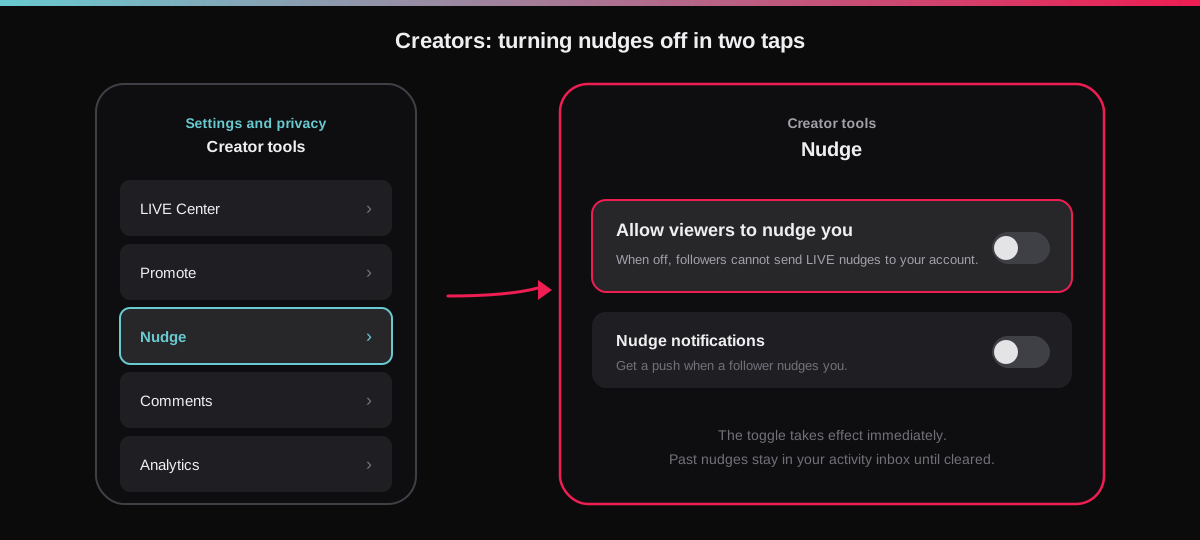
Turning nudges off does not delete past nudges from your activity inbox; it only blocks future ones. If you want a clean slate, clear the LIVE category inside your inbox after switching the toggle. The change is silent on the follower side: nobody gets a notification that you turned the feature off, and the bell sheet simply renders without the Nudge row.
TikTok Nudge vs Facebook Poke vs BeReal Nudge vs Snapchat Wave
Attention-grab gestures show up on most consumer apps under slightly different names. The differences matter, because each app routes the same tap to a different outcome. Treating them as interchangeable is how creators end up annoyed and senders end up confused.
| Feature | What it does | Who can send | Where it goes |
|---|---|---|---|
| TikTok Nudge | Asks a creator to start a LIVE stream | Followers only | Push notification on the creator's phone |
| Facebook Poke | Generic attention ping with no message | Any friend | Pokes list at facebook.com/pokes |
| BeReal Nudge | Reminds friends to post their daily BeReal | Any friend | Push notification at the friend's app |
| Snapchat Wave | Sends a hand emoji to start a chat thread | Mutual friends | Inside the existing chat thread |
| Instagram Note | Posts a short status above the inbox for 24 hours | Followers you follow back | Inbox header, visible to a chosen audience |
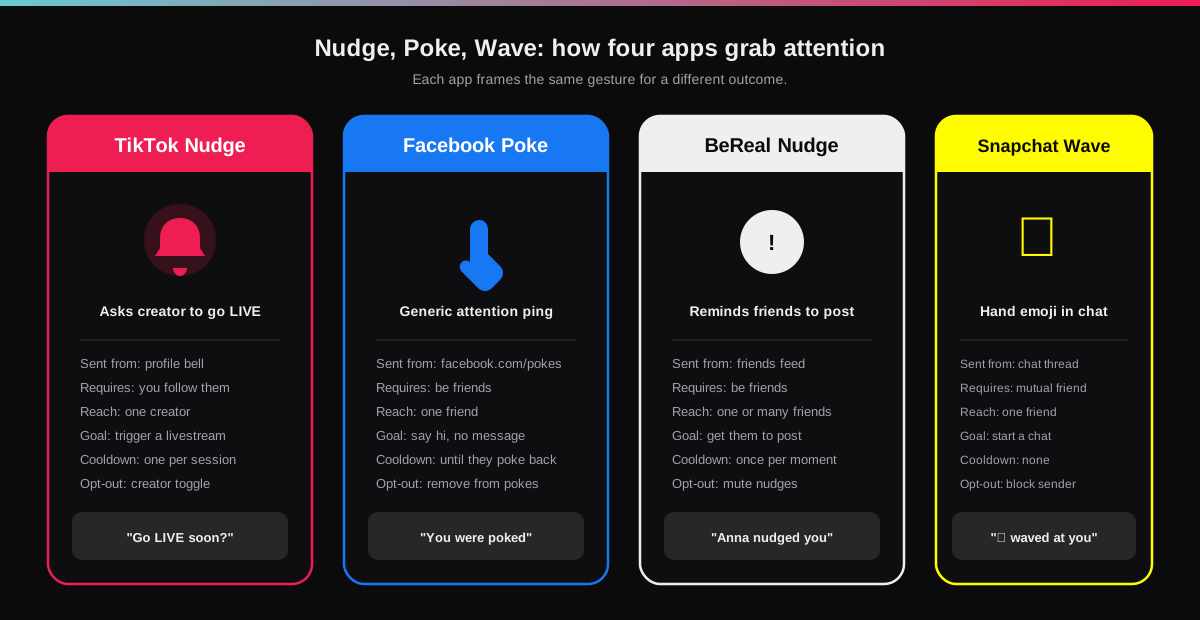
If you came in expecting a Facebook-style poke and found a LIVE request, that is the gap. TikTok is the only one of these apps where the feature has a specific commercial outcome attached (creator goes LIVE, viewers join, LIVE Gifts and Coins flow). That framing also explains why Nudge is gated behind a follow and why creators can switch it off entirely: it is plumbing for the LIVE economy, not a casual chat primitive.
Why your TikTok nudge sometimes does nothing
A nudge that does not lead to a LIVE stream is the normal case, not a bug. Creators ignore most nudges for the same reasons they ignore most comments: they are not at their phone, not in a position to film, or simply not in the mood. The most useful framing is that a nudge is a request, not a command. That said, a handful of mechanical issues cause nudges to silently fail, and they are worth ruling out before you assume the creator is ghosting.
- You are not following the creator. If the bell does not open the LIVE settings sheet at all, you are looking at the unfollowed state. Follow first, then nudge.
- The creator has nudges switched off. The Nudge row simply does not render in the sheet for creators who have flipped the toggle off in Creator tools. Look for the row before you assume the nudge went through.
- The creator is below the LIVE threshold. Accounts that cannot go LIVE cannot receive nudges. The row hides in those cases too.
- The app is out of date. The Nudge sheet has shifted twice since launch. Updating from the App Store or Play Store usually restores the option if it has gone missing for you.
- Your region does not have the feature. TikTok rolls features per market. If nobody on your contact list shows a Nudge row, the rollout has not landed there yet.
If you are a creator wondering why your nudge inbox is silent despite a healthy follower count, the answer is usually cadence, not eligibility. The viewers most likely to nudge are the same ones who watch your LIVE consistently, and they cue off your posting rhythm. Our walkthrough on how to delete or pause a TikTok account also explains how the LIVE history travels with the account, which matters if you are weighing whether to start fresh.
How brands and creators should think about Nudge
For solo creators, Nudge is a free signal of who in your follower base actually shows up. The names that recur in your nudge inbox are your highest-intent viewers, the ones worth thanking on stream, surfacing in the chat, or pulling into a Close Friends Story on Instagram. Treat the nudge list as a soft VIP roster. For brand accounts, the math is different: most nudges will come from a small core, and the right move is to schedule LIVE sessions on a predictable cadence rather than reacting to every ping. If you are juggling LIVE across platforms (Instagram, TikTok, YouTube), the SocialCRM composer handles the broader scheduling so you only have to think about the LIVE itself, not the cross-posting load. Pair Nudge with the kind of viral comment-level tactics we cover in our guide to TikTok emoji codes and you have a tight loop between LIVE alerts, comments, and repeat viewers.
FAQ
What does nudge mean on TikTok?
Nudge is a one-tap request that tells a creator you follow that you want them to start a LIVE stream. TikTok routes the tap into a push notification on the creator's phone with your username attached. It is not a chat message, not anonymous, and not available on creators you do not yet follow.
How do you send a nudge on TikTok?
Open the creator's profile, tap the bell icon in the top-right of the screen, then tap the Nudge row inside the LIVE notification settings sheet. TikTok shows a Nudge sent toast and the creator receives the push within seconds.
Why is the Nudge button missing on TikTok?
The most common reasons are that you do not yet follow the creator, the creator has switched off Allow viewers to nudge you, the creator does not meet TikTok's LIVE threshold, your TikTok app is out of date, or your region has not received the Nudge rollout yet.
Does the creator know who nudged them?
Yes. The push notification and the in-app activity card both show your username. Nudges are not anonymous, which is by design so creators can recognise loyal viewers and ignore coordinated spam.
Can a creator block nudges from one person on TikTok?
Not individually. The Nudge toggle in Creator tools is a global switch that applies to every follower. To stop nudges from a single person, the creator has to block that account outright, which also removes them as a follower and blocks every other interaction.
Is TikTok Nudge the same as a Facebook Poke?
No. Facebook Poke is a generic attention ping with no payload and no destination. TikTok Nudge has one specific job: asking a creator to go LIVE. The Nudge button is gated behind a follow, it surfaces in LIVE settings only, and the response loop is a broadcast, not a chat.
TL;DR
- Nudge on TikTok means a one-tap request that asks a creator you follow to start a LIVE stream.
- Find it under the bell icon in the top-right of any creator profile, inside the LIVE notification settings sheet.
- You must follow the creator first. Nudge is not available on unfollowed accounts and not anonymous.
- Creators can switch off Allow viewers to nudge you under Settings, Creator tools, Nudge.
- TikTok Nudge is purpose-built for LIVE, unlike a Facebook poke or a Snapchat wave, which makes it the only one of the four that ends in a livestream.
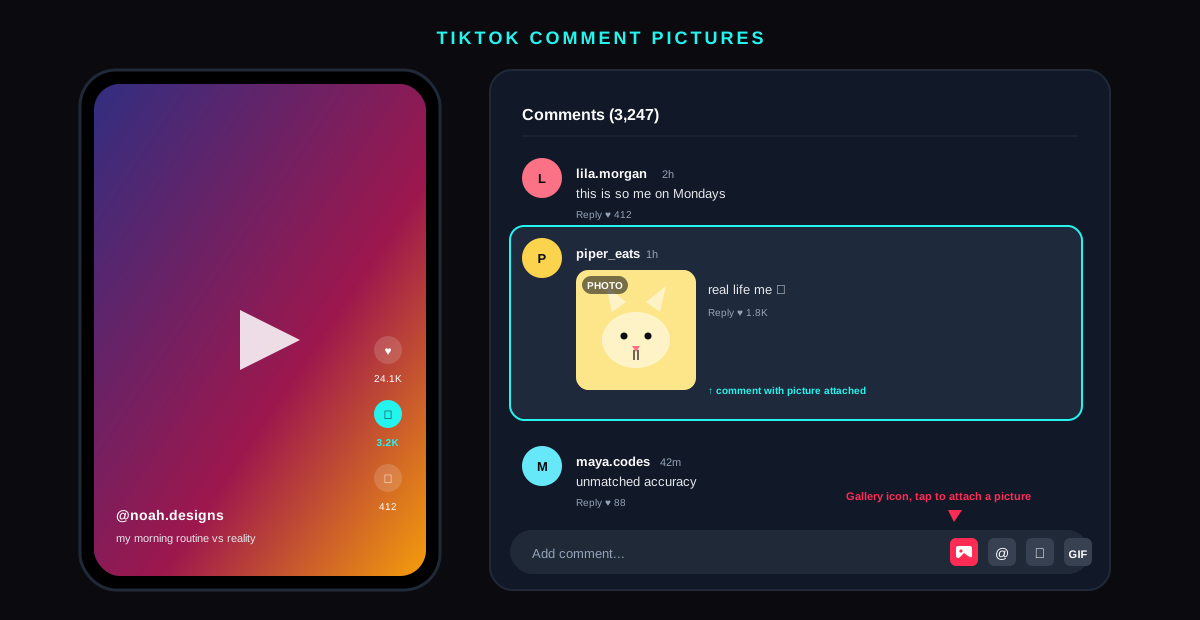
![TikTok comment showing the typed shortcode [loveface] rendering as the hidden in-app heart-eyes emoji](/_next/image?url=%2Fblog%2Ftiktok-emoji-codes%2Ftiktok-emoji-codes-hero.svg&w=3840&q=75)