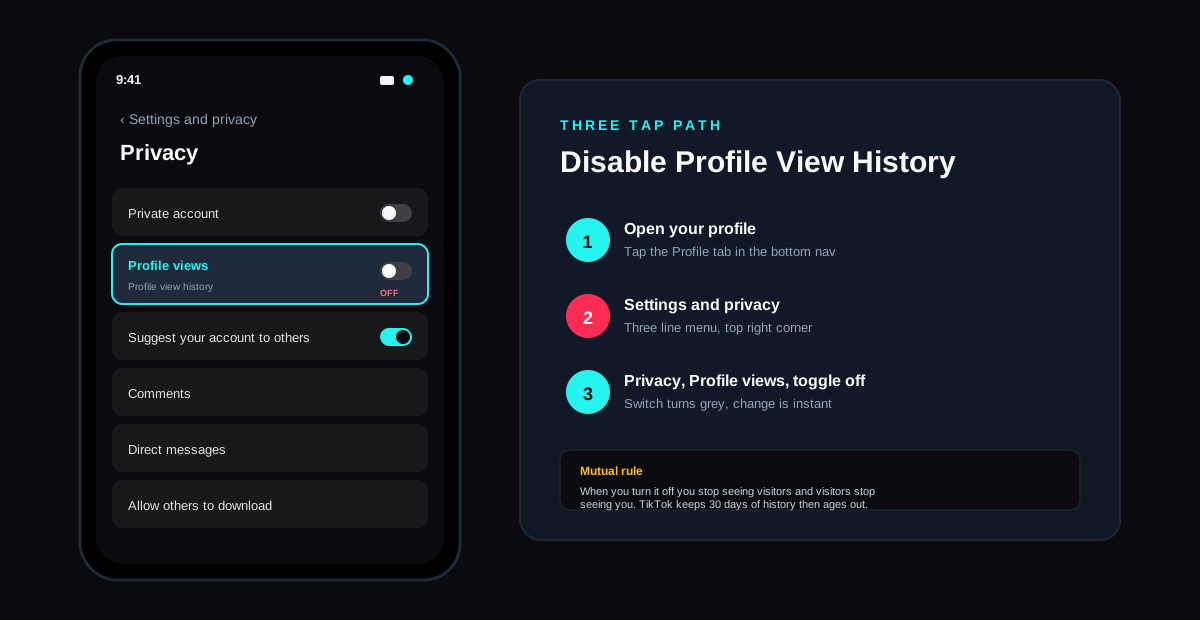
The short answer: open the TikTok app, tap your profile, tap the three line menu in the top right, tap Settings and privacy, tap Privacy, tap Profile views, then toggle Profile view history off. The change takes effect instantly. From that moment on, no one can see that you visited their profile, and you stop seeing the list of accounts that visited yours. The feature is mutual by design. If the toggle is on for you, it is on for the accounts you view, and the same rule cuts the other way the second you turn it off. Existing views older than 30 days drop off the list automatically because TikTok only keeps that window of history.
What profile views actually mean on TikTok
Profile View History is the TikTok feature that tells you which accounts have opened your profile page in the last 30 days. It does not track who watched a single video on your For You page, who scrolled past your username on someone else's comment, or who hovered on a Live banner. A view registers only when an account taps into your profile and sees your bio, follower count, and video grid. That tighter definition is why the list is usually shorter than people expect, even on accounts with millions of followers.
The feature was rolled out globally in early 2024 after a long test in select markets. According to the official TikTok newsroom announcement, the design goal was to mirror the mutual visibility model that Instagram, LinkedIn, and Snapchat already use for parts of their products. If both accounts opt in, both can see the list. If either side opts out, neither side learns anything.
What counts as a view
A profile view is logged when someone taps your username, your avatar in a comment, your handle in a search result, or your profile link on a tagged post. Watching your video without tapping the username does not count. Adding you to a list or sending you a DM does not count. Hovering on the desktop site does not count. Only an actual profile page load.
The 30 day window
TikTok stores a rolling 30 days of profile views. Anything older drops off the list automatically. That window matters because turning the toggle off does not wipe history; it stops new views from being recorded. Existing entries age out on their own. If you turn the setting off today and reactivate it 35 days later, the list comes back empty.
How to turn off profile views on TikTok step by step
The setting lives in the same Privacy section as the private account switch, the Suggest your account to others toggle, and the comment filter. The path is identical on iOS, Android, and the TikTok desktop web app, although the desktop version sometimes lags a release behind on the labelling. The sequence below works as of June 2026 and matches the screenshots in the TikTok help center entry on Profile views.
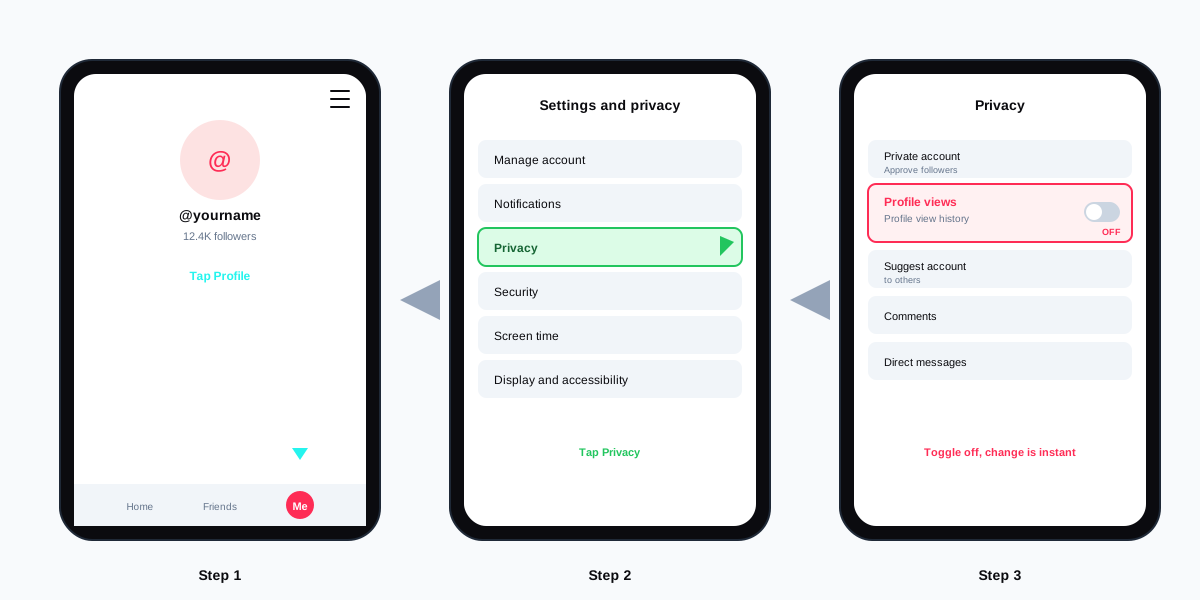
- Open the TikTok app and tap your profile. The Profile icon sits in the bottom right of the main nav. The settings tray is account scoped, so make sure you are on the account you want to change before you keep going.
- Tap the three line menu in the top right. The icon sits to the right of your username. On some builds it shows as a gear instead. Both lead to the same tray.
- Tap Settings and privacy. The Privacy section is the third item from the top, just below Account and below Manage account on certain builds. Tap Privacy.
- Tap Profile views. The row sits between Private account and Suggest your account to others. If you do not see the row, the feature is not yet rolled out in your region.
- Toggle Profile view history off. The switch turns grey when the feature is disabled. There is no confirmation prompt. The change is live the instant the switch flips.
If you ever want it back on, the same path applies in reverse. Tap the toggle, and TikTok starts recording fresh views from that moment. Old views do not return because they were never recorded while the feature was off. The list rebuilds itself over the next 30 days.
What changes the second you flip the toggle
Four things shift at once when Profile view history goes off. Knowing all four matters because some are intuitive and one catches almost every new user off guard.
- Your visits go invisible. Other accounts can no longer see that you opened their profile, even if their own toggle is on. Your username drops out of every Profile views list across TikTok.
- Your list of viewers disappears. The Profile views tab in your own inbox goes blank. New views stop being logged, so the counter no longer climbs.
- The reciprocal rule applies. Anyone who turned the toggle off has always been invisible to you, and you joining the off side closes the loop. The mutual model means no asymmetry is possible.
- Engagement signals do not change. Likes, comments, shares, saves, and follows all continue to log normally. Only the act of opening a profile becomes anonymous.
The last point is worth repeating. Turning off Profile view history does not anonymise your account. It only hides the profile open event. If you like a video, the creator still sees your like notification. If you comment, your handle is public. For broader anonymity, pair the toggle with the controls in our guide to deleting a TikTok account or the lighter touch options below.
Profile views compared to other TikTok privacy controls
Profile View History is one of about a dozen privacy switches TikTok exposes. Each handles a different surface, and the most common mistake is assuming one toggle covers all of them. The table below maps the controls that touch the same boundary as Profile views so you can build the right stack for your account.
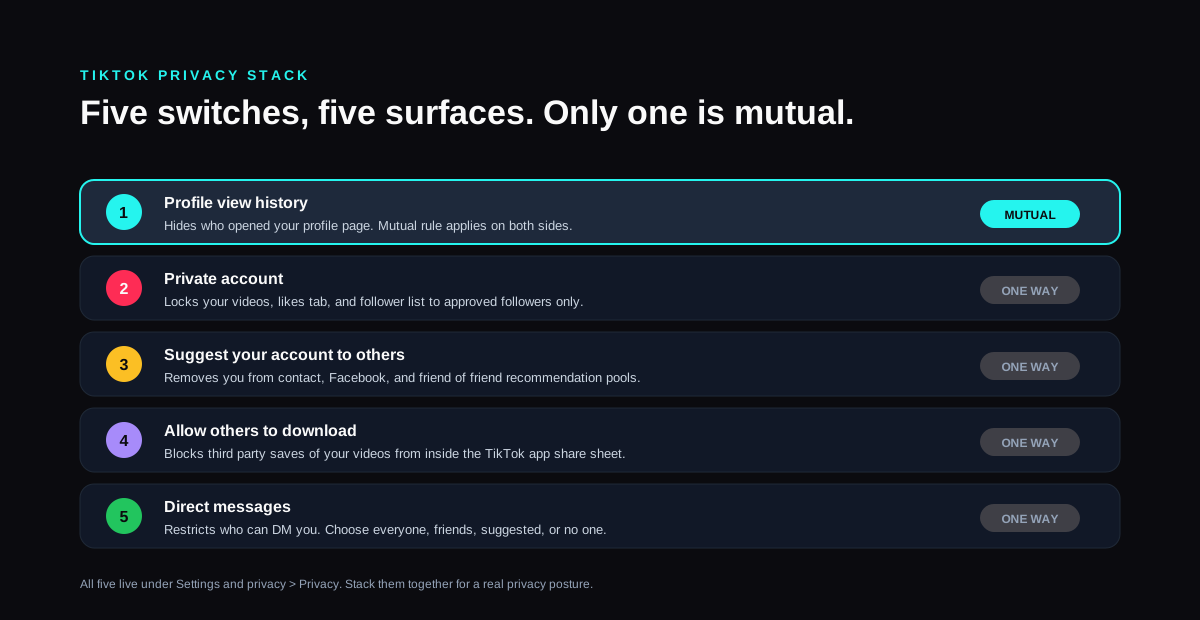
| Setting | What it hides | Mutual? |
|---|---|---|
| Profile view history | Who saw your profile page | Yes |
| Private account | Your videos, likes, and follower list | No |
| Suggest your account to others | You from contact and friend suggestions | No |
| Allow others to download | Third party saves of your videos | No |
| Direct messages | Who can DM you (everyone, friends, off) | No |
Pair profile views with a private account if you want full silence
A private account locks the whole feed. Only approved followers see your videos, your likes tab, and your follower list. Combine it with Profile views off and you become a true ghost browser. People you visit do not know, and no one without an approved follow can see what you post. For cross platform parallels, our walkthrough of turning off active status on Instagram covers the equivalent move on the Meta side.
The third party angle
No legitimate third party app can show you who viewed your TikTok profile if the toggle is off. Every viewer app marketed on the App Store or Google Play that promises anonymous profile views is either a scam, a credential harvester, or pulling a fabricated list to push ads. The same pattern repeats across other platforms. We covered it in detail in the honest breakdown of Snapchat story viewer apps and the conclusion holds here: the only data source for TikTok profile views is TikTok itself, and TikTok respects the toggle.
FAQ
Does turning off profile views delete past views?
No. The toggle stops new views from being recorded but existing entries remain in the database until the 30 day rolling window ages them out. If you want the list empty immediately, you can wait roughly a month, or you can deactivate and reactivate the feature with at least 30 days off in between for a clean slate.
Can someone still see I viewed their profile if my toggle is off?
No. TikTok respects the toggle on both sides. When you turn Profile view history off, your visits do not register on any other account, no matter what their own setting is. The feature has no override or business tier exception. Verified accounts and Pro accounts follow the same rule as everyone else.
Why is the Profile views option missing from my settings?
TikTok rolled out the feature region by region and account type by account type. If you do not see the row in Privacy, either the rollout has not reached your country, your app version is older than 32.0, or your account was flagged as a business or government account where the feature is hidden by default. Update the app first, then check again.
Does turning off profile views hide me from the Friends tab?
No. The Friends tab is a separate surface, populated from your mutual follows and contact sync. To remove yourself from Friends suggestions, turn off Suggest your account to others in the same Privacy menu and revoke contact sync from Manage account, Sync contacts.
Will I lose engagement if I turn off profile views?
No measurable effect. The TikTok ranking model uses watch time, completion rate, shares, comments, and save signals. Profile views are not part of the ranking input. The academic write up from the Electronic Frontier Foundation review of TikTok privacy controls notes the toggle is a pure visibility control with no downstream effect on recommendation quality. Turn it off without worrying about reach.
How is this different from the older view counter?
The legacy profile view counter that TikTok briefly tested in 2020 only showed a number, not a list of accounts. It was sunsetted in 2022 and replaced with the current Profile View History feature, which gives the named list but moves it behind the mutual toggle. The number only counter no longer exists.
TL;DR
- Three taps to turn off profile views on TikTok. Profile, Settings and privacy, Privacy, Profile views, toggle off. The change is instant.
- The setting is mutual. Switch it off and you stop seeing visitors, while everyone you visit stops seeing you. No asymmetry.
- Old views age out on their own. TikTok stores 30 days of profile views, so the existing list fades within a month regardless.
- Profile views is just one of five privacy switches to consider. Private account, suggestions, downloads, and DM controls round out the stack.
- Schedule TikTok content without touching the toggle by composing inside SocialCRM, which queues posts to TikTok alongside Instagram, X, and LinkedIn.
- Ignore third party viewer apps. TikTok respects the toggle. No outside tool can recover the list when you have turned it off.