The short answer: to delete your TikTok account in 2026, open the app, tap your profile, hit the menu icon, go to Settings and privacy, tap Account, then Deactivate or delete account, pick Delete account, verify with a code, and confirm. TikTok then starts a 30-day grace period during which logging back in cancels the deletion and restores everything. On day 30 the videos, followers, DMs, and the username are permanently removed.
How to delete your TikTok account: the five-tap path
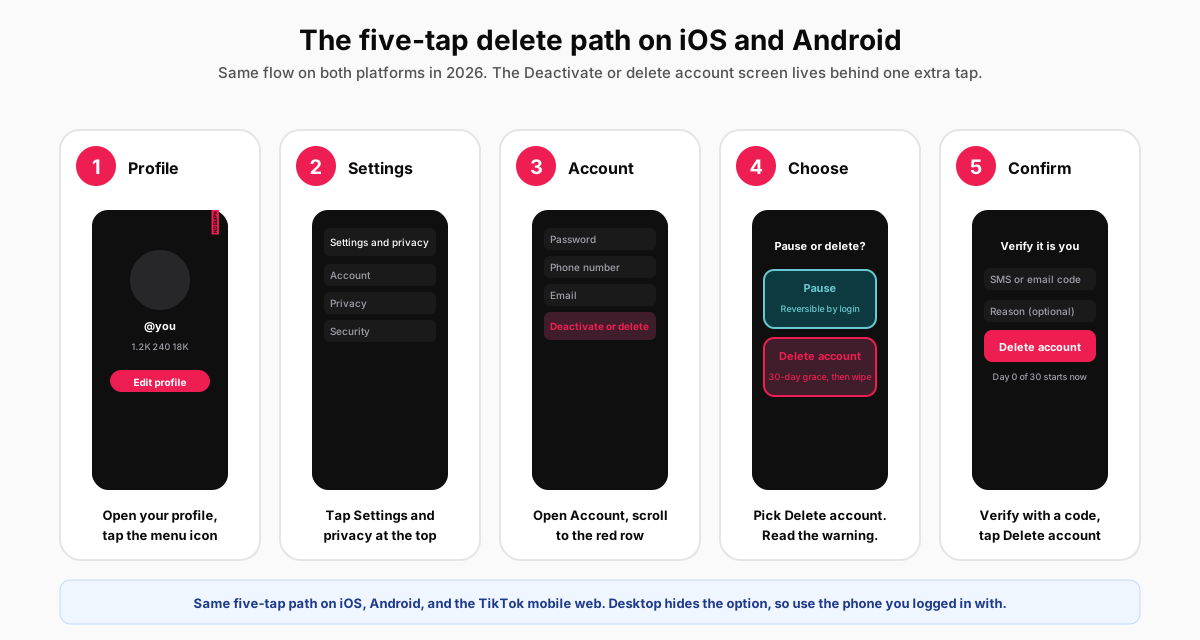
TikTok keeps the delete account screen two menus deep on every platform. The path is identical on iOS, Android, and the TikTok mobile web; the desktop site at tiktok.com hides the option entirely, so reach for the phone you signed in with most recently.
The mobile flow on iOS and Android
- Tap your profile picture in the bottom tab bar (the rightmost icon), then the three-line menu in the top-right corner.
- Tap Settings and privacy. The first row inside the menu, usually under a Profile section header.
- Tap Account. The first option in the Account section near the top of the Settings list.
- Scroll to Deactivate or delete account. The row sits at the very bottom of the Account screen, coloured red to flag the destructive action.
- Pick Delete account, verify with a code, then confirm. TikTok sends a six-digit code to the phone number or email on file and asks for an optional reason. Tap Delete account to start the 30-day timer.
The desktop and web workaround
TikTok's desktop site at tiktok.com does not surface the delete account button at all in 2026, despite carrying almost every other Settings page. To delete from a computer, open tiktok.com on a mobile browser (iOS Safari or Android Chrome) and tap the desktop request to refresh as the mobile site. The same five-tap path then becomes available. Otherwise, install the app, sign in once, and run the flow there. TikTok's own help center article on deleting an account confirms the mobile-only path and the 30-day window.
What happens after you delete: the 30-day grace period
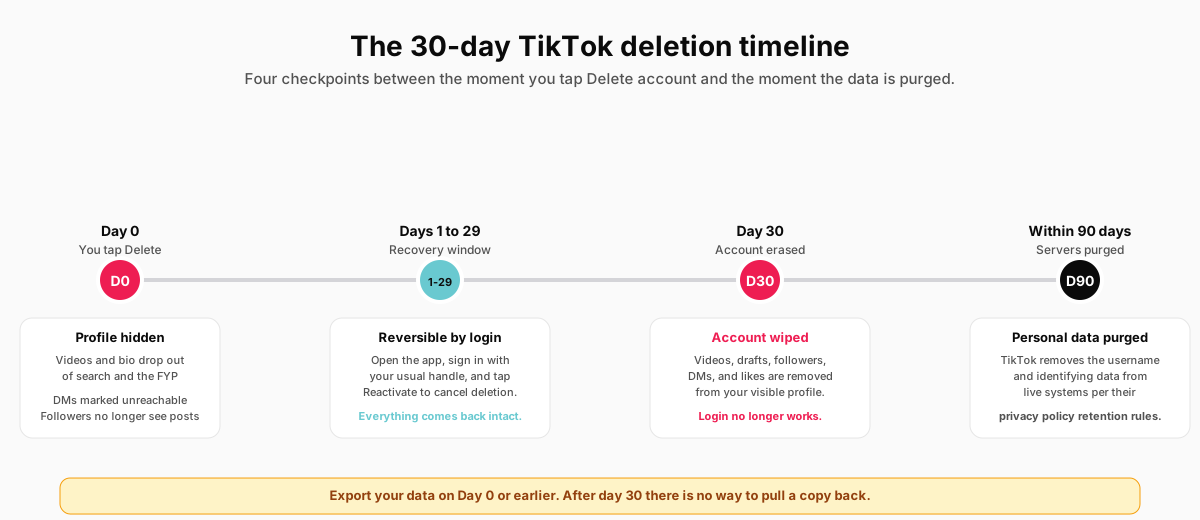
The instant you confirm, TikTok hides the profile from search, the For You feed, and friends lists. Your videos stop appearing in other people's recommendations within minutes. DMs you sent show a generic Unavailable label on the recipient side. The follower count on every creator you used to follow drops by one. To anyone outside your account, you are effectively gone.
Behind the scenes, TikTok holds the data for 30 days. The single way to undo deletion is to log back in inside that window: open the app, enter your usual email and password (or use the SMS code path), and tap the Reactivate button on the welcome-back screen. The profile snaps back with videos, followers, DMs, drafts, and likes restored exactly where they were. After day 30, that path closes. Login returns an account-not-found error, the username releases into the public pool, and the account record drops out of live systems on TikTok's usual data-retention schedule (within about 90 days for personal data, per their public privacy policy).
Pause vs delete: which one you actually need
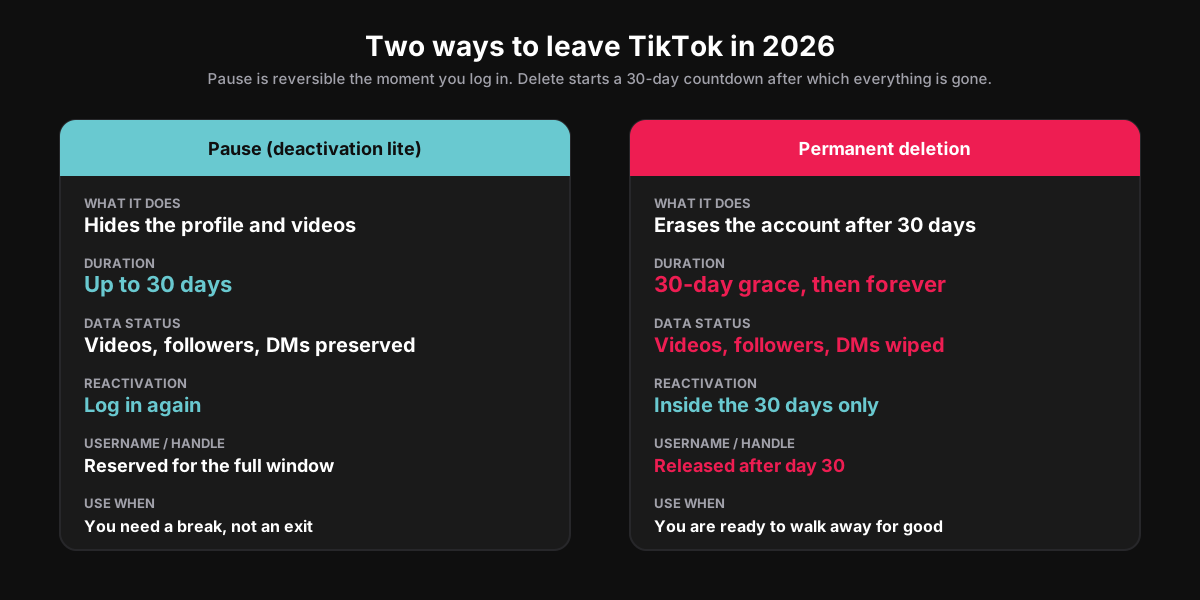
Most people opening the Deactivate or delete account screen want the pause, not the delete. Pause hides the profile, drops the videos out of the For You feed, and muffles notifications for up to 30 days. Logging back in before the window closes restores everything in seconds. Pause is the right call when you need a study week, a deload before a big launch, or a clean break from a comment section that turned ugly.
Delete is the right call only when you are walking away. The 30-day grace still applies, but the intent of the screen is one-way. Treat it as a contract: do not tap Delete account unless you are ready to lose the handle, the audience, and every minute of cumulative watch time on day 30. If the only motive is privacy from a single person, our walk-through on hiding followers on Instagram covers the same logic on a different platform and is usually a lighter fix than deleting the account outright.
Export your TikTok data before you delete
On day 31 there is no way to get a copy of the videos, the captions, or the DM history back. Export the data first. The download takes 1 to 4 days for an active account and arrives as a ZIP file you can read in any browser. Pull the export the morning you plan to delete, not the afternoon of, so a slow processing queue does not leave you locked out of your own archive.
The export checklist
- Settings and privacy, Account, Download your data. Pick the All option for the full archive rather than the JSON-only quick view. The full archive includes original-resolution video files.
- Choose the TXT or JSON format. TXT is human-readable for casual review; JSON is what you want if you plan to feed the data into another tool later.
- Tap Request data. TikTok queues the export and emails the download link when ready, usually within 24 hours but up to 4 days.
- Save the ZIP to a non-phone location. A cloud drive or external disk. Phones get lost; backups are the point.
- Verify before deleting. Unzip the archive on a laptop. Confirm the videos, profile, and DM history are inside before you start the 30-day timer.
TikTok's official guide to requesting your data documents the same flow and the format options. We have not found a third-party tool that can reliably pull a TikTok archive after the account is deleted; the official export is the only door.
How to delete a TikTok account you cannot log into
If the phone died, the SIM card got recycled, or the email on the account no longer reaches you, the in-app path is closed. TikTok routes the recovery case through its official feedback form. Pick the Account Issues category, then Account access problems, and explain that you need to delete an account you cannot sign into. Attach proof of ownership: a photo ID with the name on the profile, a previous email screenshot, or a video showing the original signup phone.
Reviews take 7 to 14 business days in our recent experience. TikTok will email a confirmation, then process the deletion server-side without the 30-day grace period, because the account never logged in to start it. If the account was tied to a deceased user, TikTok has a separate in-memoriam account request path that immediate family can use with a death certificate.
Why TikTok might be the wrong account to delete
We have walked enough creators through this flow to know the regret pattern. A bad week, a one-off pile-on, a flagged video that should not have been flagged: those are reasons to pause, not delete. The four scenarios where deletion is the right call are clearer than they look. First, the account exposes personal identity in a way you no longer want public, and a rename will not solve it because the handle itself leaks. Second, the account has been suspended for a violation that you do not plan to appeal. Third, you have moved to a different creator identity on the same platform and the legacy handle is not worth keeping. Fourth, the account belonged to a minor or a deceased family member and you want the record gone.
Everything else is better solved by a private switch, a pause, a topic pivot, or a careful unfollow. The cost of deletion is the same on day 30 either way: the handle opens up to the next person who registers it, and the videos no longer exist anywhere TikTok controls. That is a high price for a bad week.
How SocialCRM helps you migrate before you delete
If you are deleting one TikTok account to launch a cleaner one, or moving the creative energy to a different platform entirely, the messy middle step is republishing the videos somewhere people can still find them. The SocialCRM composer connects to TikTok alongside seven other platforms, including the long-form surfaces (YouTube, LinkedIn) and the short-form peers (Instagram Reels, Threads). Bulk-schedule the archive in the days before you tap Delete, and the audience that mattered most usually follows. The same cross-platform logic underpins our pieces on deleting an Instagram account and the broader question of whether YouTube counts as social media, both worth a read if the goal is consolidating platforms rather than walking away from all of them.
FAQ
How long does TikTok take to delete an account?
The account is hidden within minutes of confirming deletion. The full erase happens 30 days later. Personal data on TikTok's servers is purged within roughly 90 days per the published privacy policy. The username releases into the public pool on day 31.
Can I get my TikTok account back after I delete it?
Yes, but only inside the 30-day grace period. Log back in with the original email or phone number and tap the Reactivate button on the welcome-back screen. Everything comes back: videos, followers, drafts, DMs, likes. After day 30, the account is gone and TikTok cannot restore it.
Does deleting TikTok delete my videos from other apps?
No. If you cross-posted to Instagram Reels, YouTube Shorts, or saved videos to your camera roll, those copies survive deletion. The TikTok-hosted copies disappear with the account, but every download or repost outside TikTok is its own file and is unaffected.
Will deleting my TikTok account remove my username forever?
No. TikTok does not reserve usernames after deletion. The handle releases on day 31 and the next person to register it can claim it. If protecting the handle matters more than removing the videos, rename the account and clear out the content rather than deleting.
Can I delete a TikTok account without the password?
Use the password reset link on the login screen first. If the email or phone tied to the account no longer reaches you, file a report through the official feedback form, pick Account Issues, and attach proof of ownership. TikTok processes those requests in 7 to 14 business days.
What is the difference between pause and delete on TikTok?
Pause hides the profile and pauses notifications for up to 30 days, then reactivates automatically when you log back in. Delete starts a 30-day countdown after which every video, follower, DM, and the username itself are wiped permanently. Pause is reversible by login at any time; delete is only reversible inside the 30-day window.
TL;DR
- Five-tap path on mobile: Profile, menu, Settings and privacy, Account, Deactivate or delete account, Delete account, verify, confirm. The desktop site hides the option.
- 30-day grace period: log back in any time before day 30 and the account fully restores with videos, followers, DMs, and drafts intact.
- Export first: Settings, Account, Download your data, All format. Wait 24 hours to 4 days for the ZIP, save it off-phone, verify before deleting.
- Pause for a break, delete for an exit: pause if a week off would fix it; delete only when you are ready to lose the handle and the audience for good.
- No password access: use the official feedback form with proof of ownership. Reviews take 7 to 14 business days.