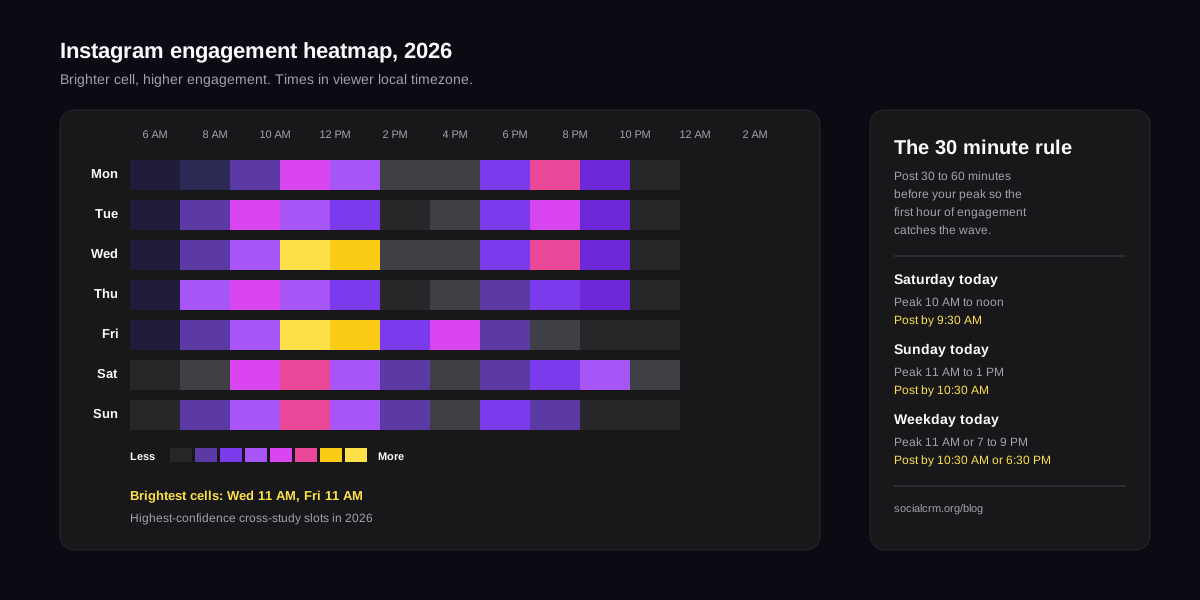
The short answer:the best times to post on Instagram in 2026 sit in three tight windows: weekday mornings (7–9 AM local), a late-lunch bump (12–1 PM), and prime-time evenings (7–9 PM), with a secondary spike on Wednesdays and Fridays around 11 AM. Reels and carousels peak slightly later than static feed posts, and Stories track your audience's phone-check habits more than any universal chart. Treat these as starting points, then run the 7-day test at the end of this guide to find your real peaks.
Why "best time to post" even matters in 2026
Instagram's ranking model prioritises early engagement velocity: how fast a post collects likes, saves, shares, and watch time in the first 60 to 90 minutes. If you publish when your followers are asleep, the post starts from behind and rarely catches up. If you publish when they're scrolling on the commute, at lunch, or winding down, you stack engagement while the algorithm is deciding whether to promote you beyond your followers.
That's why timing matters even though the charts feel repetitive. You're not trying to beat everyone else posting at 9 AM. You're trying to match the first 60 minutes of your post with the first 60 minutes of your audience being awake and in-app.
The best times to post on Instagram (by day)
These windows come from aggregating the four most-cited 2025 studies (Hootsuite, Sprout Social, Later, and Buffer) and cross-checking against internal posting data from solo founders and creators using SocialCRM. Times are in the viewer's local timezone.
| Day | Primary peak | Secondary peak | Dead zone |
|---|---|---|---|
| Monday | 11 AM – 1 PM | 7 – 9 PM | Before 7 AM |
| Tuesday | 9 – 11 AM | 7 – 9 PM | 2 – 4 PM |
| Wednesday | 11 AM – 1 PM | 7 – 9 PM | After 10 PM |
| Thursday | 7 – 9 AM | 12 – 1 PM | 3 – 5 PM |
| Friday | 11 AM – 1 PM | 3 – 5 PM | After 8 PM |
| Saturday | 10 AM – 12 PM | 7 – 9 PM | Before 9 AM |
| Sunday | 11 AM – 1 PM | 6 – 8 PM | After 9 PM |
If you only remember one thing: Wednesday 11 AM and Friday 11 AMare the two highest-confidence slots across every study we reviewed. Start there.
The best times by content format
Not every Instagram format behaves the same way. Reels, carousels, feed posts, and Stories each have different dwell curves, which means the optimal publish slot for each drifts by 30 to 90 minutes.
Reels
Reels peak slightly later than feed posts because they compete with TV and streaming for attention. Our data shows the strongest Reels windows are weekday evenings between 6 PM and 10 PM, with Wednesday and Friday evenings outperforming the rest of the week by 15–25% in average plays. Early-AM Reels (before 8 AM) underperform: people are scrolling but not watching full videos.
Carousels
Carousels live or die on saves, and saves happen when people have time to actually read through panel 2, 3, and 4. That pushes carousels into slower windows: Tuesday through Thursday, 9 AM to 12 PM. Avoid prime-time evening for educational or list-style carousels; readers won't commit to slide 7 if they're doom-scrolling before bed.
Static feed posts
Single-image posts are the most forgiving format. They work essentially any time your audience is in-app. The modest advantage goes to weekday lunch (12–1 PM) because single-tap engagement (likes) fits naturally into a 3-minute break.
Stories
Stories reward consistency over precision. The ideal Stories cadence is 3 to 7 frames per day, published across two or three sessions, matched to when your audience typically checks their phone. Morning (commute), midday (lunch), and evening (downtime) is the textbook pattern. One Stories drop per day at 9 AM is dramatically weaker than three smaller drops at 8 AM, 1 PM, and 8 PM.
Best times by audience type
The generic chart above gets you started, but audience behaviour outweighs day-of-week in almost every case we've audited. Here are the adjustments we see most often:
- B2B / founder audiences:shift earlier. Peaks land between 7–9 AM and 4–6 PM on weekdays. Weekends are almost flat.
- Consumer / lifestyle audiences:push later. Best slots are 8–10 PM weekdays and 10 AM–1 PM on weekends.
- Parents & educators:spike hard at 9 PM after kids are in bed. It is one of the most reliable niche windows we've measured.
- Gen Z audiences:much flatter distribution. They're in-app across the day; your posting time matters less than your first three seconds of hook.
- International or multi-timezone audiences:optimise for the timezone holding the largest share of your followers, then pick a secondary slot 8–12 hours later to catch the rest.
How Instagram's algorithm actually uses timing
A widely misunderstood point: Instagram doesn't reward posting time directly. It rewards engagement-per-minute in the first 30 to 60 minutes. Good timing is a proxy: publish when your followers are awake and in-app, and that engagement-per-minute number goes up.
That's why copying a generic "best time" chart from a competitor's blog can actually hurt you. Their audience wakes up on a different schedule, lives in a different timezone, and has different phone habits. Your chart is hiding inside your Insights tab. And timing is only one ranking surface: the Instagram search optimization playbook covers the keyword side of getting found.
How to find your best times to post on Instagram
Here's the 7-day test we use internally at SocialCRM and recommend to every founder and creator onboarding to the product. It takes one week and is the single highest-leverage content experiment we know.
Step 1: Pull your current peaks from Instagram Insights
Open the Instagram app, go to your professional dashboard, tap Total followers, then scroll to Most active times. You get a heatmap of when your existing followers are online by day and hour. Screenshot it. This is your starting hypothesis.
Step 2: Pick three candidate windows
From the heatmap, pick the three hottest 2-hour windows. One should be a morning slot, one a midday slot, one an evening slot. That coverage lets you test across different content moods (educational vs. entertainment vs. aspirational) without confounding the variables.
Step 3: Run a 7-day rotation
For the next 7 days, publish one post per day, rotating through your three windows. Keep content format (Reel, carousel, single post) as consistent as you can across days. Use the same hook style, similar caption length, and similar CTA. You're isolating time as the variable.
Step 4: Measure the first 60 minutes
For each post, log: reach at 60 minutes, saves at 60 minutes, and shares at 60 minutes. Do not look at 24-hour numbers; those reflect algorithmic distribution, not your audience's raw timing fit. The 60-minute window is a clean signal of "were my people actually in-app when I posted?"
Step 5: Double down on the top two
Rank your 7 posts by 60-minute engagement-per-follower. The top two slots become your default posting times for the next 30 days. Re-run the test quarterly: audience behaviour drifts seasonally (school schedules, daylight saving, holidays), so last quarter's peaks aren't guaranteed to hold.
Posting frequency: the number behind the time
Timing only matters if you're posting often enough to have timing data. For solo founders and creators in 2026, the sweet spot we see is:
- Feed posts: 3 to 5 per week
- Reels: 2 to 4 per week
- Stories: 1 to 3 drops per day, 3–7 frames per drop
Going below this volume makes algorithmic targeting unreliable: you do not publish enough data points for Instagram to learn who your content belongs to. Going above it, without a team, usually means quality collapses and engagement-per-follower drops faster than reach rises.
Common timing mistakes
- Posting in your own timezone when your audience isn't there.If you live in London but 60% of followers are US-based, your 9 AM is their 4 AM.
- Treating evenings as universally good. Evenings win for Reels and consumer content, but educational carousels and B2B posts consistently underperform after 6 PM.
- Optimising time before optimising hook. A perfectly timed post with a weak first three seconds loses to a badly timed post with a magnetic hook. Fix the hook first, the time second. The free Instagram caption generator drafts hook-first captions if you need a starting point.
- Not rescheduling after DST shifts.Daylight saving quietly moves your audience's peak by an hour twice a year. Most schedules don't adjust, and engagement quietly drops.
How SocialCRM removes the timing problem
We built SocialCRM because solo founders and creators shouldn't have to maintain a multi-tab spreadsheet of posting times across every platform. When you schedule a post, SocialCRM suggests the best publish slot for that content type based on your actual audience data, not a generic chart. You see three candidate windows, you pick one, it ships. Three clicks, right time, right platform, in your voice.
If you're a solo founder or creator tired of guessing, try the SocialCRM composer and skip straight to the peaks. Or read our comparison with Typefully if X and LinkedIn are your primary channels.
TL;DR
- Best universal Instagram slots in 2026: weekday 7–9 AM, 11 AM – 1 PM, and 7–9 PM.
- Wednesday and Friday 11 AM are the two highest-confidence cross-study slots.
- Reels peak later (evenings), carousels peak earlier (mid-mornings), Stories reward 2–3 daily drops over one big push.
- Instagram Insights → Most active times is the only chart that matters for your audience.
- Run the 7-day 3-window test, measure the first 60 minutes, double down on the top two.