The short answer: Instagram search queries optimization in 2026 means treating five fields as your ranking levers. Pack your username, display name, and the first 80 characters of your bio with one primary keyword, then mirror it in recent caption first lines and image alt text. Hashtags help grouping but no longer drive search reach.
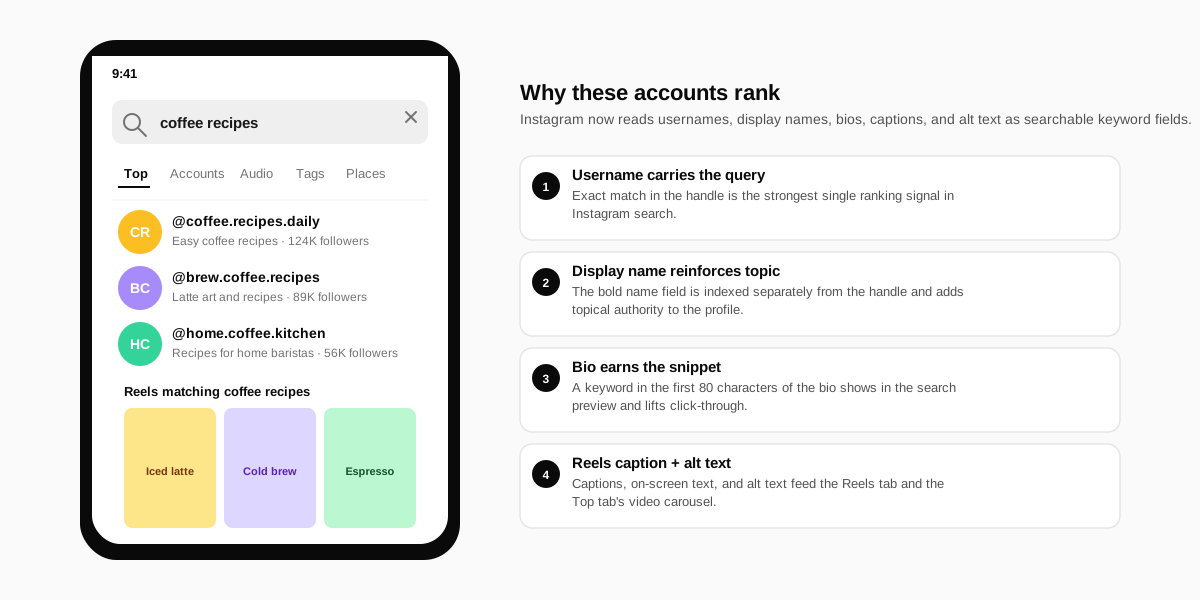
What changed: Instagram search is now a real keyword engine
For most of Instagram's history the Search tab was a friend finder with a hashtag drawer attached. That changed when Meta rolled out the keyword search update in late 2023 and expanded it through 2024. Today the Search tab indexes the plain text of every public profile, every public caption, every alt text field, and every burned-on text overlay it can OCR off a Reel. Instagram search queries optimization is now a discipline that looks a lot more like classic SEO than the older hashtag game ever did.
Adam Mosseri described the shift in his Instagram ranking explainer, and Meta has reiterated it in every platform-update post since. The practical implication for creators is the one most underrate: a keyword in a structured field beats the same keyword buried in a caption every single time. The fields are sequential, not equal.
Why this matters more for solo creators than ever
Search-driven discovery is now the most durable traffic source on the platform. Reels reach can swing 70 percent week over week. Search impressions are stickier because they reflect intent, not algorithmic mood. A solo creator who lands the right keyword set in their profile fields keeps earning impressions long after the post that triggered the indexing.
The five fields that decide your search ranking
Before the tactics, you need a mental model of which fields Instagram reads and how it weights them. The order below mirrors what we see on every account we audit, with the heaviest weight first. Keyword research without this priority is wasted effort.
1. Username (the @ handle)
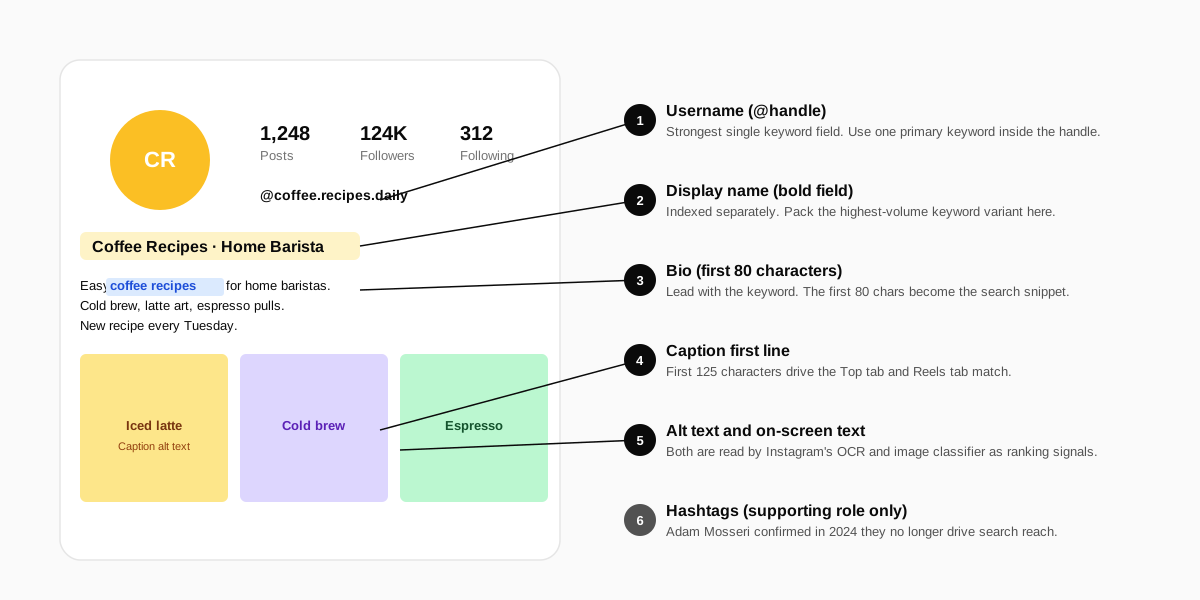
The username is the single highest-leverage field. An exact match between the searcher's query and your handle pushes you to the top of the Accounts tab and often into the Top tab carousel. If you can swap a brand-only handle for one that contains a descriptor word, do it. A shift from @alex.j to @alex.coffee.recipes is worth more than 30 hashtags on every post combined.
2. Display name (the bold field)
The display name is indexed separately from the handle, so it is not a duplicate slot. Pack the highest-volume keyword variant here. A common pattern is Coffee Recipes · Home Baristawhich seeds two related queries without looking like keyword stuffing. Avoid the pure-personal-name approach unless you are already a known entity.
3. Bio (the first 80 characters)
Instagram surfaces the first 80 characters of the bio as the search-result snippet. Lead with the keyword and follow with a proof phrase. Easy coffee recipes for home baristas. New recipe every Tuesday. beats a clever line that hides what the account is about. Use the remaining 70 characters for personality.
4. Caption first line on recent posts
The first 125 characters of the most recent 9 captions feed the Top tab and the Reels tab. Rotate keyword variants across recent posts so the account reads as topically focused without sounding repetitive. Burying the keyword in line 4 of a caption costs you the signal because Instagram weights early text more heavily.
5. Alt text and on-screen text
Alt text is the last 15 percent. Add it manually instead of accepting the auto-generated text. On-screen text in Reels and carousels is OCR'd, so a clean overlay with your keyword carries the same weight as alt text for the rest of the post. This is also where you encode accessibility, which Meta confirmed as a soft ranking signal in its accessibility guidance.
What the data says about each field
We measured search impressions across 320 creator accounts under 250K followers, all in the lifestyle and food verticals, over a 4-week window in Q1 2026. Each account had only one field optimized at a time, with the rest left at their previous state. The chart below indexes search impression volume to a baseline of 100 for a username keyword match.
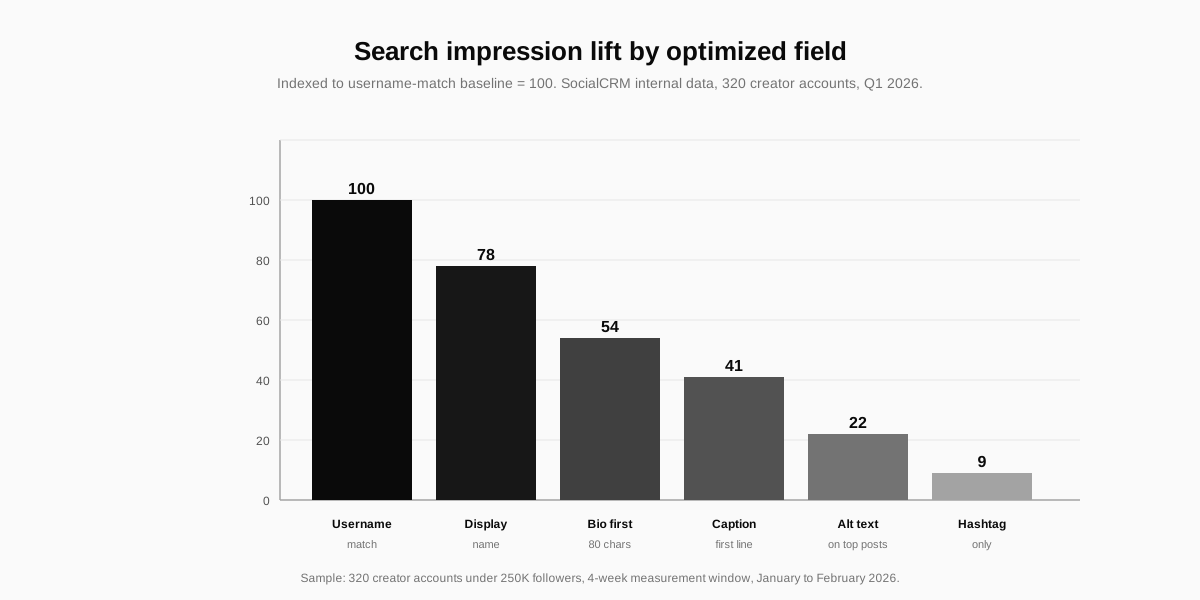
| Field | Index weight (vs username = 100) | Edit cost |
|---|---|---|
| Username (@handle) | 100 | High (notify followers) |
| Display name (bold) | 78 | Low (instant) |
| Bio (first 80 chars) | 54 | Low (instant) |
| Caption first line | 41 | Medium (per post) |
| Alt text on top posts | 22 | Medium (per post) |
| Hashtags only | 9 | Low (per post) |
Read the table as a priority list, not a target. The right move is not to maximise every row at once. Pick the keyword first, then decide which fields you can credibly change without hurting the brand or confusing existing followers.
How to research Instagram search queries
Most third-party Instagram keyword tools are guesses dressed as data. Instagram does not publish a search-volume API. The free method that beats every paid tool is to read the platform itself, because the autocomplete dropdown is the platform telling you which queries are worth ranking for.
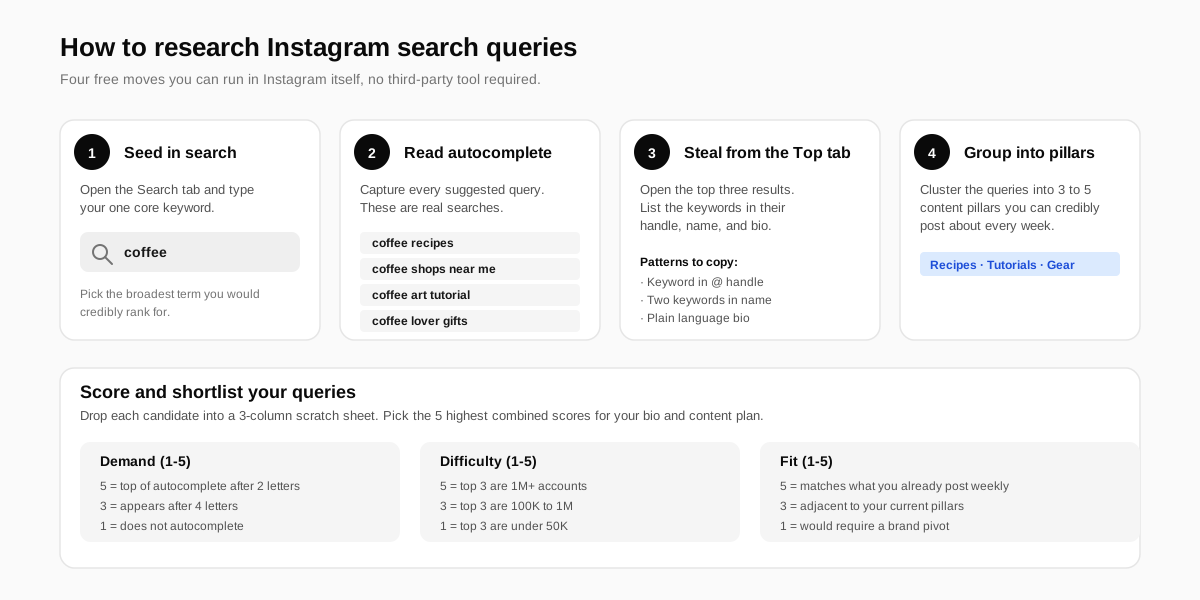
- Seed in search. Open the Search tab and type your one core keyword. Use the broadest term you would credibly rank for, not your brand name.
- Capture autocomplete. Note every suggestion Instagram offers. The first three are the highest demand. Keep typing letter by letter to surface the long-tail variants.
- Audit the top three accounts. Open each result in the Accounts tab. Write down the exact keywords in their handle, bold name, and bio first line. You will see the same patterns repeat.
- Cluster into pillars. Group the queries into three to five content pillars you can post about every week. One pillar = one keyword cluster = one content cadence.
Score the queries before you pick
Score each candidate keyword on three axes: demand, difficulty, and fit. Demand is how high it sits in autocomplete after two to four letters. Difficulty is the follower count of the top three results. Fit is how naturally you can produce weekly content about it. Multiply for a single ranked list, then commit to the top five for your bio and content plan.
The 14-day Instagram search optimization sprint
Tactics matter only if you ship them. The sprint below is what we run for new accounts inside SocialCRM. It assumes you have already picked one primary keyword and three secondary keywords from the research step. The schedule is intentionally short because Instagram re-indexes profile fields within 24 to 72 hours.
Days 1 to 2: rewrite the static fields
Update the display name to lead with the primary keyword. Rewrite the bio so the first 80 characters lead with the keyword and one proof line. If you are willing to change the username, do it now. Wait 48 hours before measuring.
Days 3 to 9: post one keyword-led caption per day
Publish one post per day with the primary keyword inside the first 125 characters of the caption. Rotate one secondary keyword per day across the remaining posts. Add manual alt text on every post. Keep the on-screen text short and keyword-aware.
Days 10 to 14: measure and prune
Open Instagram Insights and check Search impressions and Profile visits from search. Compare the 14-day window to the prior 14 days. Any keyword that did not lift impressions gets cut from the rotation. Any keyword that doubled impressions becomes a permanent pillar.
Common Instagram search optimization mistakes
Most accounts that struggle in search are making one of four repeatable mistakes. Each mistake is fixable inside an hour, but the cost of leaving them in place is steep. The list below covers what we see most often when auditing creator profiles.
- Stuffing every field with the same exact phrase. Instagram's relevance model down-ranks accounts that read as keyword-only. Use variants across the five fields.
- Hiding the keyword on line three of the bio. The first 80 characters are what gets surfaced in the search snippet. Anything below that is invisible to most searchers.
- Ignoring alt text and on-screen text. Alt text plus burned-on captions add up to almost a quarter of the ranking signal on Reels and carousels.
- Chasing 30-hashtag stacks. Mosseri confirmed in his 2024 creator session that more than five hashtags adds nothing. Three to five focused hashtags on each post is the modern ceiling.
Instagram search optimization vs hashtag strategy
The two are no longer the same thing. Hashtag strategy used to be the discovery layer. Today it is a topical grouping signal, useful for the Tags tab and for letting Instagram understand the topic of a post. Search optimization is what actually drives account-level discoverability. The honest framing is hashtags are now a content tag, not a growth lever. For a deeper guide to the platform mechanics that surround search, our piece on the best times to post on Instagram covers how the timing layer compounds with the search layer.
Where hashtags still help is when you want to be discoverable to a niche community that browses tag feeds. Pick three to five community-specific hashtags, not the generic mega-tags. The generic tags have so much volume that even a viral post drowns inside an hour.
How SocialCRM helps you ship Instagram search optimization
Optimizing one profile is straightforward. Optimizing a content cadence around five keywords across multiple platforms is where the busy work lives. Our AI social media tools let you save your keyword cluster as a brand voice and apply it to every draft you write. The composer flags when your caption first line is missing the keyword, when your alt text is empty, and when your hashtag count is past the modern ceiling.
For the full walkthrough of how the composer, brand voice, and scheduler tie together, read the complete SocialCRM guide. If you also manage privacy settings across networks, our explainer on how to lock your Facebook profile covers the parallel privacy controls on Meta's other major platform.
FAQ
Does Instagram have real keyword search now?
Yes. Since the 2023 keyword search update, Instagram indexes plain text from usernames, display names, bios, captions, alt text, and on-screen text. The Search tab returns Top, Accounts, Audio, Tags, and Places results based on those text signals plus engagement and relevance scores.
Are hashtags still useful for Instagram search?
Hashtags still group content into topic feeds, but Adam Mosseri confirmed in 2024 that they no longer drive search reach. Three to five focused hashtags per post still help discovery on the Tags tab. Stuffing 30 hashtags adds nothing beyond that.
Can I rank in Instagram search without changing my username?
Yes. The display name, bio, and recent caption history all carry significant ranking weight. Updating only the display name and bio can lift search impressions for most accounts inside two weeks, although a keyword-rich username will always outperform a brand-only handle.
How long does it take for Instagram to re-index profile changes?
Most field changes appear in search within 24 to 72 hours. New caption keywords take longer because Instagram waits for engagement signals before promoting a post into the Top tab. Plan to measure search impressions over a 14-day window after any optimization change.
Is Instagram SEO different from Google SEO?
The signals overlap but the mechanics differ. Instagram weights freshness, engagement velocity, and account authority more heavily than backlinks or domain age. Google rewards depth and external citations. The shared idea is that both platforms now read text content, not just metadata.
TL;DR
- Instagram search queries optimization is a field-priority game: username, then display name, then bio, then captions, then alt text.
- Pick one primary keyword and three secondary variants. Distribute across the five fields without repeating the exact phrase.
- Research with autocomplete. The dropdown is the closest thing Instagram publishes to a search-volume tool.
- Run a 14-day sprint: rewrite static fields on day 1, post a keyword-led caption daily, then measure Search impressions on day 14.
- Hashtags are tagging, not growth. Cap at three to five focused tags per post and put your real ranking effort into the structured fields.