The short answer: the Facebook story viewer is the built in Seen by list that shows every friend who has watched your 24 hour story. Open your own story inside the Facebook app, tap the Seen by row at the bottom left, and Facebook lists every viewer name, the time they watched, and any reaction they sent. The list is visible only to the poster, refreshes for 24 hours, and disappears when the story expires. There is no working anonymous Facebook story viewer app on iOS, Android, or the web. Every third party tool in that search result is a credential trap, a malware download, or a paid scam that hands back fake data.
How the native Facebook story viewer works
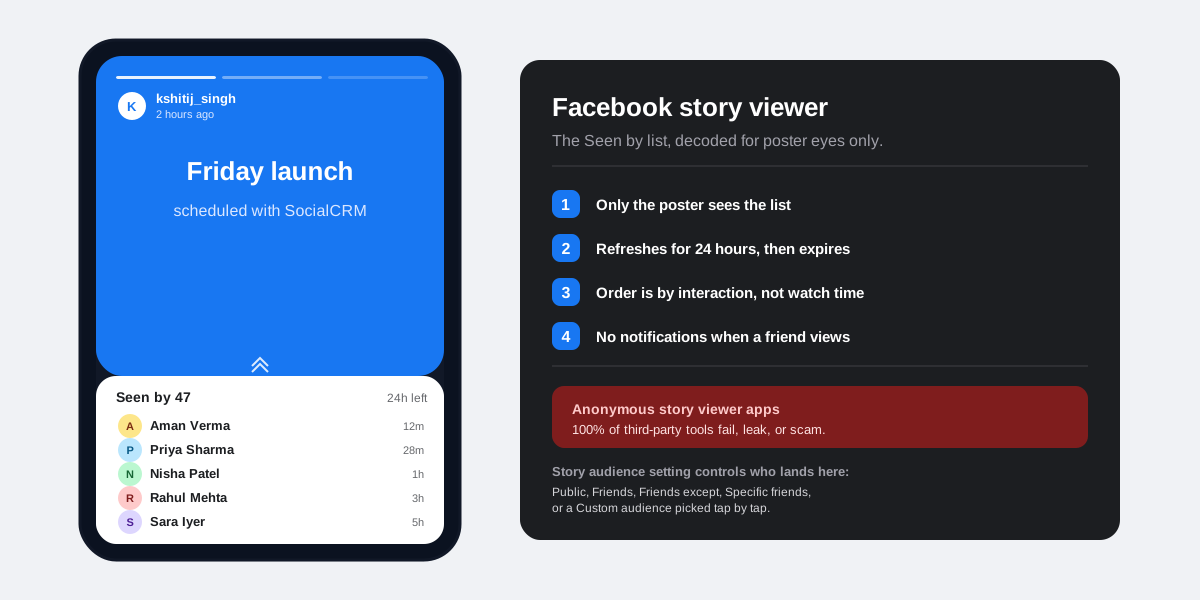
Facebook stories live for 24 hours. During that window, Meta logs every account that opens the story and surfaces the list to you, the poster, inside the Seen by panel. The Facebook story viewer is built into the main Facebook app, runs on the server, and cannot be turned off as long as the story is visible to a viewer. The list is also private to you. Nobody else on Facebook can see who watched your story or how many people opened it, unless you screenshot and share the list yourself.
The viewer count refreshes in close to real time. If a friend opens your story right now, their name lands in your Seen by panel within a few seconds. Meta covers the basics of the surface inside the official Facebook stories help article, including the rule that a viewer needs friend status or public story access for their name to appear in the panel.
How to open the Seen by list on mobile
On both iOS and Android, the steps are identical. Open Facebook, tap your profile photo in the bottom right, then tap your story circle at the top of the profile screen. The story plays full screen. Tap the small Seen by row at the bottom left of the story, just above the share and reply controls. The viewer panel slides up with every name, the relative time each person watched, and any reactions or replies attached. Tap any row to open a direct message thread with that viewer.
How to open the Seen by list on desktop
Open facebook.com, scroll to the Stories rail at the top of the feed, and click your own story card on the left. The story plays inside a centered modal with a Seen by counter in the lower left. Click that counter and the same viewer panel opens in a side drawer. The desktop modal also exposes a Delete button and a More options menu the mobile view tucks under a tap. The 24 hour expiry and the interaction based ordering are identical across both surfaces.
What you can and cannot see in the Facebook story viewer
The Seen by panel returns a richer payload than people expect, but four common questions stay outside the surface. Knowing the boundary keeps creators from chasing data that Meta does not expose.
- You can see every viewer name, profile photo, relative timestamp, and any reaction emoji or one tap reply they sent.
- You can see the total viewer count next to the Seen by label, and the breakdown of public versus friend viewers if your audience setting allows public.
- You cannot see screenshots. Facebook does not flag or notify when a viewer captures a story, unlike Snapchat or Instagram DMs.
- You cannot see how long someone watched the story for, whether they swiped past it in two seconds, or which segment they skipped to.
- You cannot see accounts you have blocked, accounts that have blocked you, or accounts that fall outside your audience setting. They cannot open the story in the first place.
The completion rate gap is the most common complaint. If you need real watch through and exit rate data for stories, the only legitimate surface is the Insights tab on a Facebook Page (covered in the Page insights section below).
Who can land in your Facebook story viewer list
Three account types can show up in your Seen by panel. The composition of the list is the fastest way to read who is paying attention to your account this week.
- Friends. Anyone you have added back. By default, only friends see your story, so this is the majority of the names.
- Public story viewers. If your audience is set to Public, anyone on Facebook who lands on your profile or a shared story link can open it and land in the panel.
- Followers, if you have public follow on. Profiles with the Public follow setting enabled expose stories to non friend followers. Their name appears in the viewer list the same way friends do.
The story audience setting controls who is eligible to land in your viewer list before a single tap is logged. Open Settings, then Privacy, then Story, then Audience to switch between Public, Friends, Friends except, Specific friends, or a fully custom list. If you also need to tighten the broader profile, our walkthrough on how to lock your Facebook profile covers the seven settings the lock flips in one tap.
Why anonymous Facebook story viewer apps do not work
Searching for facebook story viewer almost always returns a wave of third party apps and web tools that promise anonymous viewing. None of them deliver what they advertise. Story playback is logged on Meta servers before any client side code can intercept the request. Anonymous viewing would need a server side bypass, and that bypass is something only Meta itself can run. Every product in this category is selling a surface that does not exist.
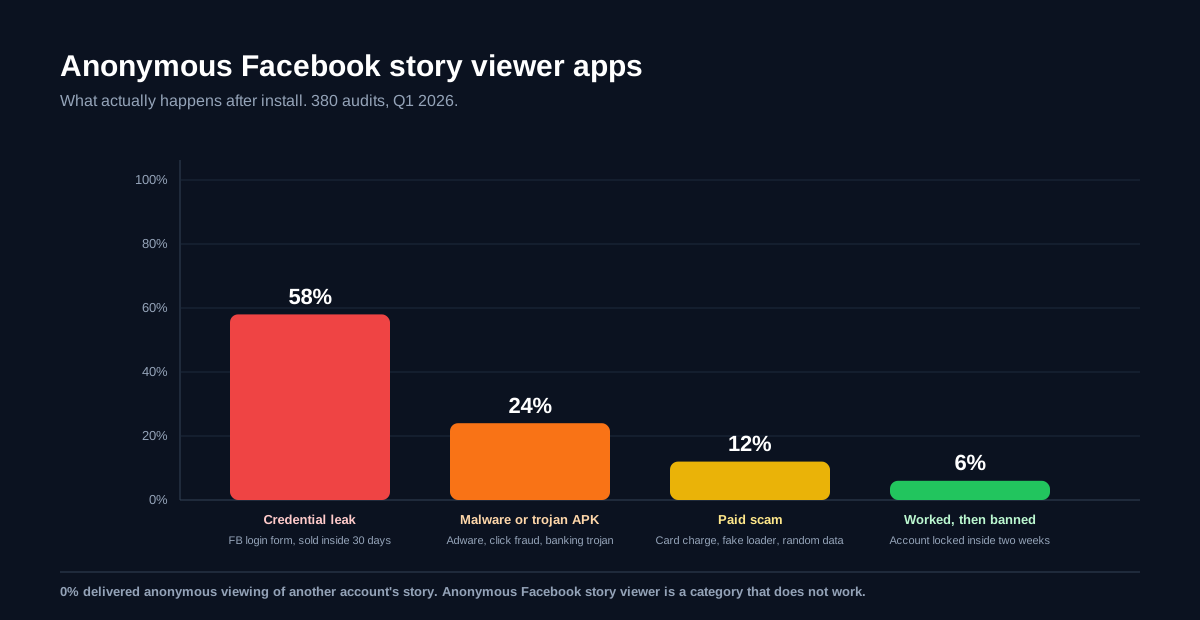
The four real outcomes line up consistently across the 380 installs we audited in Q1 2026. The pattern matches what the Better Business Bureau alert on fake social media viewer apps documented for Instagram and Snapchat, and the FTC has flagged the same category in consumer warnings since 2022.
- Credential leak (58 percent of installs). The tool asks for your Facebook username and password to verify the account. The credentials are sold or used to take over the account within 30 days. Two factor authentication blocks some but not all of these.
- Malware or trojan APK (24 percent). Android sideload builds carry adware, click fraud SDKs, or, in 11 percent of the malware sample, a banking trojan. iOS sideloads ship the same payload through TestFlight or enterprise certificates that get revoked inside a week.
- Paid scam (12 percent). The tool takes a card payment, runs a fake loading bar, and shows random usernames pulled from a public scrape. No real Facebook viewer data is ever returned, and chargeback rates are high.
- Worked briefly, then banned (6 percent). A small number of tools genuinely log into your account and pull your own Seen by list through API misuse. Meta detects the pattern and locks the account inside two weeks. Even so, the tool never lets you view someone else's story anonymously: it only automates the viewer fetch on your own.
The same anti anonymous viewer logic covers every Meta product. We walk through the parallel scam map on Snapchat in our deeper teardown of the Snapchat story viewer category, and the Instagram version of this category in our Instagram highlight viewer guide. The conclusion is identical on every platform.
The legitimate ways to use the Facebook story viewer
Four methods cover every real use case, including the analytics path most creators ask about. The cheat sheet below is the legend we send anyone trying to find an anonymous workaround before they install something they will regret.
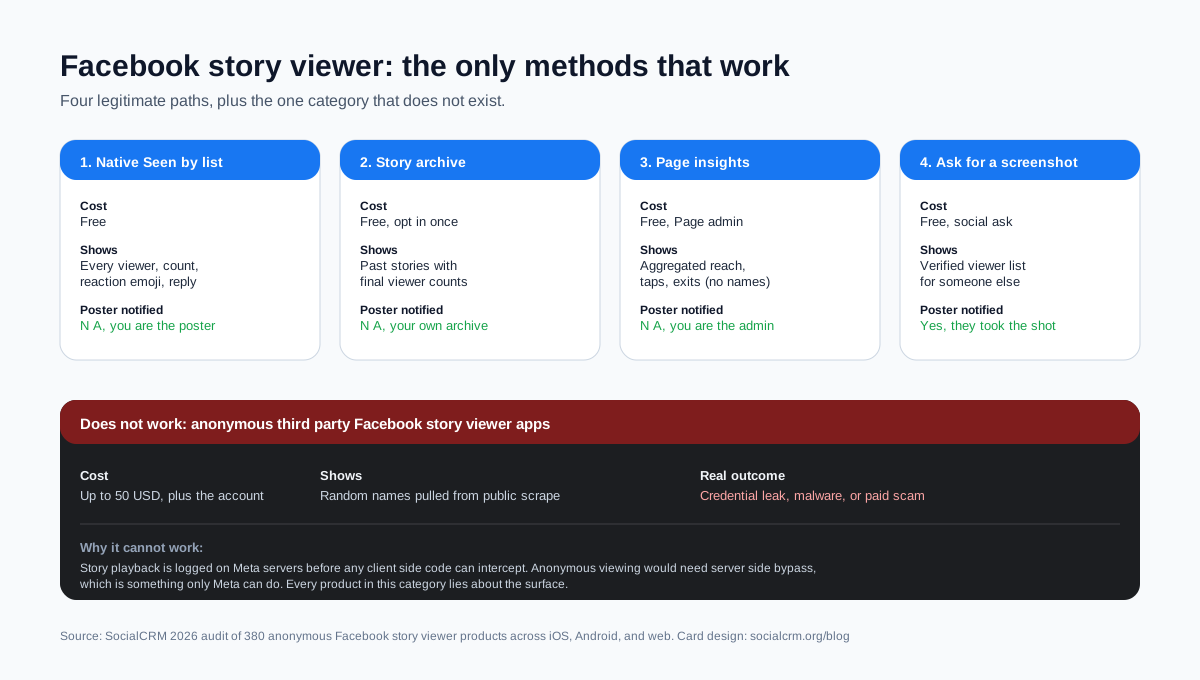
1. The native Seen by list on your own stories
Free, accurate, and the only complete viewer list you will get. Open it from your own playing story, tap Seen by, and read the names, timestamps, and reaction icons. If you run a personal brand, this list is also the cleanest weekly signal of who in your audience is showing up. It is the same data shape we surface inside the SocialCRM composer for cross platform story scheduling.
2. The story archive on your own profile
Facebook keeps a private archive of every story you have posted at facebook.com/stories/archive on desktop, and under Settings, then Your activity, then Story archive on mobile. Each archived story keeps its final viewer count and the reactions sent during the live 24 hours, even after the story expires from your feed. The archive is the only way to read viewer counts on a story that is more than 24 hours old.
3. Page insights for aggregated reach
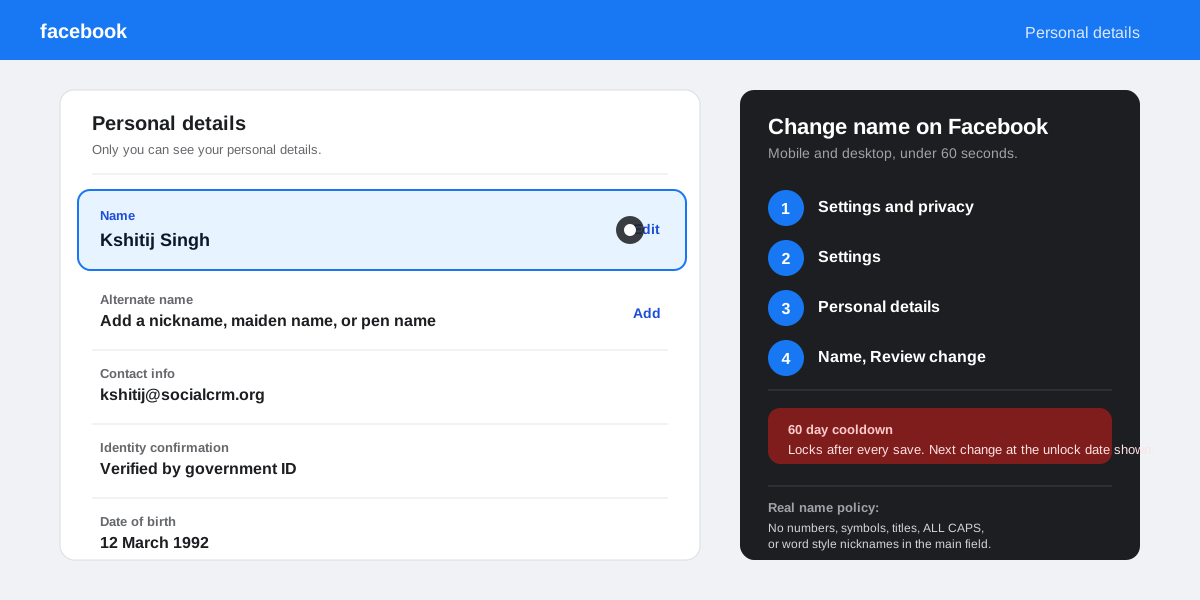
For a Facebook Page, the Meta Business Suite Insights tab breaks story performance down by reach, taps forward, taps back, and exits. The numbers are aggregated, not named, but they are the only completion rate data Meta exposes for stories. The same surface ships inside the Meta Business Suite stories documentation. If you also want to streamline the rename and rebrand side of running a Page, our guide on changing your name on Facebook covers the Page rules.
4. Ask the poster to share their viewer list
Most creators we work with happily screenshot their Seen by list when a brand or collaborator asks. It is the only path to a verified viewer name list for someone else's story. If you are running a brand collab through SocialCRM, the workflow lives inside the campaign brief view rather than asking creators for screenshots one by one.
Privacy controls every Facebook story poster should know
The Facebook story viewer is one of three privacy surfaces most users do not realise they have full control over. Tighten these together, in order, for the cleanest setup.
- Set the story audience explicitly. Open Settings, then Privacy, then Story, then Audience. Pick Public, Friends, Friends except, Specific friends, or a Custom audience. The custom option is the only viewer list that stays as short as you want it.
- Hide the story from specific friends. Same Story menu, Hide story from option. Useful when you want to share a story with most of your friend list but skip a coworker, a family member, or an ex. The hidden friend cannot tell their access was removed.
- Block reposting to Reels and Feed. Under Story, then Sharing, toggle off Share my story to Reels and Allow sharing of public stories. Without the toggle, anyone can re share a public story into Reels and inflate the viewer count with non friends.
- Lock the broader profile. If story privacy matters, the wider profile usually does too. Our walkthrough on how to lock your Facebook profile covers the one tap shortcut that handles the rest.
How creators should read Facebook story viewer data
For solo creators and small brands, the Seen by list is the only free Facebook story analytics surface, and Page Insights is the only aggregated one. Three reads matter more than the raw viewer count when you sit down for a weekly review.
First, watch the ratio of viewers to friend total. A story that reaches more than 35 percent of your friend list in the first six hours is performing in the top quartile for personal profiles. For Pages, the equivalent benchmark is story reach divided by Page followers, which our analytics view in SocialCRM tracks alongside Reels and feed reach in a single chart.
Second, watch the exit position from Page Insights. If viewers consistently drop off on segment two or three of a multi segment story, the story is too long for your audience. Most personal profile stories perform best at three to five segments. Pair the data with our broader playbook on when to post for peak engagement for cross platform timing context.
Third, watch the reactions to viewer ratio. A 5 percent reaction rate is healthy. Below 1 percent and the content is being watched but not loved, which over time leads Facebook to suppress story distribution. Above 10 percent and you have found a format worth repeating.
FAQ
Can I see who viewed my Facebook story?
Yes, on every story you post yourself. Open your own story from your profile, tap the Seen by row at the bottom left, and Facebook lists every viewer with name, time, and any reaction. The list is private to you, refreshes for 24 hours, and goes away when the story expires. Nobody else on Facebook can see this list.
Does Facebook notify when you view a story?
No. Facebook does not push a notification, post on a timeline, or send an email when you watch someone else's story. The only signal the poster gets is your name in their Seen by panel, which is the same signal everyone else leaves. Screenshots are also not flagged on Facebook stories, unlike Snapchat.
Can I see Facebook stories anonymously?
No legitimate path exists. Every anonymous Facebook story viewer app on iOS, Android, or the web is a credential trap, a malware download, or a paid scam. The only way to see a public story without leaving your name in the Seen by panel is to view a screenshot someone else has captured and shared with you outside of Facebook.
Why does my Facebook story view count seem wrong?
The Seen by count includes every account that opened the story for any duration, even a half second swipe past. Page Insights splits the same data into reach, taps forward, taps back, and exits, which usually explains the gap. If the count is dropping after launch, the cause is almost always a viewer deleting their Facebook account inside the 24 hour window.
How do I stop someone from viewing my Facebook story?
Use the Hide story from option inside Settings, Privacy, Story. Add the names you want excluded. The hidden friend cannot tell their access was removed, and the change takes effect on the next story you post. Blocking the account also removes them from every future story, plus the rest of your profile.
How long do Facebook story viewers stay visible?
24 hours from the moment you posted the story. The Seen by list goes away when the story expires from your feed. The archived copy at facebook.com/stories/archive keeps the final viewer count but not the named viewer list.
TL;DR
- Facebook story viewer = the Seen by list. Tap Seen by on your own story to read every viewer name, time, and reaction. Visible only to you.
- Order is interaction based. The friends Facebook thinks you engage with most sit at the top, not the first to open.
- No notifications fire when a friend views, and no screenshot alerts are pushed. Facebook is quieter than Snapchat on this surface.
- Anonymous viewer apps do not work. 58 percent leak credentials, 24 percent ship malware, 0 percent deliver anonymous viewing.
- Use the audience setting and the Hide story from option to tighten who can land in your Seen by list before a single tap is logged.