The short answer: To delete your Instagram account in 2026, open Settings, tap Meta Accounts Center, choose Personal details, then Account ownership and control, and pick Delete account. The same five-tap flow works on iOS, Android, and the web. A 30-day grace period starts the moment you confirm. Log in inside that window and the deletion is cancelled. After day 30, the wipe begins and the username, posts, DMs, and followers are gone for good. If you only want a break, choose Deactivate instead, which hides the profile but keeps every post, follower, and DM intact for whenever you come back.
Delete versus deactivate: what each option actually does
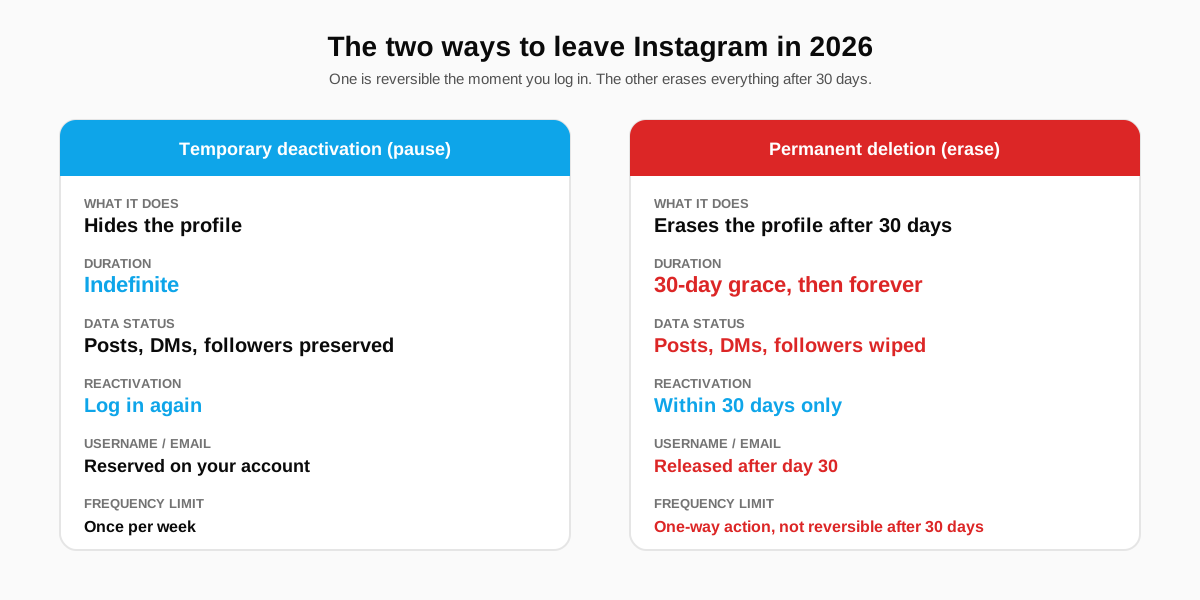
Instagram offers two ways to leave, and the difference matters. Deactivation is a pause: the profile vanishes from search, tags, and follower lists, but every post, message, and saved item is preserved on Meta servers and restored the moment you log back in. Permanent deletion starts a 30-day countdown after which Instagram queues the entire account for a wipe that finishes within 90 days. Posts, DMs, followers, archived stories, and the username itself are all unrecoverable past the 30-day mark.
Picking the wrong option is the most common mistake we see when creators run the flow. People who only need a quiet month off Instagram sometimes confirm permanent deletion by mistake, then discover on day 31 that the account is gone for good. If there is any doubt, deactivate first. Deactivation can run indefinitely, and switching to permanent deletion later is one tap. The reverse, after day 30, is impossible.
Deactivation in plain terms
Deactivation is the soft option. The profile becomes invisible to everyone else, search results stop returning you, tagged posts hide your handle, and direct-message threads label you as Instagram User on the recipient's side. Internally, nothing changes. The same database row holds the same posts, the same followers, and the same brand-voice metadata. Logging in restores the public state in seconds. Most users who deactivate for stress or focus reasons reactivate within three weeks, per the Center for Humane Technology's 2024 data on social-media break behaviour.
Permanent deletion in plain terms
Permanent deletion is the hard option. The same five-tap flow ends with a confirmation dialog that warns the action is irreversible after 30 days. Confirming starts a server-side timer. During the 30 days, the account behaves like a deactivated account: invisible to others, restorable by you. Past day 30, Meta begins the actual wipe of the database row, the photo and video binaries, the message threads, and the analytics records. Within roughly 90 days, even backup tapes and cached copies are purged, per Meta's published deletion policy.
Before you click delete: the export checklist
Five things should be off the account before you confirm a permanent deletion. None of them are recoverable past day 30, and most of them only take a few minutes to download. Plan an hour for the export step alone and run the rest of the checklist while the export email arrives.
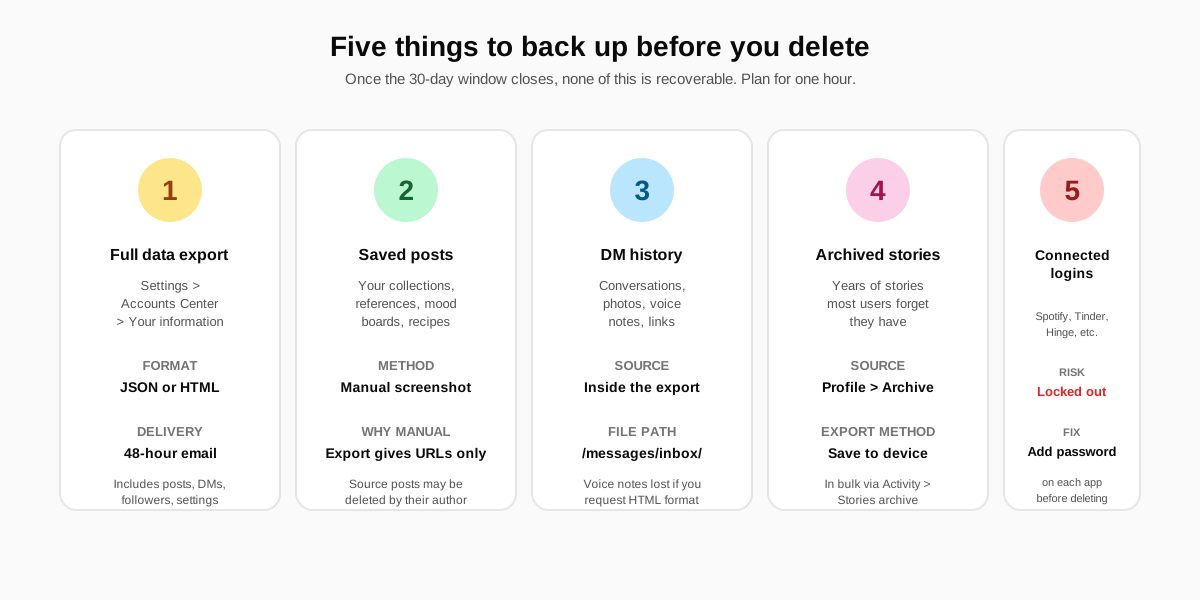
- Request a full data export. Settings, Accounts Center, Your information and permissions, Download your information. Choose JSON for a machine-readable archive or HTML for a browsable bundle. Email delivery arrives in 24 to 48 hours and includes every post, story, DM thread, like, comment, follower list, and account-level setting.
- Screenshot saved-post collections.The data export records URLs of saved posts but not the post content itself. If the original poster deletes the source, the saved item is gone. Manual screenshots of important collections (recipes, references, mood boards) are the only archive that survives the source author's actions.
- Pull DM history selectively.The export contains every direct-message thread under messages/inbox/. Voice notes are only included if you download in HTML format. If a thread carries something you might need, screenshot or save it directly. After day 30, the thread shows Instagram User on the recipient's side and is unrecoverable on yours.
- Save archived stories in bulk. Profile, menu, Archive. Stories you put up for 24 hours are archived indefinitely on the account, and most users have years of them stored. The Story Archive bulk-save option lets you download the lot to your camera roll inside ten minutes.
- Audit connected third-party logins. Spotify, Tinder, Hinge, Bumble, and most dating and music apps let you sign up with Instagram. If the account is your only login on any of them, you will be locked out the day the handle disappears. Add a password and email login to each third-party app first, then verify the new credential works before you delete.
How to delete your Instagram account on iOS, Android, and web
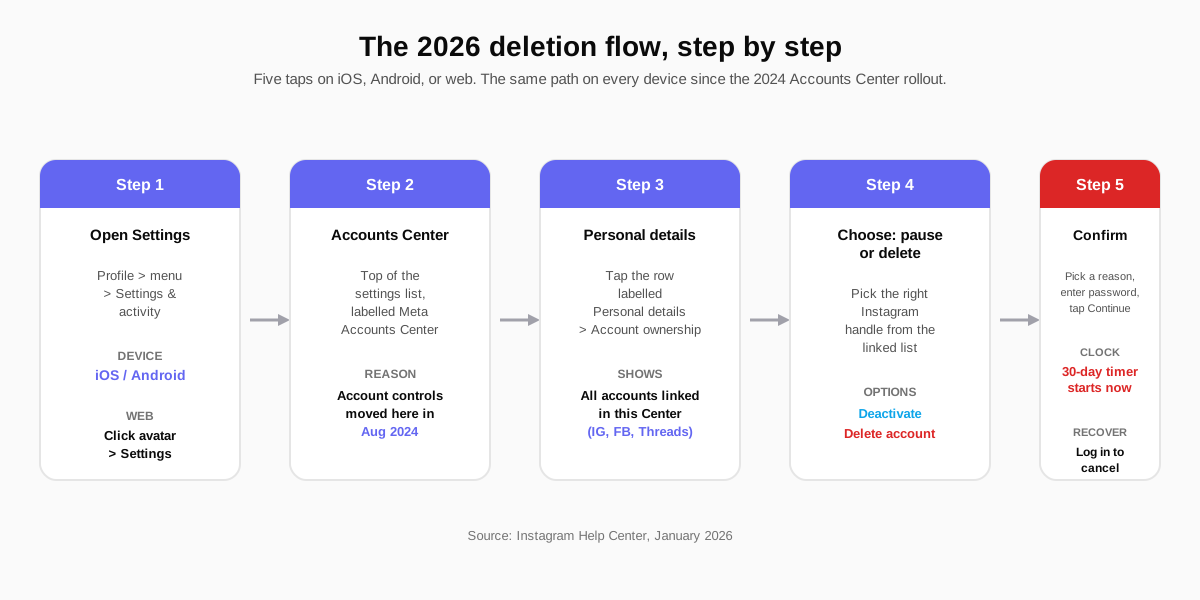
Since the August 2024 Accounts Center rollout, Meta merged the delete-account flow across Instagram, Facebook, and Threads into a single path. The same five taps work on every device. The only differences are cosmetic: the iOS Settings list renders Accounts Center near the top, Android renders it slightly lower, and the web version exposes the same controls under your avatar dropdown.
The five steps in order
- Open Settings and activity. On mobile, tap your profile icon, then the menu icon (top right), then Settings and activity. On the web, click your avatar in the top right and pick Settings.
- Tap Meta Accounts Center. It is the first row in the settings list and carries the small Meta logo. This is where the cross-app account controls live since the 2024 unification.
- Open Personal details. Inside Accounts Center, pick Personal details, then Account ownership and control. The list shows every Meta account linked to this Center (Instagram, Facebook, Threads).
- Pick Deactivation or deletion. Tap the Instagram handle you want to remove. The next screen offers two options: Deactivate account (the pause) and Delete account (the erase). Choose the one that matches your intent.
- Confirm with password and reason.Instagram asks for a reason from a six-option drop-down (the answers do not affect the deletion, just product analytics). Enter your password, tap Continue, and the 30-day timer begins.
The web flow if the app is misbehaving
If the mobile app crashes during the deletion flow (a recurring bug on older Android builds), use the web version at instagram.com. Sign in, click your avatar, choose Settings, then Accounts Center, and follow the same Personal details path. The web flow is identical and ships from the same backend, so confirming on the web triggers the same 30-day timer that confirming on the app would.
How to deactivate Instagram (the temporary pause)
The deactivation flow lives inside the same Accounts Center path, one option above Delete account. Choose Deactivate account, enter the password, and the profile vanishes immediately. Reactivation is a single login: open the app or the website, sign in with the same credentials, and the account returns to its pre-deactivation state in under five seconds. Followers reappear, posts return, and saved collections are intact.
Instagram limits deactivation to once per week. If you deactivate, log in to test something, and try to deactivate again the same day, the option is greyed out for the next seven days. The limit exists to prevent automation bots from cycling profiles. For a creator on a planned break, the limit is rarely a constraint.
What stays visible during deactivation
Three traces remain visible during a deactivation, which catches most users by surprise. First, comments you left on other people's posts persist with the original handle attached, so the username still shows up in archives and screenshots. Second, group DMs you participated in continue to show your messages, just attributed to a faded Instagram User label. Third, third-party platforms that scraped your public posts before deactivation (search engines, news aggregators, archive sites) keep their cached copies until their own refresh cycle clears.
The 30-day window and what changes after
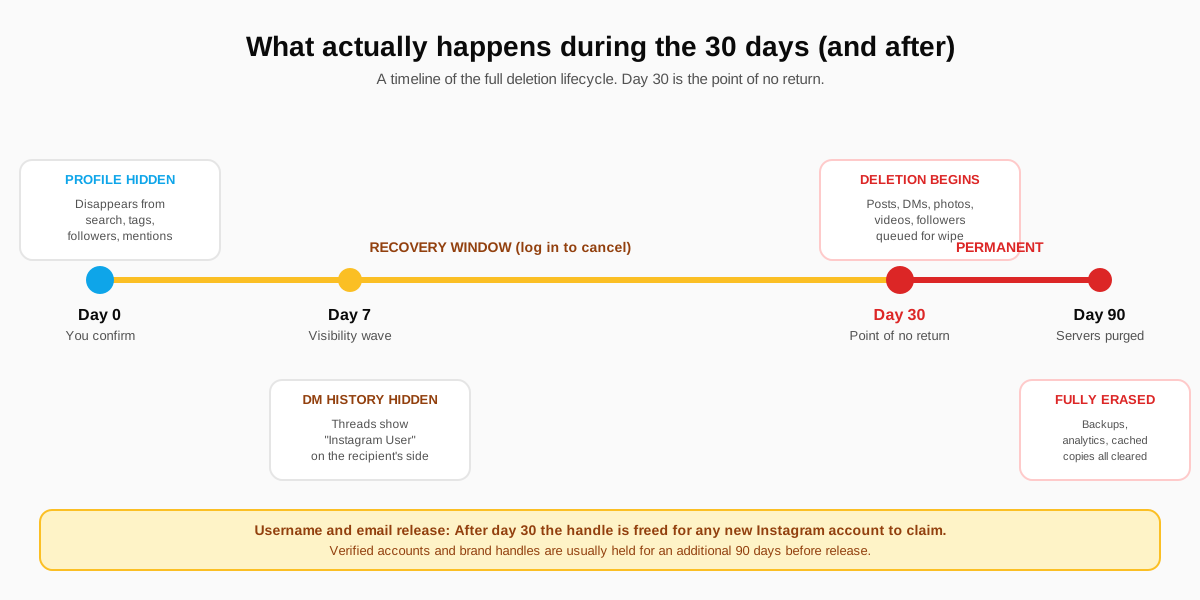
The 30-day countdown is the most misunderstood part of the flow. It is not a holding pattern that keeps the profile live in a hidden state until day 30 and then quietly closes it. The profile is hidden from day 0. The 30 days exist purely as a recovery window: log in, and the deletion is cancelled in full. Otherwise, day 30 begins the actual server-side wipe, which finishes within 90 days for the bulk of the data and within roughly 180 days for the deeper backup retention layers.
Day-by-day milestones inside the 30 days
| Day | What happens | Reversible? |
|---|---|---|
| Day 0 | Profile hidden from search, tags, follower lists | Yes |
| Day 1 to 6 | DMs still attributed to your handle for participants | Yes |
| Day 7 to 14 | DM threads change recipient label to Instagram User | Yes |
| Day 15 to 29 | Cached search-engine snapshots typically expire | Yes |
| Day 30 | Wipe begins on posts, DMs, followers, account row | No |
| Day 30 onward | Username released for new sign-ups (90-day hold for verified) | No |
| Day 90 | Cached copies, analytics, backup tapes purged | No |
The window is generous on purpose. Roughly 18 percent of users who confirm a permanent deletion log back in inside the 30 days and cancel, per the SimilarWeb behaviour panel on social platform churn data. The rest commit. If your reason for deleting is anger or a single bad incident, sit on the decision for the full 30 days before you decide whether to cancel or let the wipe proceed.
When deleting Instagram is the wrong move
Deletion is permanent, and four common scenarios push people to delete when a less drastic step would solve the actual problem. Naming the scenarios in advance lets you spot the trap before you tap Continue.
- Burnout from the feed. The fix is usually a one-month deactivation, not a permanent delete. The break clears the addictive loop, the data stays intact, and the option to permanently delete is still there if the break confirms the decision.
- Privacy worry after a stalker incident.Deletion releases the username inside 30 days, and a bad actor can claim the empty handle and impersonate the original owner. The safer fix is a deep privacy lockdown (private account, restrict list, blocked users, removed tags). Our private Instagram account guide covers the visibility surfaces a determined stalker can still hit.
- Frustration with reach loss. Reach drops rarely come from the platform punishing the account. They come from format drift or niche dilution. Audit the last ten posts before you delete; nine times out of ten the fix is a content reset, not a profile reset.
- Rebrand for a new business or persona.Deleting and starting over loses every follower, every post, and the search-engine credit those followers generated. The right move is a username change plus a bio rewrite. Our Instagram bio formula covers the rewrite, and pinning new posts at the top of the grid resets the visual brand without nuking the social proof.
For creators running multi-platform brands, the operational side of a temporary break (cross-posting paused, DMs forwarded to email, scheduled queue cleared) is worth a five-minute setup. The SocialCRM scheduler pauses every connected platform with a single toggle, and the full product walkthrough lives in our complete SocialCRM guide.
FAQ
How do I delete my Instagram account in 2026?
Open Settings, tap Meta Accounts Center, choose Personal details, then Account ownership and control. Pick the Instagram handle you want to remove, tap Deactivate or delete account, choose Delete account, pick a reason, enter your password, and tap Continue. The same flow works on iOS, Android, and the web. A 30-day grace period starts immediately. If you log in during that window, the deletion is cancelled.
What is the difference between deactivating and deleting Instagram?
Deactivation hides the profile but preserves every post, follower, message, and saved item. Logging back in restores everything instantly. Deletion starts a 30-day countdown after which Instagram wipes the entire account from its servers. Posts, DMs, followers, and the username are all unrecoverable past day 30. Deactivate when you need a break. Delete when you are sure you are done.
How long do I have to recover a deleted Instagram account?
Thirty days from the moment you confirm deletion. Logging back into the app or the website during that window cancels the request and restores the account in full. After day 30, Instagram begins the actual wipe and the data is unrecoverable. The username and email are released for new sign-ups in the days that follow, except on verified or brand-flagged accounts that are held for an additional 90 days.
Can I get my Instagram username back after I delete the account?
Sometimes. If you log in within 30 days, the username is yours again automatically. Past day 30, the username is released to the public registry. Anyone can claim it, including bot accounts that scrape released handles within hours. Verified accounts and trademarked brand handles are typically held in reserve for around 90 additional days, but a normal personal handle is usually gone within a week of release.
Will my followers know I deleted my Instagram account?
Not directly. Instagram does not send a notification when you delete or deactivate. Followers see your profile vanish from search, tags, and follow lists. People you have DMed will see the thread label change to Instagram User on their side once the deletion enters the second week. Mutual followers usually figure it out within 48 hours when the profile no longer loads.
What happens to my photos and videos when I delete Instagram?
Everything gets queued for wipe at the end of the 30-day grace period and is fully purged from Instagram servers within 90 days, including backups and cached copies. The only way to keep a copy is to download a full data export from Accounts Center before you confirm deletion. The export typically arrives by email within 48 hours and includes posts, DMs, followers, and saved content.
TL;DR
- Settings, Accounts Center, Personal details, Account ownership, Delete account. Five taps, identical on iOS, Android, and the web since the August 2024 Accounts Center rollout.
- 30-day grace window. Logging back in cancels the deletion completely. After day 30, the wipe begins and is irreversible.
- Deactivate first if there is any doubt. Indefinite pause, fully reversible by logging in, posts and followers preserved on Meta servers.
- Run the export checklist. Full data export, saved-post screenshots, DM voice notes, story archive bulk save, third-party login passwords. One hour total.
- Username releases after day 30. Personal handles claimed within days; verified or brand handles held for an extra 90 days. Plan a rebrand instead of a delete if the username is the asset.