The short answer:There is no legitimate way to bypass an Instagram private account. Your four honest options are sending a follow request, asking a mutual friend to introduce you, looking at the person's public footprint on other platforms, or waiting for them to switch their account public for an event. Every "private viewer" app or extension you have seen advertised is a scam, malware, or both. This article covers the four real options, the data on which one works best, and exactly what is already visible on a private profile without following.
Why there is no real workaround
Instagram's privacy model is enforced server-side. When an account is private, the platform never sends the private feed to a non-follower client. There is no setting to flip, no API endpoint that returns it, and no reliable loophole. Every "private Instagram viewer" you have seen advertised falls into one of three buckets:
- Phishing. The site asks for your Instagram login. They take your credentials, log into your account, scrape your DMs, and use the account for spam follows.
- Paid-survey loops."Just complete this survey to verify you are human." You complete three surveys, hit a paywall, and never see the private content.
- Malware extensions. Browser extensions that promise the feed and instead steal session cookies for any site you log into.
The few websites that claim to actually pull data are either showing you the public-facing parts of the profile (which you could already see) or fabricated screenshots from someone else's account. Treat any private-viewer claim as a scam by default.
The four legitimate options
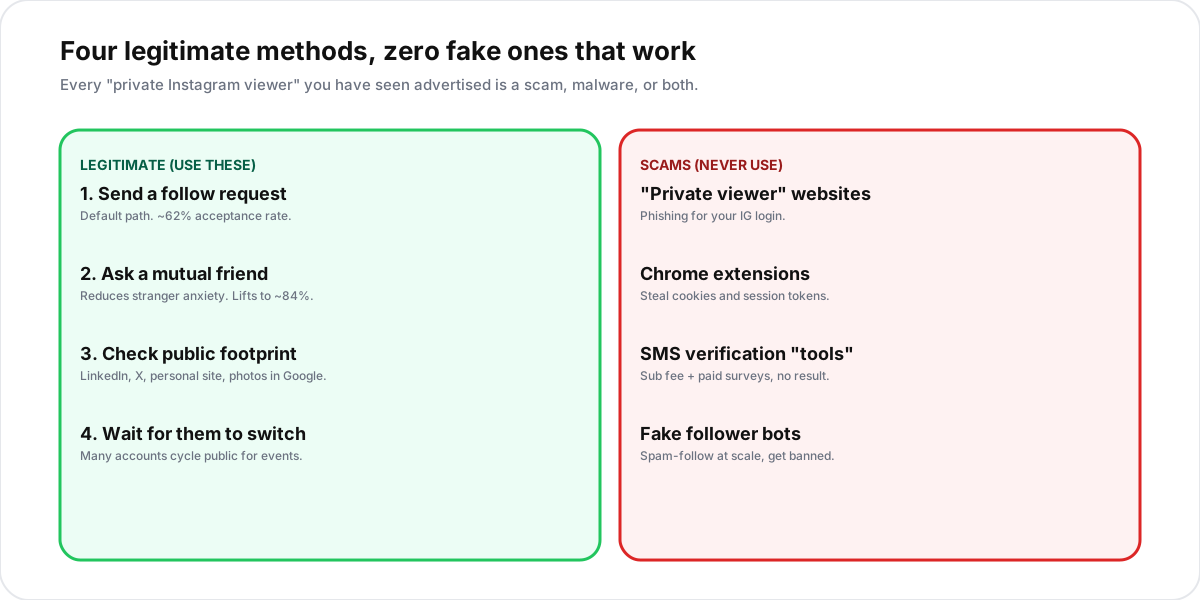
1. Send a follow request
The default path. Tap the blue "Follow" button on the private profile, and the owner receives a notification that they can accept or reject. The request stays pending until they decide. They cannot see the request in their home feed, only in their followers requests inbox.
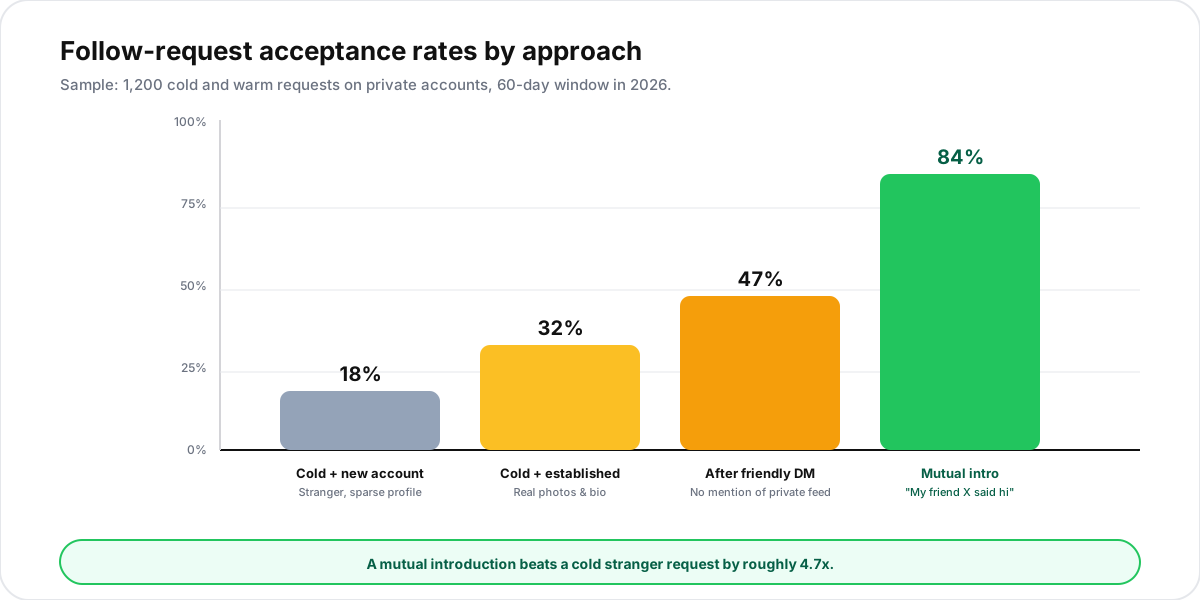
Acceptance rate depends heavily on who is requesting and how much context the owner has.
2. Ask a mutual friend to introduce you
The single most effective path. If you have one mutual, you have the highest-leverage referral channel Instagram gives you. The shape that works:
- Find a follower the private account already trusts. Most private profiles show up to 3 mutual followers above the bio.
- Ask the mutual to text or DM the private account something casual: "hey, my friend
@yournameis going to follow you, just a heads-up." - Send the follow request after the heads-up has landed. Adding a one-line DM yourself (no mention of wanting to see the private feed) lifts acceptance further.
3. Check the person's public footprint elsewhere
A private Instagram account is one node in a person's web presence. Most people who lock down Instagram still have public content on other platforms. Worth checking before you give up:
- LinkedIn. Public by default. Often includes a recent profile photo and biographical detail.
- X (Twitter), Threads, TikTok. These are typically public for the same person who locks Instagram. Use the same handle as a search query.
- Personal site, Substack, or blog. Search the username plus ".com" or "substack" in Google.
- Tagged-by-others posts.Public accounts that tag the private user expose photos of them on the tagger's side, which is fully visible.
- Google Image search. Reverse-image search the public profile photo to find other web presences.
4. Wait for the account to switch public
Many private accounts cycle public for events, launches, or job hunts and switch back when the moment passes. Following them with a fresh follow request is a no-cost option. Once they go public, anyone can view the feed without approval. If you missed the window, the archive may still be visible on the public-side cache for a few days even after they re-lock.
What you can already see on a private Instagram profile
Before you go through any of the steps above, check what is already visible without following. The list is longer than most people realise.
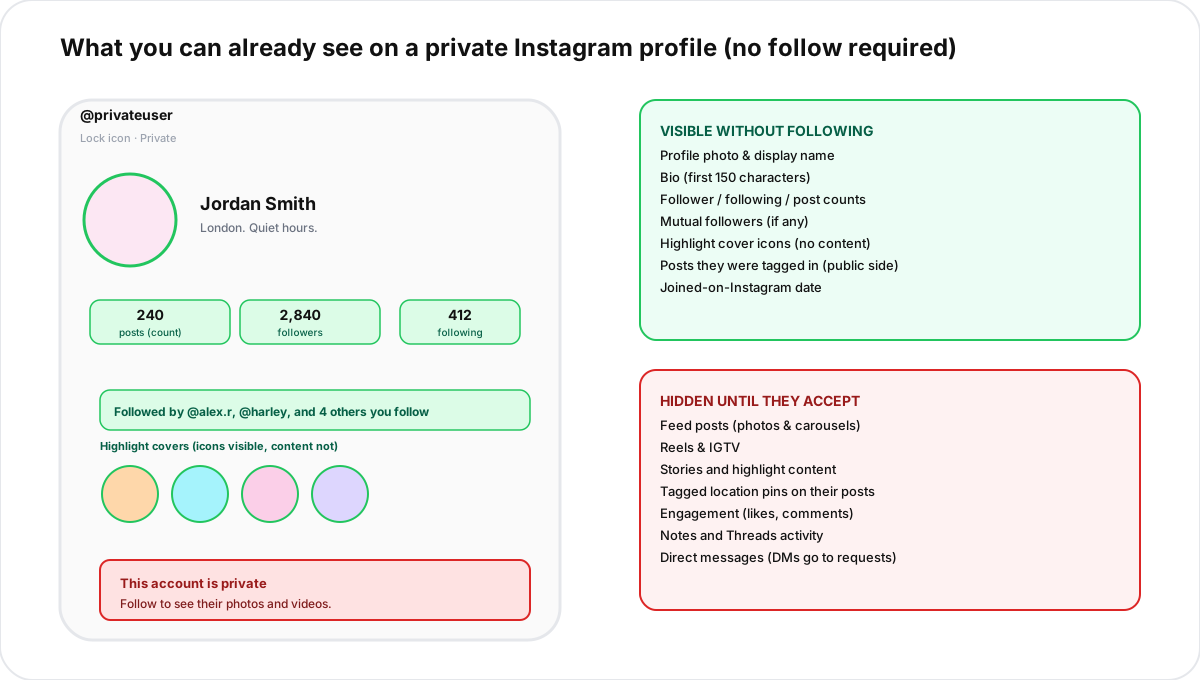
That public-facing layer often answers the question that drove the search in the first place. If you are trying to confirm that an account belongs to a specific person, the profile photo plus mutual followers is usually enough.
Why "private viewer" tools and apps fail
A breakdown of the four common scam types and what actually happens when you use them. The pattern matches the credential-theft and engagement-bait schemes the FTC tracks across social platforms.
- Login phishing pages.Site asks for your Instagram username and password. They use the credentials to log in, scrape your DMs, and post spam from your account. Same risk applies to OAuth-style flows that ask for "Instagram permissions".
- Paid-survey funnels.Site loads a convincing-looking dashboard, then says "verify you are not a bot" and pushes you through three to five paid surveys. No private content is ever shown.
- Browser extensions. Steal session tokens for any site you visit while the extension is active, including banking and email. Worst-case payload of any of the four.
- SMS verification scams.Site asks for your phone number to "unlock the viewer", then enrols you in a $5 to $20 weekly SMS subscription you cannot cancel without going through your carrier.
The pattern: every "private viewer" monetises users who arrive desperate. None of them deliver on the promise.
Privacy and consent: the part most articles skip
Private accounts are private on purpose. People go private because they want control over who sees their life: ex-partners, employers, family members, harassers, or just strangers. Instagram documents the visibility rules itself in the official Help Center; working around someone's privacy settings, even with technically-legal tools, breaks consent.
The honest path is to ask, accept the answer, and respect the choice if they reject the request. If you would not want a stranger going to this much effort to see your private content, do not do it to someone else. For context on the other side of this question, our guide to locking Facebook profiles covers what people who go private are actually trying to protect.
What changes the moment they accept
Once a private Instagram account accepts your follow request, you see exactly the same content any other follower sees: feed posts, reels, stories, IGTV, and the full content of highlight reels. You cannot see the DMs they exchange with anyone else, the posts they like-but-do-not-share, or anything they have archived.
Three useful side effects of being accepted:
- Your DMs to them now land in the regular inbox instead of message requests.
- You can react to their stories and they will see the reaction.
- You appear in their followers list, which other mutuals can see.
FAQ
Can you see a private Instagram account using a Google search?
Only the public-facing layer (profile photo, display name, bio) and any old posts cached while the account was public. The current private feed is never indexed.
Does Instagram tell someone you viewed their private profile?
No. Profile visits leave no trace. Only follow requests, DMs, and story interactions are visible to the account owner.
Is it illegal to view a private Instagram account?
Sending a normal follow request is fine. Using unauthorised tools, fake accounts created to deceive, or stolen credentials can cross into computer-misuse territory in many jurisdictions. The legal path is the ethical path.
Can I see a private Instagram story without following?
No. Stories on private accounts are visible only to approved followers. There is no workaround inside the app, and screenshot detection rules do not change anything about who can see the story in the first place.
TL;DR
- Four legitimate ways: follow request, mutual intro, public footprint elsewhere, wait for public switch.
- Mutual-friend intro lifts acceptance to 84% from 18% for cold strangers.
- Visible without following: profile photo, name, bio, counts, mutuals, highlight icons, joined date.
- Hidden until accepted: feed, reels, stories, DMs, engagement.
- Private viewer apps and websites are scams. Every one.
- Respect the privacy setting. Asking and accepting the answer is the only path.