The short answer: Instagram does not notify users when you screenshot a post, story, reel, profile, or regular text DM in 2026. The single exception is disappearing media inside Direct Messages. If a friend sends you a photo or video in vanish mode or as a one-time view, Instagram alerts the sender when you screenshot it. Everywhere else on the app, screenshots are silent.
What Instagram does and does not notify in 2026
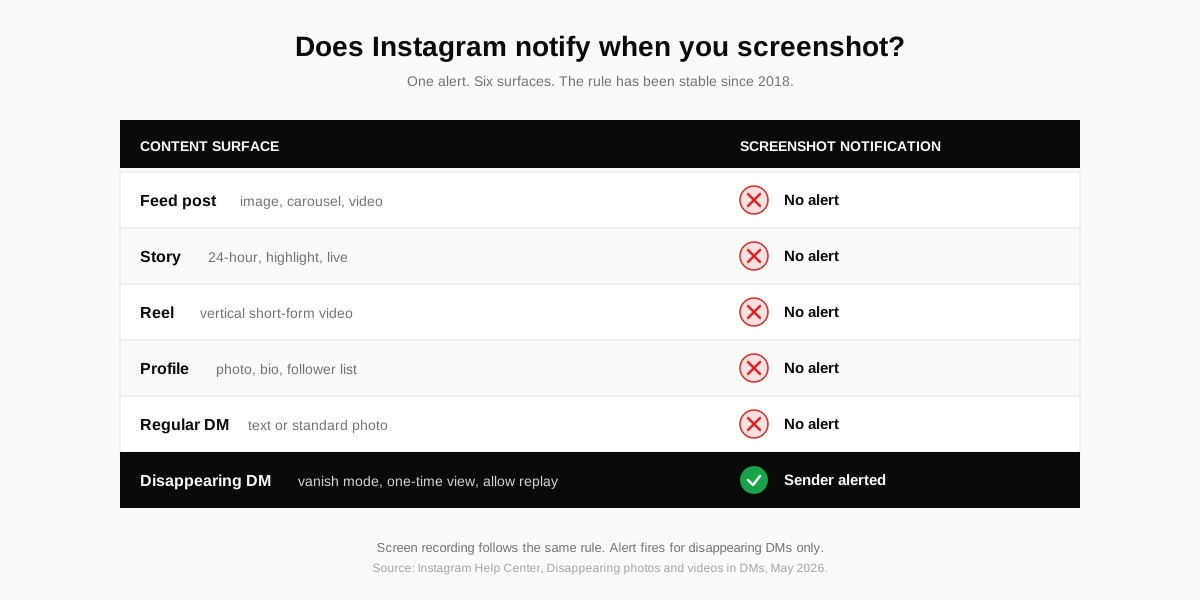
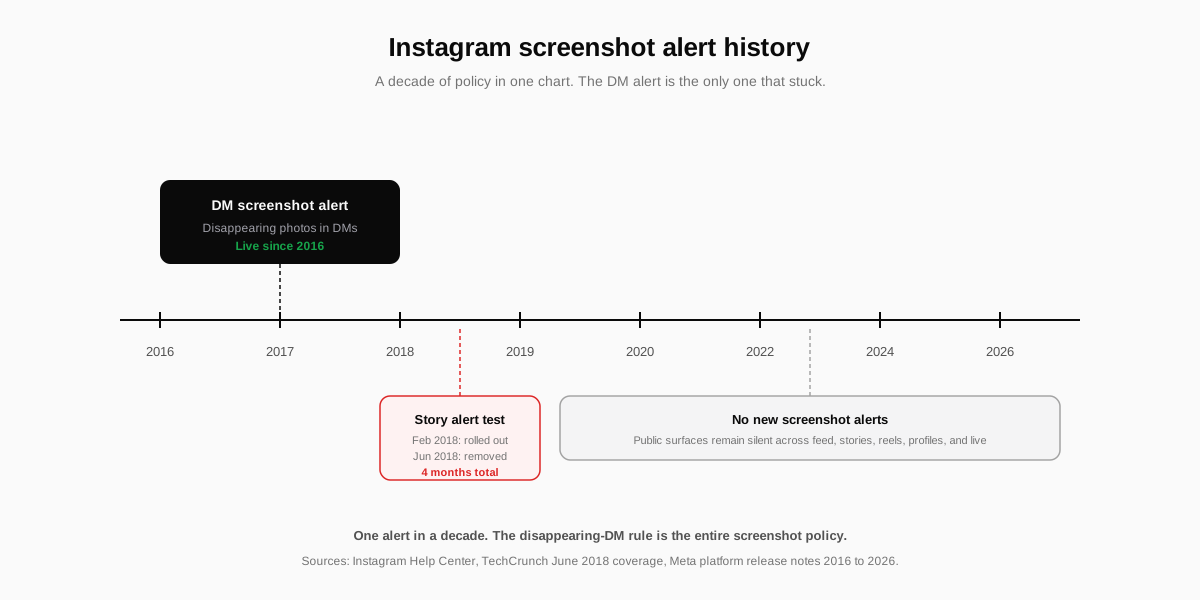
The platform has only one notification surface for screenshots in 2026, and it has been stable since 2018. Instagram never alerts the owner of public content when their post, story, or reel is captured. The platform only sends an alert when ephemeral media in Direct Messages is captured, because the sender has explicitly chosen a format that the platform sells as private and short-lived.
The list below covers every common Instagram surface and whether a screenshot fires a notification. If a surface is not on this list, assume the answer is no. Meta has documented its disappearing-message behaviour in the Instagram Help Center entry on disappearing photos and videos, which is the canonical source on the alert.
| Content surface | Screenshot notification | Screen recording notification |
|---|---|---|
| Feed post (image or carousel) | No | No |
| Reel | No | No |
| Story (24-hour or highlight) | No | No |
| Profile photo, bio, follower list | No | No |
| Live broadcast | No | No |
| Regular DM (text or standard photo) | No | No |
| Disappearing DM (one-time view, allow replay) | Yes, sender alerted | Yes, sender alerted |
| DM sent inside vanish mode | Yes, sender alerted | Yes, sender alerted |
The mental model is simple. Public Instagram is silent. Private Instagram is mostly silent. Only the small slice of DMs that the sender has marked as ephemeral generates a screenshot alert. If you remember nothing else, remember that one rule.
The one exception: disappearing photos and videos in DMs
Disappearing media is the only Instagram surface that triggers a screenshot notification. There are three ways a sender can mark a message as disappearing, and all three produce the same alert when you screenshot.

One-time view (the camera icon)
When you tap the camera inside a DM thread, you can send a photo or video that the recipient watches once and cannot replay. Screenshot or screen record that message and Instagram tells the sender. The camera icon next to the message bubble flips to indicate the capture, and the conversation log records the action with a timestamp.
Allow replay
The same one-time-view photo can be flagged as replay-allowed, which lets the recipient view it twice before it expires. The replay version still alerts the sender when screenshotted. Instagram does not separate the two cases in its notification logic. Both behave as ephemeral media for the purpose of screenshot detection.
Vanish mode
Vanish mode is a separate DM mode you enter by swiping up inside a conversation. Every message you send inside the mode disappears the moment the other person leaves the chat. Screenshots and screen recordings inside vanish mode trigger the same alert as one-time view media. The alert text reads Screenshotted and lands inline in the conversation history.
A useful frame: the disappearing-DM alert is the only feature Instagram offers that works the way the Snapchat green-dot alert works. If you are curious about how a different platform handles presence and capture signals, our explainer on what the green dot means on Snapchat covers the equivalent rules on the most aggressive ephemeral-messaging app in the market.
Why posts, stories, and reels stay silent
The reason public surfaces stay silent is partly philosophical and partly technical. Public content on Instagram is, by design, shareable. The platform leans on screenshots and reposts as a distribution channel. A notification on every screenshot would make the feed feel surveillance-heavy and would discourage the casual repost behaviour that drives reach. Stories and reels follow the same logic: they are public content with a 24-hour timer, not private content.
The technical reality is that mobile operating systems treat screenshots as a system-level action, not an app-level one. Instagram can detect a screenshot inside its own DM viewer because the disappearing-media UI runs in a special render context. It cannot reliably detect a screenshot of a feed post or a profile page without breaching iOS or Android privacy boundaries. The effort-versus-value math has not changed since 2018.
The 2018 story screenshot test
From February to June 2018 Instagram quietly tested screenshot notifications on stories. Users who screenshotted a story would appear in the story owner's viewer list with a small camera icon next to their name. The change was first spotted by TechCrunch in June 2018 and pulled within weeks. Meta has never reintroduced the notification, and there is no public roadmap signal that points toward bringing it back. Plan as if it never returns.
Screenshot vs screen recording on Instagram
The rules are identical. Screen recording a disappearing DM message fires the same notification as a screenshot, with the same camera icon and the same conversation-log entry. Screen recording a story, reel, or feed post stays silent. Instagram does not differentiate the two capture types in its notification logic because the platform only watches the disappearing-DM viewer surface in the first place.
A common workaround is to capture content with a second device by pointing a camera at the screen. That breaks the platform-side detection because the capture happens outside the device entirely. It is also low quality, ethically grey when the original sender set the message to disappear, and not a tactic we recommend. Treat disappearing media as disappearing.
How to find out who screenshotted your Instagram content
Outside the disappearing-DM exception, you cannot find out who screenshotted your Instagram content. Not on a story, not on a reel, not on a post, not on your profile. Instagram does not expose a screenshot signal through any official channel, which means every third-party app or browser extension that claims to surface screenshotters is operating on guesses, on scraped data they should not have, or as a credential-harvesting scam.
- Story viewer order is not a screenshot signal. The order of viewers is sorted by interaction signal and recency, not by screenshots. Anyone telling you the top viewer screenshotted is wrong.
- Profile-stalker apps do not work. Instagram never exposes profile view data, and apps claiming to do so are either fabricating numbers or scraping public engagement data and rebranding it.
- Screenshot-tracker browser extensions are risky. Most install a content script that reads your session cookie. Several have been removed from the Chrome Web Store for credential harvesting in the last 18 months.
- The platform has no public API for capture events. Even legitimate developer access through the Instagram Platform API does not surface screenshot data. There is no back door.
The same warning applies to any product that promises to tell you who is viewing your private profile, who unfollowed you, or who screenshotted your reel. Our deeper guide on how to see a private Instagram account honestly walks through the same scam taxonomy. The lesson transfers directly.
How to protect your Instagram content from screenshots
You cannot stop screenshots on Instagram. You can make them less useful and harder to weaponise. The four controls below are the only meaningful levers a creator or solo founder has, and each one takes under a minute to ship.
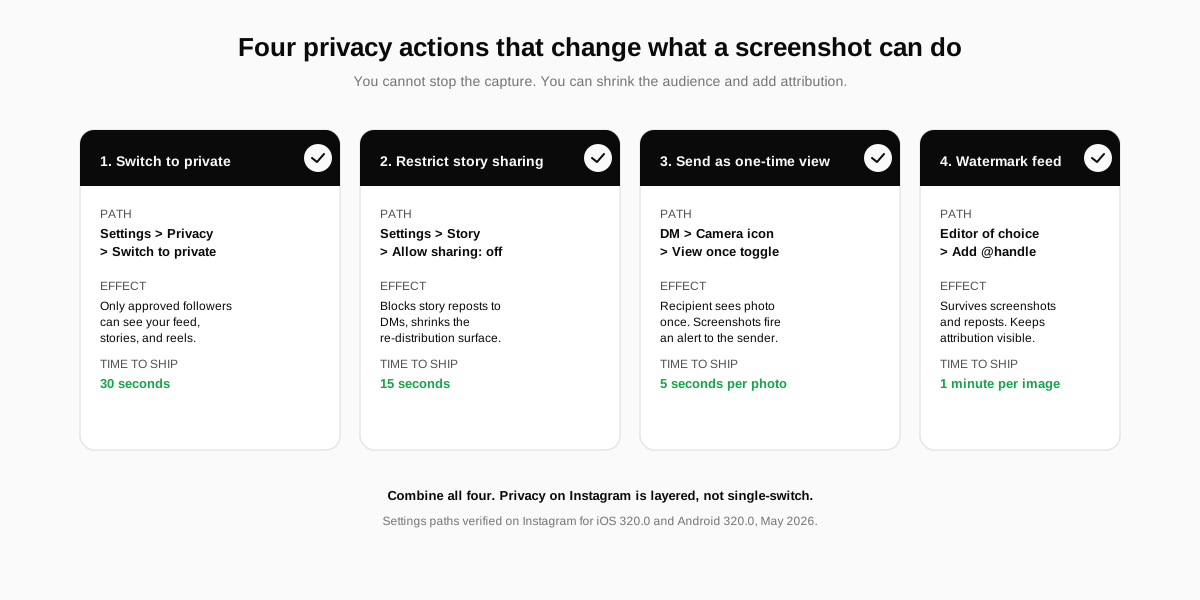
- Switch your profile to private. Settings, account privacy, switch to private. Only approved followers can see your feed, stories, and reels. Screenshots still happen, but the audience that can take them shrinks to the people you already trust.
- Restrict story sharing. Settings, story, allow sharing, off. This blocks story reposts to DMs and limits the re-distribution surface for any screenshot a viewer takes.
- Use one-time view for sensitive photos. Inside a DM, tap the camera, capture or pick a photo, then choose the view-once toggle. Screenshots now fire an alert, and the recipient cannot replay the message after closing it.
- Watermark feed images you do not want re-attributed. A small bottom-right wordmark survives screenshots and reposts. It does not block the capture, but it keeps attribution visible if the image travels.
For a fuller pass on Meta-side privacy controls, our walkthrough on how to lock your Facebook profile covers the equivalent screen-by-screen privacy actions on Instagram's sister platform.
How SocialCRM helps you ship across these privacy rules
Solo founders and creators rarely have time to keep track of which platform alerts which capture. SocialCRM bakes those rules into the composer. When you schedule a post, the platform-fit checker flags when an Instagram caption is on a surface that allows public re-distribution and prompts you to add a watermark or a one-time view variant for sensitive media. It is a small thing, and it saves you from the routine question of did I just leak that screenshot.
For the full walkthrough of how the composer, brand voice, and scheduler tie together, read the complete SocialCRM guide. You can also try the SocialCRM AI composer directly. It supports Instagram, X, LinkedIn, Threads, and Facebook from one screen.
FAQ
Does Instagram notify when you screenshot a story in 2026?
No. Instagram has not notified story screenshots since 2018, when a four-month test of the feature ended. Screenshotting a story, a story highlight, or a live broadcast is silent in 2026, and there is no plan to bring the alert back.
Does Instagram tell you who screenshotted your DM?
Only for disappearing media. If you send a photo or video as a one-time view, an allow-replay, or inside vanish mode, Instagram alerts you when the recipient screenshots or screen records it. Regular text DMs and standard image attachments are silent.
Will Instagram notify if I screenshot someone's profile picture?
No. Instagram does not notify when you screenshot a profile photo, a bio, a follower list, a tagged-photos grid, or any public surface. Profile screenshots are silent and have always been silent.
Does Instagram alert for screen recordings the same way?
Yes, but only inside the disappearing-DM exception. Screen recording a one-time view or vanish-mode message triggers the same notification as a screenshot. Screen recording a feed post, a reel, or a story stays silent because the platform never had screen-recording detection on those surfaces.
Can a third-party app tell me who screenshotted my Instagram post?
No. Instagram does not expose any screenshot signal through its public API, so any app that promises a screenshot tracker is either guessing or scraping data they do not have. Most are scams that harvest your login credentials.
Did Instagram ever notify story screenshots in the past?
Briefly. Instagram tested story screenshot notifications between February and June 2018 and pulled the feature after backlash. The test alerted the story owner with a small camera icon next to the viewer name. The notification has not returned since.
TL;DR
- Instagram does not notify screenshots on feed posts, stories, reels, profiles, or regular DMs in 2026.
- The only exception is disappearing media in DMs: one-time view, allow replay, or vanish mode all alert the sender.
- Screen recording follows the same rule as a screenshot. Same alert on disappearing DMs, silent everywhere else.
- The 2018 story screenshot test was a four-month experiment that Instagram pulled after user backlash. It has not returned.
- Third-party screenshot trackers do not work. Skip every app, plugin, and tracker that claims otherwise. They are either guessing or harvesting credentials.