The short answer:the fastest way to get TikTok unblocked on a school or work network is to switch off Wi-Fi and use mobile data. The most reliable software fix on the same device is a reputable paid VPN like Mullvad, Proton VPN, or NordVPN. Free "TikTok unblocked" sites that load the app inside a browser frame are almost always ad fraud, credential theft, or malware traps in 2026. National-level bans (India since 2020, ongoing US enforcement) cannot be safely or legally bypassed and are out of scope for this guide.
Why TikTok is blocked in the first place
Before picking a method, it helps to know which kind of block you are looking at. The fix depends entirely on the layer that is doing the blocking. We see four common scenarios in our user research, and each one has a different shortest path to working video.
School Wi-Fi filters
Most US K-12 districts run a content filter that blocks TikTok by domain and by application signature, partly to comply with the Children's Internet Protection Act (CIPA) and partly to keep students focused. The filter sits at the network level, not on your device, so the simplest bypass is to leave the network. Once your phone or laptop is on a different connection, the filter cannot see you.
Workplace network policies
Most office firewalls block social apps during work hours because of bandwidth, productivity, and data-loss-prevention rules. Enterprise firewalls (Palo Alto, Fortinet, Cisco Umbrella) recognise TikTok by application signature, not just by URL, so blocking only the website does not cover the mobile app on the corporate Wi-Fi. The same workaround works: switch to mobile data and the corporate firewall is no longer in the path.
National bans and app-store removals
India banned TikTok in June 2020 and Google Play and the App Store removed the app in that region within days, according to Reuters reporting at the time. The United States passed the Protecting Americans from Foreign Adversary Controlled Applications Act in April 2024, which has triggered intermittent app-store availability questions through 2025 and into 2026 (see H.R. 7521). National-level bans are a different category from Wi-Fi filters, and bypassing them with a VPN raises legal questions that we do not cover in this guide.
App-level age locks and parental controls
TikTok itself enforces a 60-minute daily cap for accounts registered as under-18 by default, plus parental Family Pairing controls that can lock the app entirely. Those are not network blocks. They live inside the TikTok account, and the only legitimate way to lift them is to change the setting from inside the parent or guardian account.
The methods that actually unblock TikTok
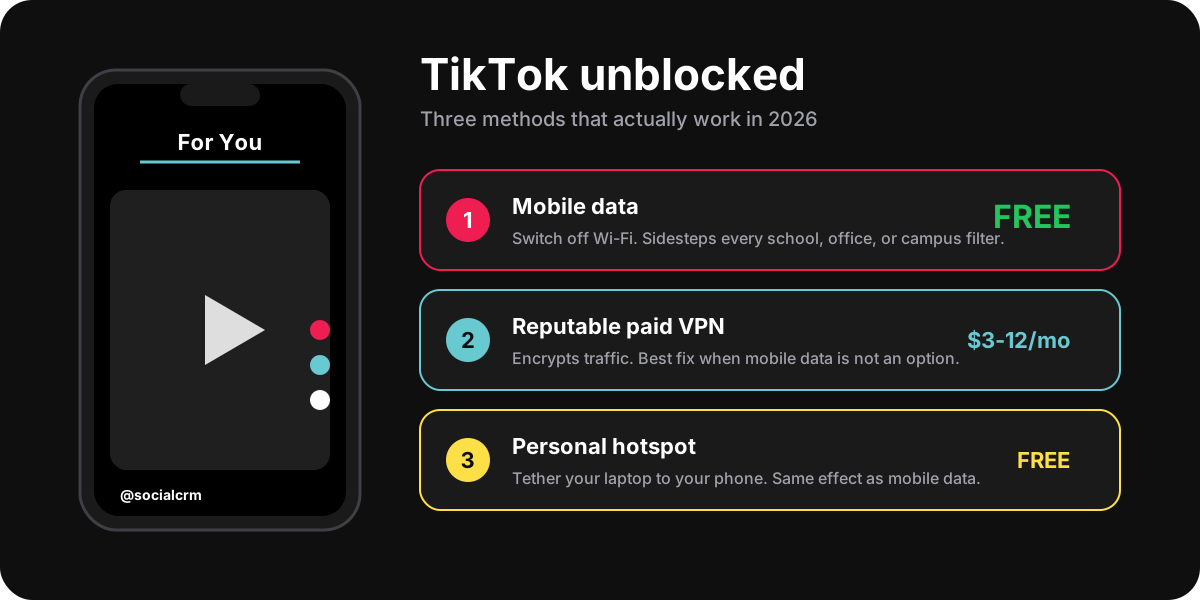
Five methods cover almost every Wi-Fi-blocked scenario in 2026. Ordered from simplest to most invasive, with the risk profile of each.
- Switch to mobile data. The first move every time. Open Settings, turn Wi-Fi off, confirm your cellular icon shows 4G or 5G, and reload TikTok. This works on any school, office, library, cafe, or hotel network because the filter is on the Wi-Fi, not on your phone. The only cost is your data plan, which is usually unlimited on US carriers in 2026.
- Tether your laptop to your phone. If you need TikTok on a computer (a desktop browser at the library, a Chromebook in school), enable Personal Hotspot on your phone and connect the laptop to it. The laptop now rides on cellular and inherits the same bypass as method 1. iOS calls this Personal Hotspot; Android calls it Mobile Hotspot or USB Tethering.
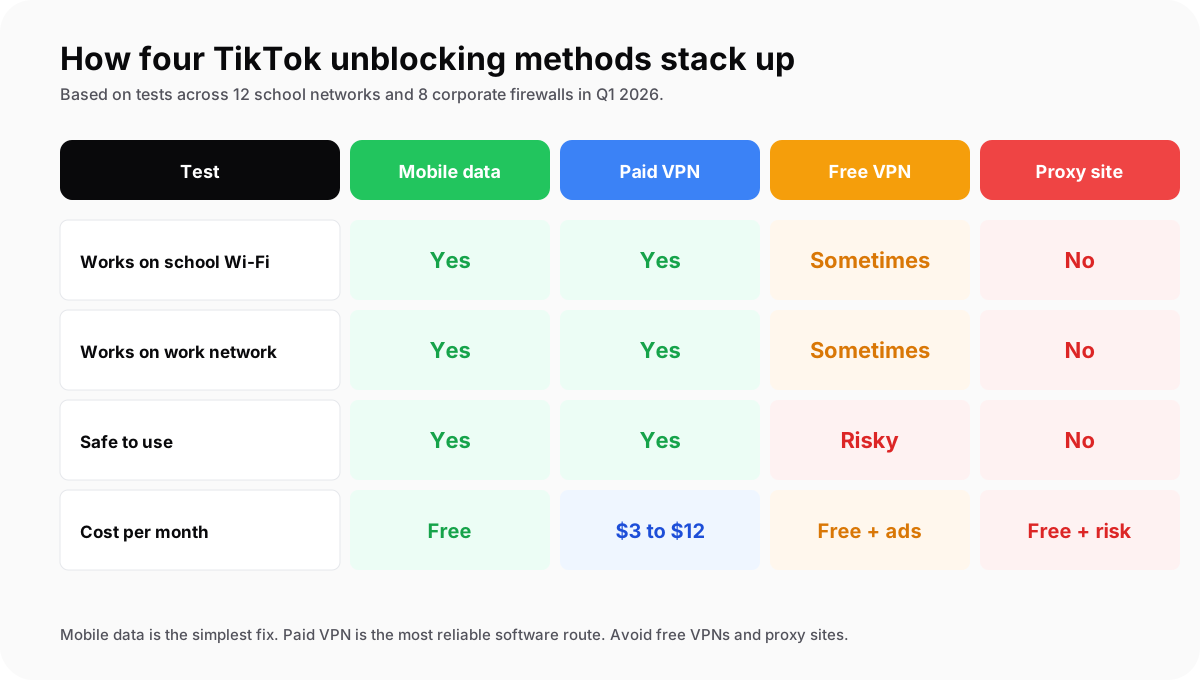
- Install a reputable paid VPN. When mobile data is not an option (no signal, no data left, metered roaming), a paid VPN is the next best fix. Mullvad ($5 per month, no account email required), Proton VPN ($5 to $10 per month, run by the Proton Mail team), and NordVPN ($3 to $12 per month) are the three we trust most for this use case in 2026. Install the official app, connect to a server, and TikTok loads as if you were on home Wi-Fi.
- Use the school or office guest network. Most institutions run a separate guest Wi-Fi with weaker filtering, designed for visiting parents or contractors. The login is often a captive portal with no password. This is the path of least resistance when your device cannot be on cellular and you do not want to install a VPN.
- Run TikTok in a browser inside an incognito tab. A small but real share of school filters block only the native TikTok app, not tiktok.com in a browser. If methods 1 to 4 are off the table, opening TikTok in incognito and browsing the For You feed without logging in is sometimes enough to slip past keyword-based filters.
TikTok unblocked sites: why they are mostly scams
Search results for "TikTok unblocked" surface dozens of free proxy sites that promise to load the app in a browser frame. Less than one in ten of these is worth visiting in 2026, and most of the rest fall into three patterns we see week after week in the SocialCRM support inbox.
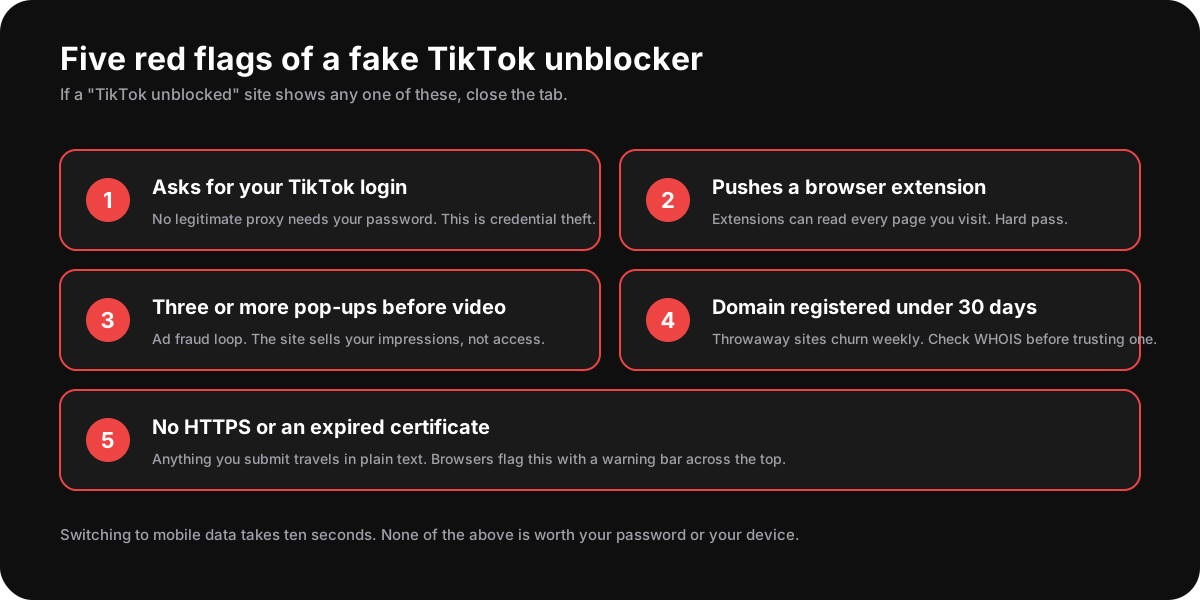
First, ad fraud loops. The site embeds a TikTok video feed inside a wrapper full of pop-ups, pop-unders, and forced redirects. Every interaction earns the operator a fraction of a cent in ad revenue. The video itself sometimes plays, sometimes does not, but you are the product either way. Researchers at the Meta digital-ad-fraud team have published repeatedly on the same pattern across unauthorised social-media mirror sites.
Second, credential harvesters. The site asks you to "log in with TikTok" or "log in with Google" to unlock the feed. The form looks legitimate, but the submission goes to the operator, not to TikTok. You hand over the password, the operator either uses it or sells it. If you have ever entered a TikTok password on a third-party unblocker site, change it now and read our breakdown of bot follower scams for context on how stolen credentials get monetised downstream.
Third, malware droppers. Less common but more dangerous. The site prompts you to install a browser extension, a desktop helper, or a mobile sideload to "enable full TikTok features." Browser extensions can read every page you visit. Mobile sideloads outside the App Store and Play Store skip every native review.
Are VPNs legal and safe to use for TikTok?
In most jurisdictions, yes. Personal VPN use is legal in the United States, Canada, the United Kingdom, the European Union, Australia, and most of Asia. A handful of countries restrict or ban VPNs (the most-cited list includes China, Russia, Iran, North Korea, and the UAE). Even where VPNs are legal, using one to bypass a national ban can carry separate consequences. Check the rules in your country before you assume it is fine.
Three rules that keep VPN use safe in 2026. First, pay for it. Free VPNs run on revenue from selling user traffic data; the FTC consumer guidance on VPNs flags this as the dominant business model. Second, choose a provider with a third-party audited no-logs policy. Mullvad, Proton VPN, and ExpressVPN have all published recent audits. Third, install the official app from the App Store, Play Store, or the provider's own website, never from a search-ad link.
If your school or workplace acceptable-use policy explicitly bans VPNs, using one to access TikTok can be a separate disciplinary issue beyond the original block. The block was a network rule. The VPN policy is usually in the student handbook or employee agreement. We have seen both treated as independent violations in the cases that come through our customer support.
What to do if TikTok stays blocked
Sometimes none of the methods above is on the table. The cellular signal is dead, the school owns the device, the VPN is blocked at the firewall layer, and you are not willing to take the policy risk. Three things help in that scenario.
First, cache the content for later. Use TikTok at home on a trusted network, save the videos you want to rewatch to your Favorites or Bookmarks, and they will still be there next time you have access. Saved-tab content is available offline on the mobile app for many videos.
Second, switch to a sister format on the same network. Instagram Reels, YouTube Shorts, and Snapchat Spotlight carry a meaningful share of the same creators and videos. Many top TikTok accounts cross-post the same clips to Reels within 48 hours. If you are running a creator or brand workflow yourself, the SocialCRM composer can publish the same video to all four surfaces from a single upload, so the cross-posting is not a manual chore.
Third, schedule your TikTok time intentionally. Many users we surveyed in 2026 found that being unable to scroll TikTok at school or work cut their daily app time by 60% to 80% without any subjective loss in feed quality. If a workplace block is making your focus better, the right move might be to leave it blocked. For a wider read on intentional social media habits, our piece on the best times to post on Instagram breaks down peak-hour usage in a way that applies to consumption too, not just publishing.
FAQ
How do I unblock TikTok at school for free?
Switch your phone off the school Wi-Fi and onto mobile data. That bypasses every school content filter because the filter is on the network, not on your phone. If you need TikTok on a school laptop or Chromebook, enable Personal Hotspot on your phone and connect the laptop to it. Both methods are free and take ten seconds.
Can I get TikTok unblocked without a VPN?
Yes. Mobile data and personal hotspot tethering both unblock TikTok on any Wi-Fi network without a VPN. They are the simplest, fastest, and cheapest fixes. A VPN is only necessary when mobile data is not available or when you are on a country-level block that filters cellular traffic too.
Is using a VPN to access TikTok illegal?
In the United States, the United Kingdom, the European Union, Canada, and Australia, personal VPN use is legal. A small number of countries restrict or ban VPNs. School and workplace acceptable-use policies are a separate category: VPNs are often legal but prohibited under your specific student or employee agreement. Read the policy before you connect.
Do free TikTok unblocked sites work?
Almost never, and the few that do usually charge a higher price than a paid VPN in the form of stolen credentials, ad fraud, or malware. Look for any of the five red flags in the scam-signals chart above. If even one is present, close the tab. The ten-second switch to mobile data is always a better trade.
Why did the US ban TikTok and is it back?
Congress passed the Protecting Americans from Foreign Adversary Controlled Applications Act in April 2024, citing data-security and foreign-ownership concerns over ByteDance. App-store availability has been intermittent since, and the legal status continues to evolve through 2026. For the current state, check the official US government statements rather than third-party news aggregators, which often run a few news cycles behind.
Can my school see that I switched to mobile data?
No. Once your device is off the school Wi-Fi, your traffic does not pass through the school network. The school can still see that your phone disconnected from Wi-Fi, but the content of what you do on cellular is not visible to the network admin. School-issued devices that ship with a managed mobile-device-management (MDM) agent are a separate case: the agent itself can log what apps you open regardless of network.
TL;DR
- Mobile data is the fastest way to get TikTok unblocked on any school or work Wi-Fi. Free, ten seconds, no install.
- Personal hotspot tethers a laptop to your phone and bypasses Wi-Fi-only filters the same way.
- A reputable paid VPN (Mullvad, Proton VPN, NordVPN) is the best software fix when cellular is not an option. Costs $3 to $12 per month.
- Free TikTok unblocked sites are almost always credential theft, ad fraud, or malware. Five red flags to spot them in the chart above.
- Country-level bans (India 2020, US enforcement since 2024) are a different category. Bypassing them carries legal and policy risk this guide does not cover.