The short answer: to change your name on Facebook, open the app, tap your profile photo, then Settings and privacy, then Settings, then Personal details, then Name. Edit the first, middle, or last name fields, tap Review change, type your account password, and tap Save changes. Facebook locks the Name field for 60 days after every save, and big renames can trigger a government ID review before the change goes live. The desktop flow runs through facebook.com Settings, Personal details, Name with the same screens and the same 60 day cooldown.
How to change your name on Facebook in the mobile app
The Facebook iOS and Android apps share the same four tap path in the 2026 release. Meta consolidated the Name editor inside the Personal details panel during the 2023 settings refresh, and the Name row has lived at the top of that panel ever since. If your screen looks different, your app is more than 18 months old and worth updating from the App Store or Play Store before you save the rename, so the review modal lands on the current UI.
The four taps, in order
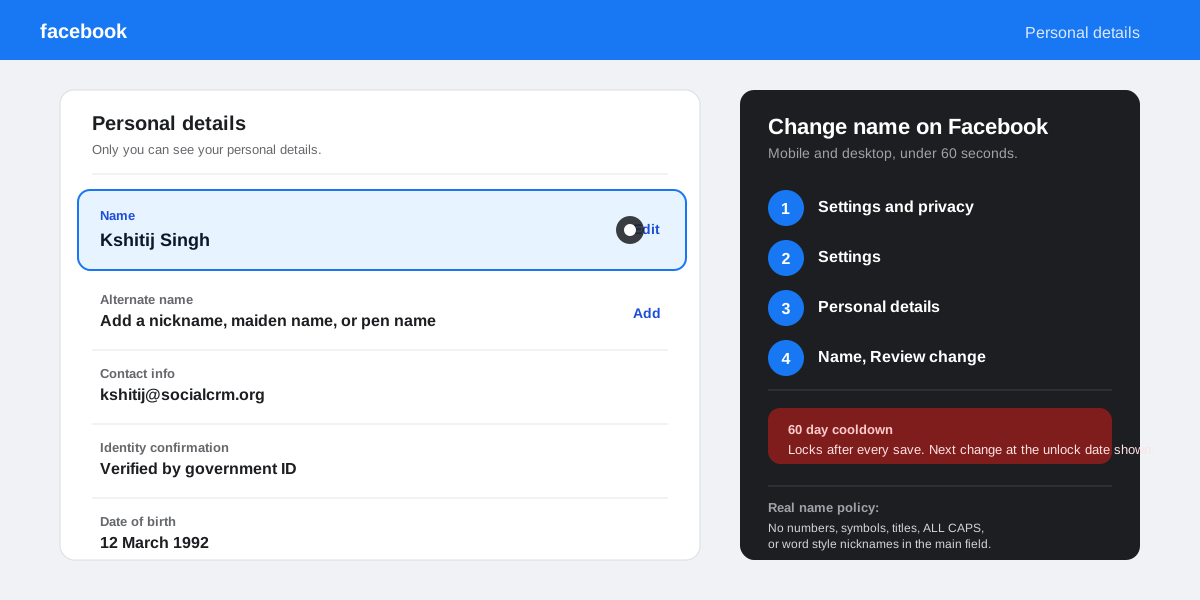
- Open Settings and privacy. Tap your profile photo in the bottom right, scroll once, and tap the gear icon labelled Settings and privacy at the top of the menu.
- Tap Settings. The first row inside the Settings and privacy expansion. Personal details sits under the Account section a quarter of the way down the list.
- Tap Personal details, then Name. Facebook shows three editable fields: First name, Middle name (optional), and Last name. The character limit per field is 50.
- Edit, Review change, Save changes. Type the new value, tap Review change, confirm the preview, type your account password, and tap Save changes. The rename ships in under five seconds.
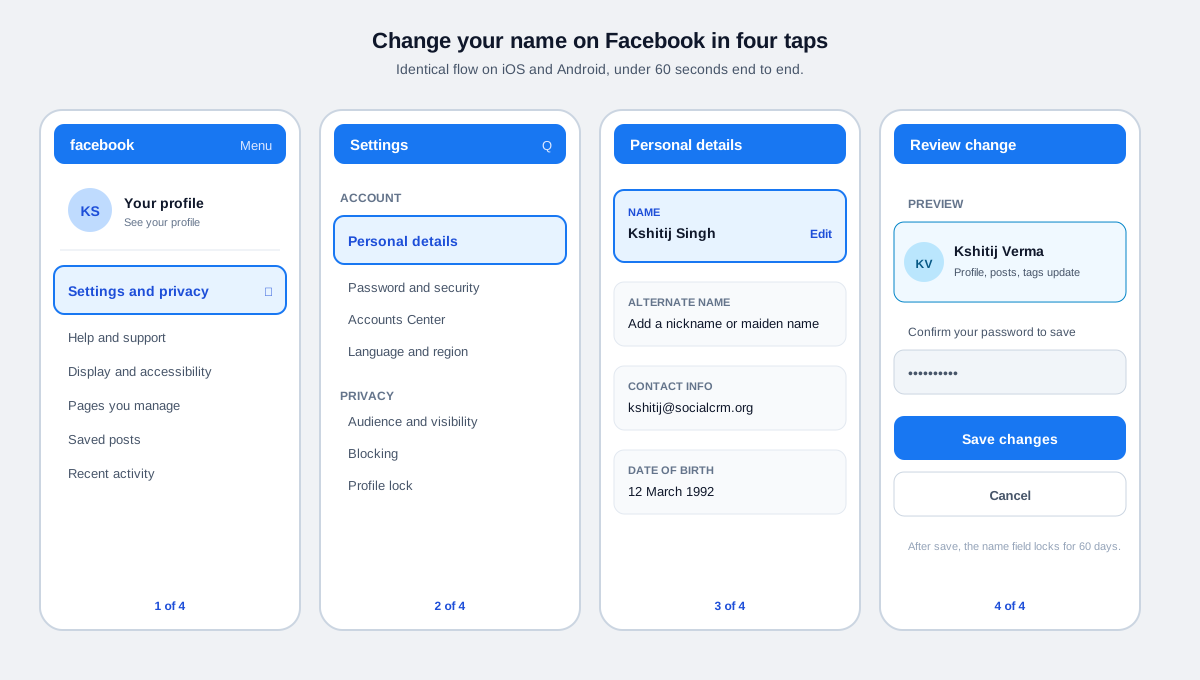
What the Review change preview actually does
Review change loads a profile card with the new name, your current photo, and a one line note that the rename will rewrite tags, comments, and posts. It is the last chance to catch a typo before the 60 day clock starts. If you mistype a capital letter or leave an extra space, fix it now: every successful save burns one cooldown window, even when the only difference is a fixed character.
How to change your name on Facebook on desktop
The desktop flow uses the same screens with a different navigation chrome. Open facebook.com, click the down arrow in the top right of any Facebook page, pick Settings and privacy, then Settings, then Personal details in the left rail, then Name. Edit the fields, click Review change, type your password, and click Save changes.
The flow is identical across Chrome, Firefox, Safari, and Edge. The only difference from mobile is that Facebook does not nest Personal details inside an Accounts Center screen on desktop: it loads inside the classic Settings panel that has not changed materially since 2022. The 60 day cooldown and password confirmation apply exactly the same way.
Facebook name policy: what gets rejected at the form
Meta's real name policy is the single biggest reason a Facebook name change fails. It applies to every personal profile and is documented in the Names allowed on Facebook help page and reinforced in the Account Integrity Community Standards. Five categories trigger an automatic rejection.
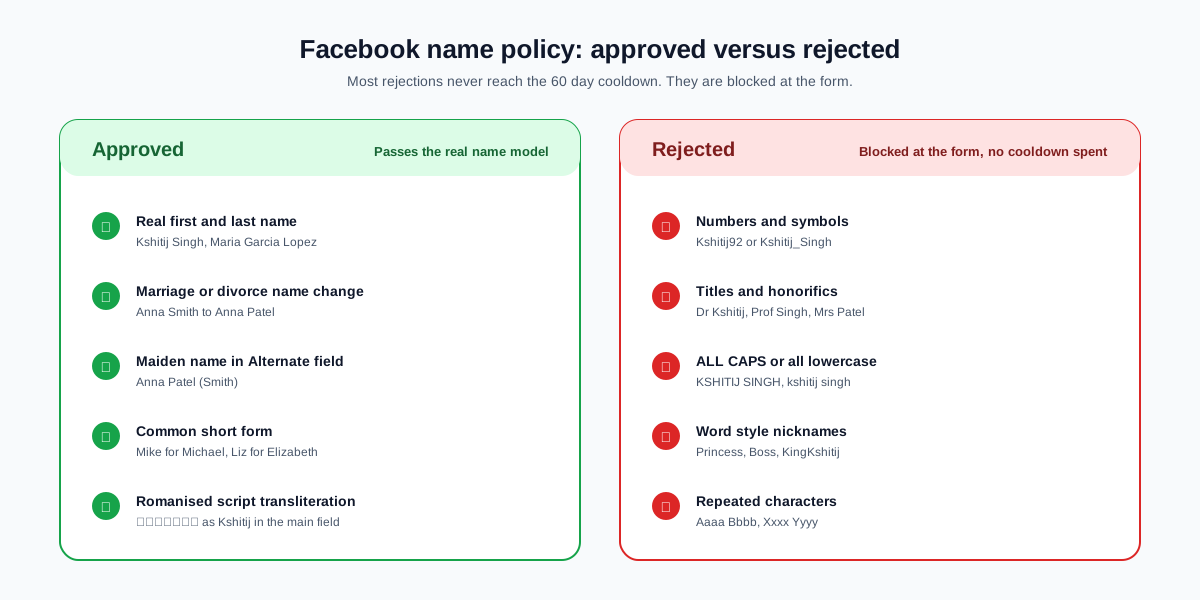
- Numbers and symbols get stripped at the form. Kshitij92 and Kshitij_Singh both bounce before the Review screen even loads.
- Titles and honorifics like Dr, Prof, Mr, Mrs, and Sir are rejected. Facebook treats them as occupational descriptors, not parts of a real name.
- Word style nicknames (Princess, Boss, KingKshitij) fail an automated check that pulls from a public name dictionary built across Meta's services.
- Unusual capitalisation like ALLCAPS, all lowercase, or alternating cAsE bounces back. The first letter of each name must be uppercase, the rest lower.
- Pen names and stage names in the main field get rejected. Move them into the Alternate name field below (see the next section).
Names that are rejected by the form do not consume the 60 day cooldown. The save never completes, so the clock does not start. You can keep retrying with a compliant variant on the same day.
The 60 day Facebook name change cooldown
Once a name change saves successfully, Facebook locks the Name field for 60 days. The Edit button greys out and the lock screen shows the exact date you can change it again. The cooldown protects against impersonation and identity drift, and Meta has confirmed it across every help center refresh since 2018.
The cooldown is per account, not per device. Changing the name on your phone and then trying to change it again from a desktop session a minute later hits the same lock. The countdown also pauses when an account is restricted for a community standards violation and resumes when the restriction ends.
If you need an emergency rename inside the 60 day window (a typo on your real name, a marriage, a legal name change), use the appeal flow at the bottom of the locked Name screen labelled Request a name change. Attach a government ID that matches the new name, and Meta typically reviews the case within 72 hours.
Adding a nickname or maiden name without burning the cooldown
The Alternate name field sits in the same Personal details screen, two rows below Name. Anything you enter there shows in parentheses next to your main name on the profile and in people search results, without touching the field that the 60 day cooldown locks.
The Alternate name field accepts up to 50 characters and supports most international scripts. It is the right shelf for four common cases.
- Nicknames that friends use to search you up. Birdy, KD, Big Mike all live here cleanly.
- Maiden names and former last names after marriage or divorce, so old friends still find you by the original spelling.
- Pen names and stage names for writers, performers, and creators who keep a public persona separate from a legal name.
- Romanised transliterations of a non Latin script main name, so the profile is reachable from both alphabets.
The Alternate name field has no cooldown. You can add, edit, or remove it as often as you like. It does not appear in tags or comments, only on the profile header and in search.
How a Facebook Page name change is different
The profile name flow above does not apply to a Facebook Page. Pages use a separate name editor at Page Settings, Page info, Name. The Page name cooldown is seven days, not 60, and the request is reviewed by a human before publishing. Pages can be renamed up to two times in a rolling twelve month window. Meta documents the rules in the Page name guidelines.
If you are renaming a Page as part of a broader rebrand, pair this guide with our walkthrough on how to delete a Facebook Page for the wind down case, and our piece on how to lock your Facebook profile for the personal profile privacy sweep that often follows.
What to do when a Facebook name change is rejected
A small share of name changes pass the automated form and still fail at the review stage, especially major renames that trigger ID verification. Three recovery paths cover almost every case.
Upload a government ID through the appeal screen
Meta surfaces a Confirm your identity card on the locked Name screen whenever a change is queued for review. Tap the card, pick the ID type (passport, driver's licence, national ID), and upload a clear photo of the front. The review window is one to three business days, and Meta deletes the ID copy after 30 days according to its ID retention policy.
Use the dedicated name mismatch form
If the appeal card never appears (a regional rollout gap, an account in a restricted state), the Confirm your name on Facebook form is the global fallback. The form accepts the same documents and routes to the same trust and safety team. Save the case number from the confirmation email so a follow up can reference it.
Wait out the cooldown and try a smaller edit
If the rejected change was a full overhaul (first and last name at once), Meta is more likely to approve a phased approach: edit the surname now, wait the 60 days, then edit the first name. Each save consumes one 60 day window, but the smaller deltas pass the real name model with fewer false positives.
How SocialCRM handles a Facebook name change
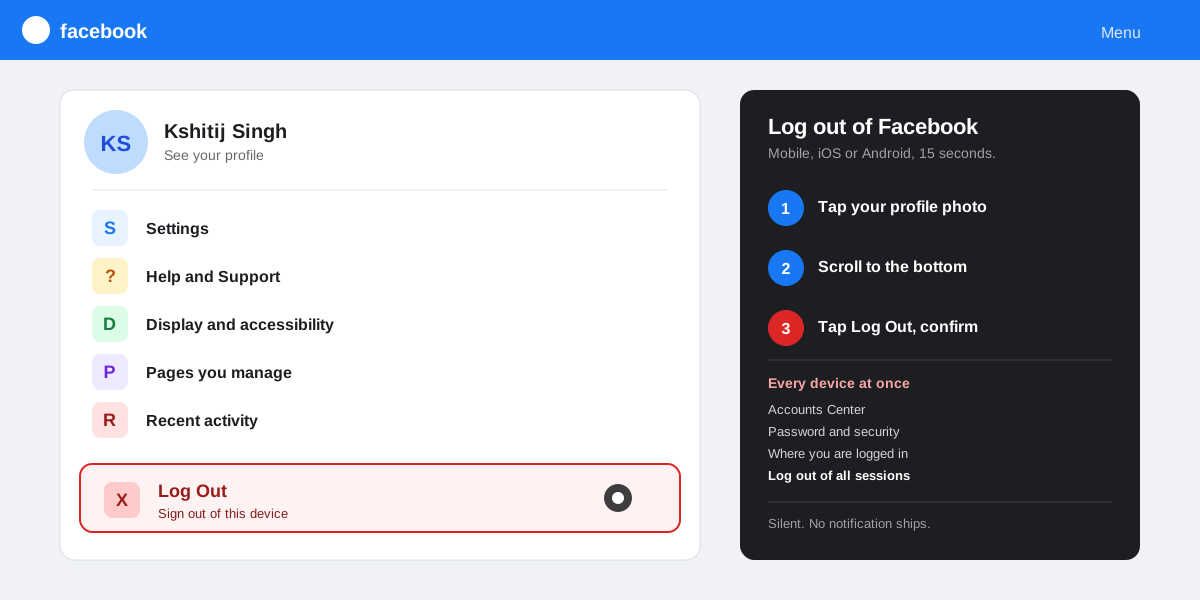
Renaming your personal profile does not interrupt your scheduling. The SocialCRM composer stores its connection to your Facebook Page using a server side Page token, not your personal profile name. Scheduled posts, drafts, and analytics keep flowing through the rename. If you also rename the Page, refresh the Page connection inside SocialCRM Settings to pull the new Page name into your dashboard. The same logic covers the security side workflows we walk through in how to log out of Facebook and the privacy side hygiene in how to unblock someone on Facebook.
FAQ
Why can I not change my name on Facebook right now?
The Name field is locked for 60 days after every successful save. Open the Name screen to read the exact unlock date. If the field is editable but the save keeps failing, the change is hitting the real name policy: strip numbers, symbols, titles, honorifics, ALLCAPS, and word style names, and move any nicknames or pen names into the Alternate name field.
How many times can I change my name on Facebook?
There is no hard yearly cap on personal profiles, but every change starts a 60 day cooldown. That works out to about six changes per year at the very most. Rapid repeated renames can also flag the account for trust and safety review, which slows future changes down further.
Does changing my name on Facebook notify friends?
No. Facebook does not push a notification, post on your timeline, or email anyone when you rename. Friends see the new name the next time your profile, a tagged photo, or a comment loads in their session. Some viewers do show a small Recently changed badge under the profile header for a few days, but most accounts will not.
Can I change my Facebook name to a nickname?
Only if the nickname looks like a real name. Common short forms (Mike for Michael, Liz for Elizabeth) pass the real name model and post fine. For anything stylised or symbolic, use the Alternate name field, which appears in parentheses on the profile and does not trigger the real name check.
How do I change my Facebook name back to my old name?
Open Settings, Personal details, Name and edit the fields to match the previous spelling. The 60 day cooldown still applies, so you can only reverse a rename once two months have passed. If the original change was made in error and the cooldown is still active, use the Request a name change appeal on the locked screen.
Why does Facebook keep changing my name to my legal name?
Meta sometimes auto corrects a name that the real name model flags as fake, after a friend report or a routine review. Submit a government ID through the Confirm your name form to lock the preferred spelling into the account. Once the account is verified, the auto correction stops.
TL;DR
- Mobile and desktop path: Settings and privacy, Settings, Personal details, Name. Edit, Review change, password, Save changes.
- 60 day cooldown after every save. The Edit button greys out and shows the next available date.
- Real name policy rejects numbers, symbols, titles, ALLCAPS, and word style names at the form. No cooldown is spent on a rejected attempt.
- Alternate name field holds nicknames, maiden names, and pen names with no cooldown and no review.
- Stuck on a rejection? Use the Confirm your name form with a government ID. Review takes one to three business days.