The short answer: the only native way to post anonymously on Facebook in 2026 is the Anonymous posts feature inside a Facebook Group, and only when the Group admin has turned it on. Your name and avatar are stripped from the public post, but the admins, the moderators, and Meta itself can still see who wrote it. Profiles, Pages, Marketplace listings, Stories, and comments outside of Groups all stay tied to your real-name Facebook account.
What Facebook means by an anonymous post
Facebook Anonymous posts are a Group composer feature Meta first rolled out to Health Support Groups in 2021 and opened to all Group categories through 2022. The setting replaces the author byline and avatar on a single Group post with the label Anonymous Member, so other members of the Group cannot see who wrote it. Likes, comments, and share counts behave the same as any other Group post. The anonymity is one-way and per-post: the author is hidden from peers, never from the Group admins and never from Meta. The official rollout note lives in Meta's Facebook Help Center article on Anonymous posts in Groups, which is the authoritative reference for every claim in this guide.
How to post anonymously in a Facebook Group
The composer flow is the same on iOS, Android, and the desktop web in the 2026 release. Two requirements have to be true before the Post Anonymously option appears in the composer.
- The Group has Anonymous posts enabled. Only an admin can flip the toggle, under Group settings, Member controls, Anonymous posts. If the option is off, no member sees the composer affordance and the only remedy is to ask an admin in writing.
- You are a current member in good standing. Suspended members, pending join requests, and members who have hit a recent posting strike see the regular composer with no Anonymous option, even in Groups where the feature is on.
The four taps, in order
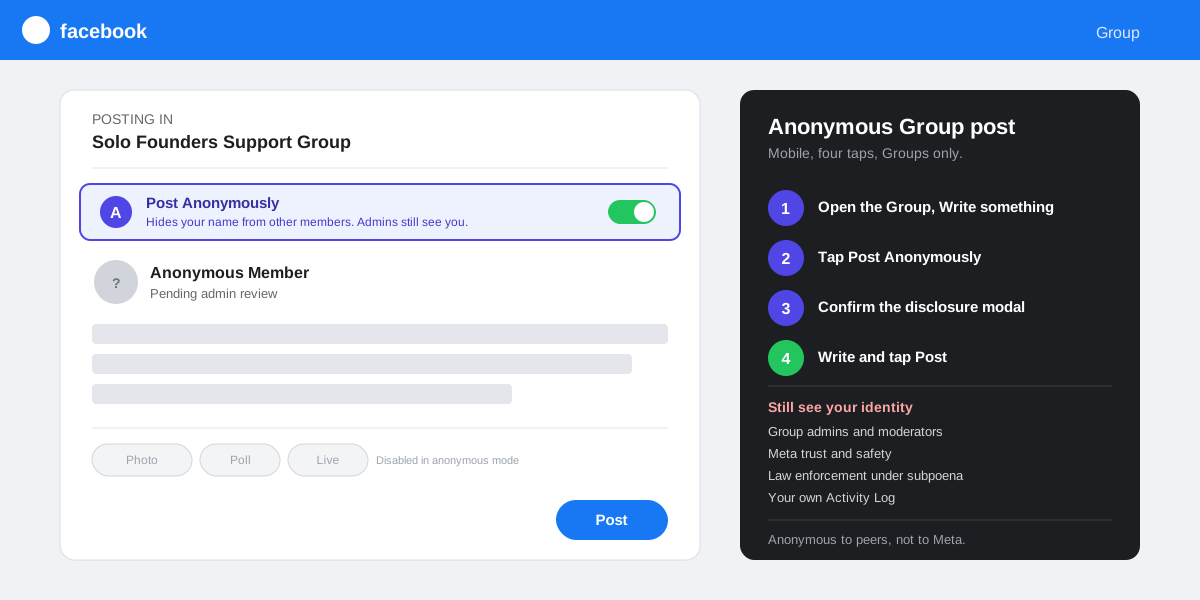
- Open the Group from your Groups tab or the search bar and tap Write something at the top of the feed. The composer card opens with your name and avatar at the top as the default byline.
- Tap Post Anonymously. The link sits at the top of the composer right under your byline, marked with a small mask icon. Your byline flips to Anonymous Member and your avatar greys out. If you do not see the link, the admin has not enabled anonymous posting in this Group.
- Confirm the disclosure modal. Facebook shows a one-screen warning that explains who can still see your identity (admins, moderators, Meta) and that the post will not appear on your timeline. Tap Continue to accept.
- Write the post and tap Post. The post lands in the Group feed with Anonymous Member as the byline, awaiting admin review if the Group requires it. Most Groups gate anonymous posts behind manual admin approval, so expect a delay of minutes to days before peers see the post.
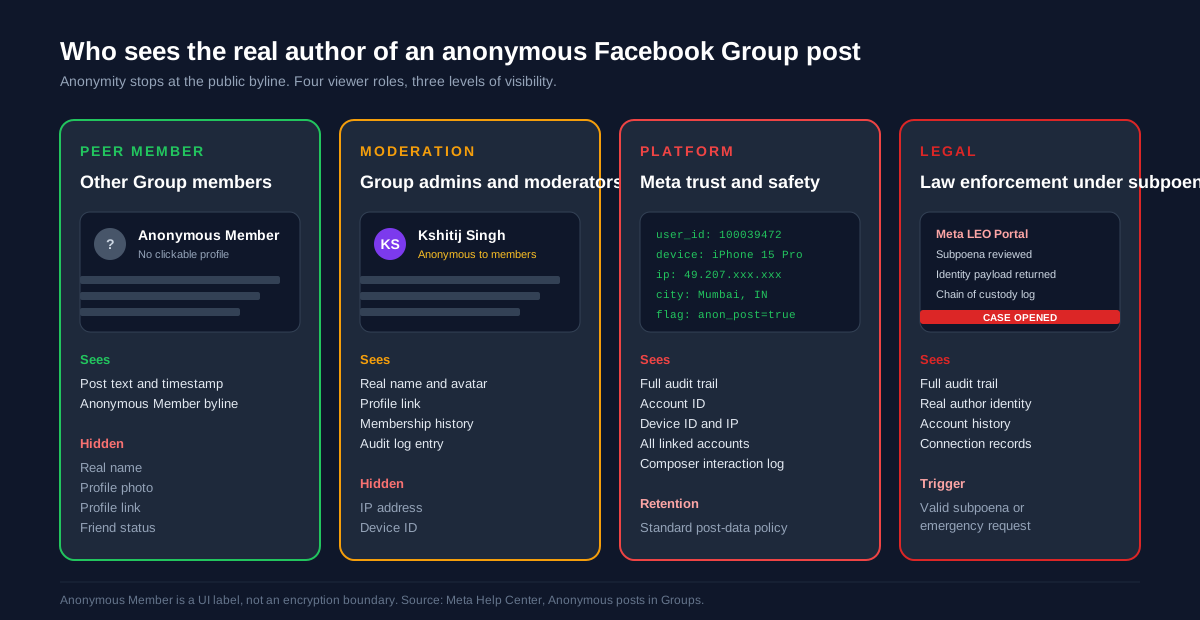
Who can still see your identity behind an anonymous post
Anonymity on a Facebook Group post stops at the public byline. Five parties always retain full visibility into the real author, and the disclosure modal lists most of them before you publish. Treat anonymous posts as confidential to your peer audience, not secret in any absolute sense.
- Group admins and moderators see the original author on every anonymous post, with the real name, profile photo, and a small Anonymous to members badge. Admin tools (Member requests, Reported content, the audit log) all surface the real account.
- Meta trust and safety retains the full audit trail (account ID, device ID, IP at the time of posting) for every Group post, anonymous or not. The retention window matches Meta's general post-data policy and is referenced in the Misrepresentation chapter of the Community Standards.
- Law enforcement under a valid subpoena can request the audit trail through Meta's Law Enforcement Online Requests portal. The Anonymous Member byline is a UI label, not an encryption boundary. Whistleblowing or evidence sharing requires a tool that actually severs the link to your identity, not a Facebook anonymous post.
- Your own Activity Log records every anonymous post you have made, by Group, with the full original text and a flag for the anonymous flow. Anyone who can reach your logged-in Facebook session can read the list.
- Other anonymous authors in the same Group cannot see each other's identities, but commenting on an anonymous post under your own name links the comment to you and creates a circumstantial trail if you are also the author.
What you cannot post anonymously on Facebook
Anonymous posting is scoped tightly to the Groups composer. Every other Facebook surface ties the post, comment, or listing to the underlying account, and the platform has shipped no anonymous toggle on any of them through the 2026 release. Knowing the boundary keeps you from leaking your identity by accident.
Your profile timeline and Stories
Profile posts, life events, Stories, and Reels all render with your name, avatar, and a clickable link back to your full profile. There is no privacy setting and no composer option that hides the author. The only way to keep a profile post off public eyes is the standard audience selector (Public, Friends, Only me, Custom), which limits who can see the post but never strips the byline.
Pages, Marketplace, and Events
A Page post carries the Page name and Page avatar as the byline, which is a different identity than your personal profile. Posting as a Page hides your personal profile from peer viewers, but every Page admin shows up by name inside Page Insights, and Meta can map a Page back to its admin accounts under the same audit policy that covers Groups. Marketplace listings always carry your real profile and a clickable link to it. Anonymous listings violate Meta's marketplace policy and get removed within hours.
Comments and reactions
Comments under any post (anonymous Group post included) always carry the commenter's real-name profile. The anonymous toggle only applies to the parent post. A comment under an anonymous post is the most common way people accidentally out themselves as the original author, because the comment timestamp and tone often cluster suspiciously close to the parent.
The four scams that promise anonymous Facebook posting
Search results for anonymous Facebook posting are dominated by tools that do not work and are not safe. Four scam patterns cover almost every result, and the common thread is that they all need credentials, permissions, or money for a feature Meta has never shipped. The same pattern shows up across every platform-privacy myth we cover in our piece on how to lock your Facebook profile, where third-party lock apps are equally dishonest.
- Browser extensions claiming Anonymous Mode. Install requires Read and change all your data on facebook.com, which is the full account takeover permission. The extension posts under a stub throwaway account it controls, then mines your session cookies for credential resale. Detection ranges from 24 hours to a permanent ban.
- Anonymous Facebook posting websites. You hand over your email and password to a third-party form that promises to ship the post on your behalf without a byline. The credentials are sold on the dark web within hours. The site usually never posts anything; the value is the password.
- Paid services charging $5 to $50 per post. The seller publishes the text from one of dozens of throwaway accounts. Reach is zero because throwaway accounts have no audience, and Meta deletes the post inside an hour for community standards violations. The buyer rarely receives proof of posting.
- WhatsApp and Telegram groups promising the same. The operator collects payment via UPI, PayPal, or crypto, posts a screenshot of a fake confirmation, and blocks the buyer. The pattern is identical to follower-purchase scams we documented in the cheap Instagram followers breakdown.
The three legitimate workarounds
If Group anonymous posts do not fit the use case, three legitimate workarounds let you publish without a personal byline. None of them are truly anonymous (Meta can always map the account back to the human), but each one separates the post from your everyday profile.
Post as a Facebook Page
Create a Page with a topic-led name (a project, a product, an alias persona) and post from it. Other users see the Page name and Page avatar; your personal profile stays off the post. The handoff is one tap on the composer: while logged in as your profile, tap the byline at the top of the composer and pick Post as Page from the dropdown. The Page route is the cleanest pseudonym layer on Facebook and the one Meta itself supports without policy friction. When you are ready to wind a Page down, follow our walkthrough on how to delete a Facebook Page for the 14-day grace window and recovery routes.
Submit to a Confessions Page
Confessions Pages (a fixture on university and workplace Facebook communities since the early 2010s) accept anonymous submissions through a Google Form or Typeform, moderate them, and post the curated entries on the Page wall. The Page admin sees your form response, which can include your IP address depending on the form settings, so this is anonymity to the audience and not to the admin. Confessions Pages are governed by the host Page's own moderation rules, and Meta retains its usual account-level audit trail on the admin who pressed Publish, not on the human submitter.
A second account on a permitted alias
Meta's real-name policy allows secondary accounts in a narrow set of cases (a stage name, a pen name, or a professional alias that can be documented). The account carries the alias as the public name and posts under that name on every surface, the same as a regular profile. Meta still maps the alias account to the underlying person and may request government ID if the alias is flagged. The policy is documented in the Facebook Help Center article on the name on your profile. Aliases without a legitimate underlying use case fall under Misrepresentation and are removed.
How to schedule anonymous Group posts through SocialCRM
SocialCRM connects to a Facebook Group with the same Meta API access scope a human admin uses, so anonymous Group posts behave through the API exactly the way they do in the native composer. Inside the SocialCRM composer, pick a Group as the target, flip the Anonymous toggle on the Facebook target row, and the scheduler ships the post with the same Anonymous Member byline at the configured time. The toggle is only visible when the connected Group has Anonymous posts enabled on Meta's side, the same constraint that governs the native flow.
If you are running a privacy sweep on the same account, pair this guide with our walkthrough on how to log out of Facebook across every device, and the unblock someone on Facebook guide for the relationship side of the audit. The three chores together close most of the loose ends on a personal Facebook account in under fifteen minutes.
FAQ
Can I post anonymously on my own Facebook timeline?
No. Facebook has never offered an anonymous toggle on personal timeline posts and shipped no such feature in the 2026 release. Every timeline post, Story, Reel, and photo carries your real-name profile as the byline. The only privacy controls on a timeline post are the audience selector (Public, Friends, Only me, Custom) and the manual delete option.
Will the Group admin know I wrote the anonymous post?
Yes. Group admins and moderators always see the real author of every anonymous post inside admin tools, with the real name, profile photo, and a small Anonymous to members badge next to the byline. Anonymity is one-way: opaque to peer members, fully transparent to the moderation layer. Treat the feature as confidentiality toward your peers, not secrecy from the people who run the Group.
Why is the Post Anonymously option missing from my Group composer?
Three causes account for almost every missing option. The Group admin has not enabled Anonymous posts under Group settings, Member controls. You are a new member still inside the post probation window some Groups apply to first-time posters. Your app is more than 12 months old and is missing the 2024 composer refresh; an App Store or Play Store update fixes the third case.
Are anonymous Facebook posting apps safe?
No. Every browser extension, website, and paid service that promises anonymous posting on your Facebook timeline is a scam, malware loader, or credential trap. Meta has never shipped an anonymous toggle outside Groups, so any third-party tool advertising the feature is selling a product that does not exist. Installing one usually ends in account compromise, a permanent ban, or both.
Can Meta or the police trace an anonymous Facebook post?
Yes. Meta retains the full audit trail (account ID, device ID, IP at posting time) for every Group post, anonymous or not. Law enforcement that clears a subpoena through Meta's Law Enforcement Online Requests portal receives the audit trail and the real author identity. Anonymous posts are a UI label that hides identity from peers, not an encryption boundary that hides it from Meta or any legal requestor.
What is the difference between anonymous and pseudonymous on Facebook?
Anonymous means no visible byline on the post (Anonymous Member), and only the Groups composer supports it. Pseudonymous means a public alias that the platform treats as your name (a pen name, a stage name, a project Page name). Pseudonymous identities ship on Pages and on the narrow alias categories Meta documents in the real-name policy. Posting as a Page is the most reliable pseudonym layer Facebook offers.
TL;DR
- Only Groups support anonymous posts. The admin must enable Anonymous posts under Group settings, Member controls, and the composer flow is Write something, Post Anonymously, Continue, Post.
- Admins always see you. Anonymous Member hides the byline from peers. Group admins, moderators, Meta, and any legal requestor that clears a subpoena always see the real author.
- Nothing else on Facebook is anonymous. Timeline, Stories, Reels, Pages, Marketplace, Events, and comments all carry your real-name profile, with no composer override available.
- Skip every third-party anonymous poster. Browser extensions, websites, and paid services that promise the feature are scams. Meta has never shipped a non-Group anonymous toggle.
- Legit workarounds: post as a Page, submit to a Confessions Page, or run a documented alias account under Meta's real-name policy.