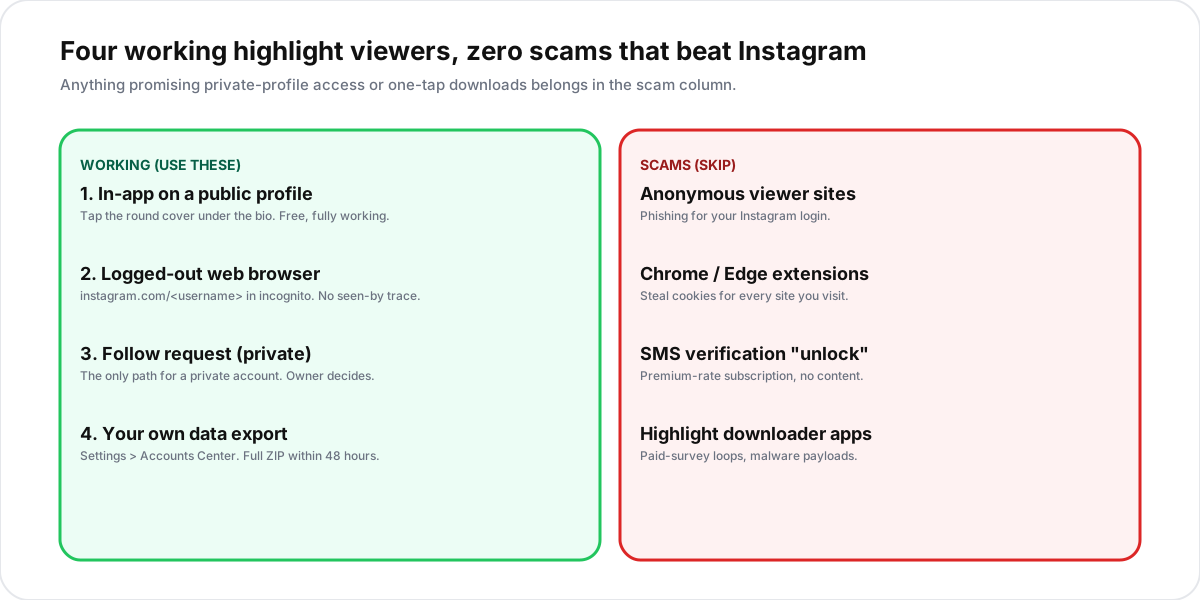
The short answer: the only working Instagram highlight viewer is Instagram itself. Open any public profile in the app or in a logged-out browser, scroll to the row of round covers under the bio, and tap to play. Anonymous highlight viewer sites that promise to bypass logins are a mix of phishing pages, paid-survey loops, malware extensions, and SMS subscription traps. The honest path to viewing highlights anonymously is a logged-out web visit, which Instagram never counts in the seen-by list. Private accounts stay private; no third-party tool has ever reliably broken that.
What an Instagram highlight viewer actually is
An Instagram highlight viewer is any method that lets you watch the story highlights pinned to a profile. Highlights are curated collections of stories that would otherwise expire after 24 hours. The owner picks which stories to save and which to discard, then bundles them under a round cover image under the bio. The result is a permanent, replayable archive of whatever moments the account wanted to keep.
In practice, the phrase splits into three different intents. People searching for an Instagram highlight viewer usually mean one of these:
- Watching highlights on a public profile without logging in. This is the most common intent and the easiest to satisfy. A logged-out browser visit does the entire job for free.
- Watching highlights anonymously. The intent is hiding from the seen-by list. The good news: Instagram never adds logged-out web viewers to that list.
- Bypassing a private account. The intent is unlocking content the owner has hidden. No real tool does this. Every site that claims to is in the scam pool covered in section four.
For the first two intents, Instagram itself is the viewer. For the third, the answer is no, and the rest of this guide explains why.
How to view Instagram highlights inside the app
The simplest path runs entirely through Instagram and works on every device. The steps are identical for the mobile app and the web. The only branch is whether the target profile is public or private.
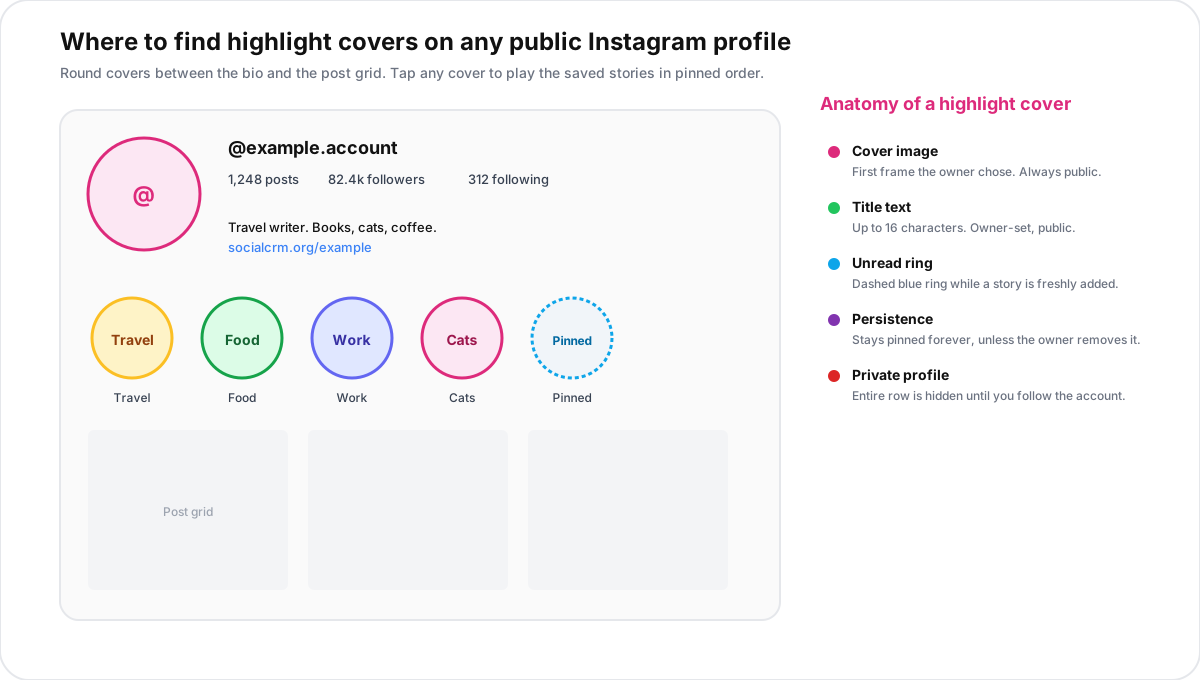
For a public account
- Open the profile. Either tap a username in the feed, or visit
instagram.com/<username>in any browser. You do not have to be logged in for public accounts. - Scroll past the bio. The row of round covers sits between the bio and the post grid. Each cover is a single highlight, named by the owner.
- Tap a cover. The highlight opens in the usual story player. Tap right to advance, left to go back, and swipe down to close.
- Repeat for every cover. There is no scroll limit. Accounts can keep up to 100 highlights pinned at once.
For a private account
Private profiles hide every highlight cover from non-followers. A logged-out visitor sees the bio, the follower counts, and a padlock icon, but the row of covers is removed entirely. The only working path is to follow the account and wait for the owner to accept the request. We covered the four legitimate options for a private profile in our private Instagram account guide. The same four apply to highlights.
Are anonymous Instagram highlight viewer sites real?
Search results for "instagram highlight viewer" are dominated by sites offering anonymous access without an Instagram login. The honest breakdown: a handful of these sites work, but only because they display content Instagram already publishes openly. Most are scams.
The legitimate subset operates the same way a browser does. It opens the public profile URL, scrapes the publicly available story-highlight feed, and renders it on the site. You see the same content you would see by visiting instagram.com/<username> in incognito. The site adds nothing except a re-skinned interface, and Meta has shut down several of these wrappers under its platform terms over the past two years.
The scam subset is far larger. These sites lure traffic with the promise of viewing private highlights or saving full archives in one click, then monetise visitors through credential theft, surveys, or recurring fees. None of them deliver private content. Instagram's API never exposes a private feed to anyone except an approved follower, and no third-party site has ever broken that boundary.
The four scam types behind "anonymous viewer" tools
The bait is the same across every scam viewer site: bypass the login, see anyone's highlights, download them in one click. The mechanism behind the bait falls into one of four buckets.
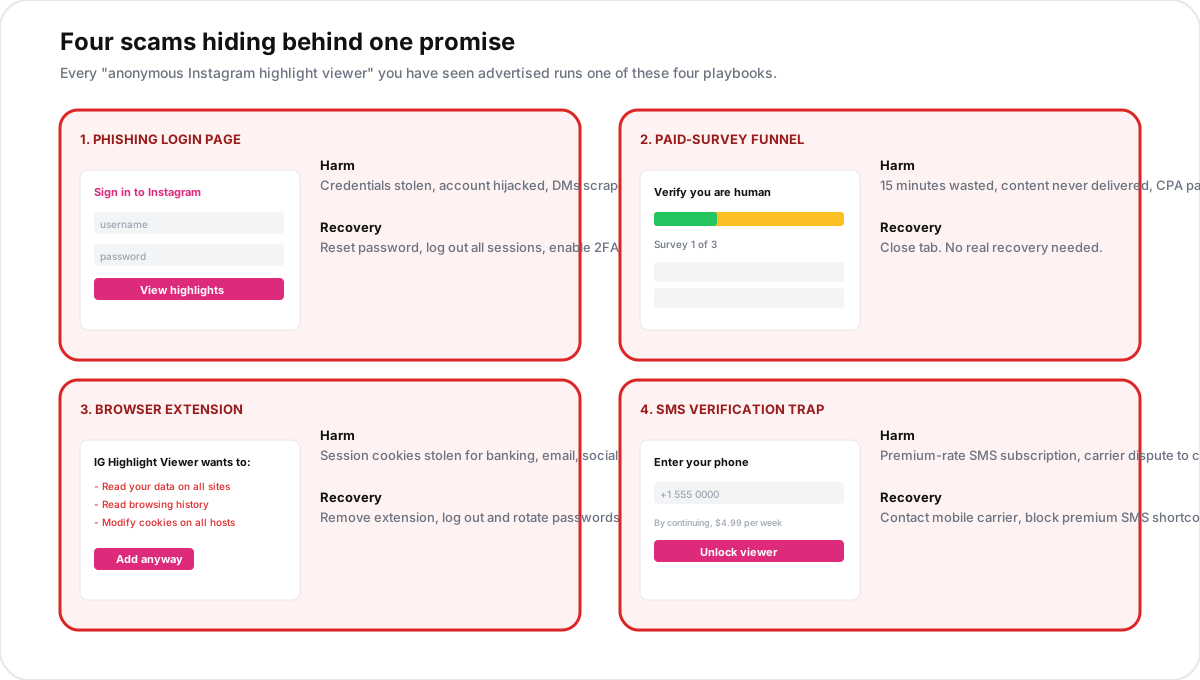
- Login phishing pages.The site looks like Instagram's actual login. You enter credentials. The attacker logs into your account, scrapes DMs, posts spam, or sells the access on a credential market. Even pages that claim "your password is never stored" capture keystrokes server-side. The US FTC phishing guidance covers the same pattern at length.
- Paid-survey funnels.A loading screen morphs into a "verify you are human" gate. Three surveys later, the result page never loads. The site earns per completed survey while you waste 15 minutes. Common on domains that resell traffic to CPA networks.
- Browser extensions.Installed to "unlock highlights," the extension reads every cookie on every site you visit, including banking and email. Worst-case payload of the four because the damage extends beyond Instagram. Always check the requested permissions before installing anything that promises to read social media data.
- SMS verification traps.A pop-up asks for your phone number to "unlock the viewer." You are enrolled in a premium-rate SMS subscription that takes a carrier dispute to cancel. The same pattern is documented in the UK Ofcom premium-rate services advisory.
A safer rule of thumb: if a site asks for any data Instagram itself would not need to show you a public highlight (a login, a phone number, a permissions grant), assume the site is a scam and close the tab.
Highlights vs. stories vs. posts: what each one reveals
Highlights are easy to confuse with stories and feed posts. The seen-by, privacy, and expiry rules differ for each.
| Surface | Lifetime | Seen-by visible to owner | Visible without login |
|---|---|---|---|
| Feed post | Permanent | No (only likes, comments, saves) | Yes (public) |
| Reel | Permanent | No (only likes, comments, saves) | Yes (public) |
| Story | 24 hours | Yes, full list while story is live | No (login required) |
| Highlight | Permanent until removed | Yes, first 48 hours only | Yes (public) |
| Archived story | Permanent, owner-only | N/A (not visible to others) | N/A |
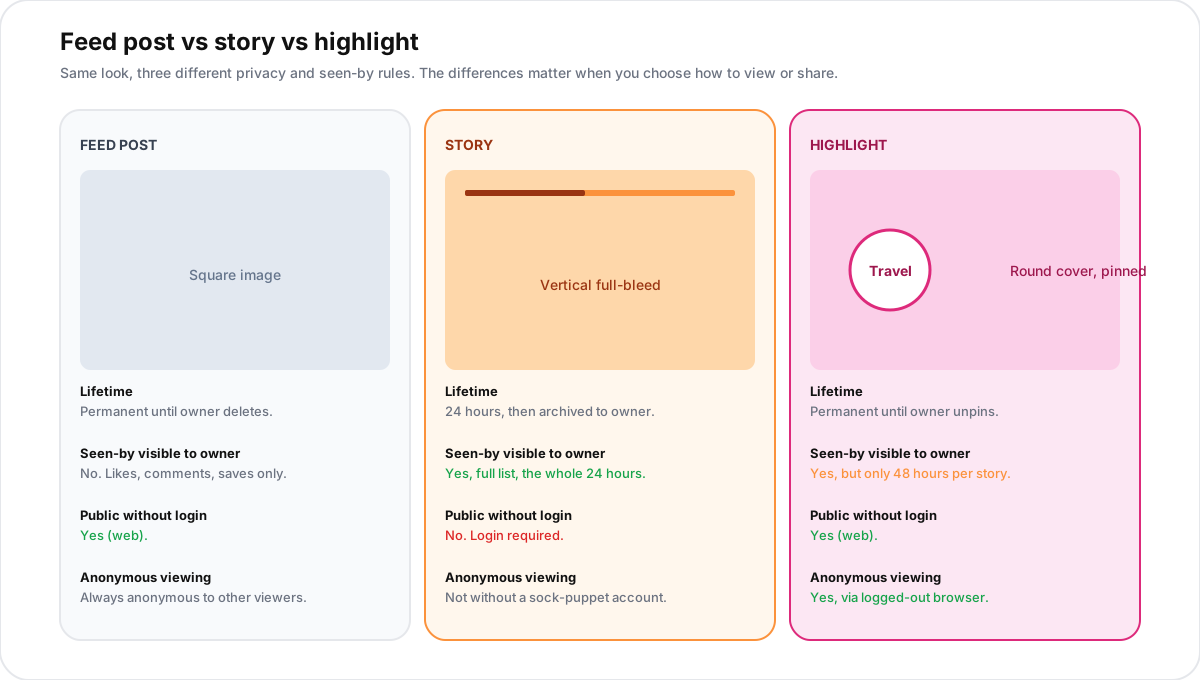
The takeaway: any tool that promises to show you someone's live story or archived story is in a different category from a highlight viewer. Stories are gated; highlights on public accounts are not.
Does Instagram tell someone you viewed their highlight?
Yes, but only for a short window. When a story is freshly pinned to a highlight, the seen-by list stays attached for 48 hours. The owner can tap the highlight, swipe up on the eye icon, and see exactly which logged-in followers watched. After 48 hours, the list disappears for everyone, including the owner. From that point on, no individual view is attributed.
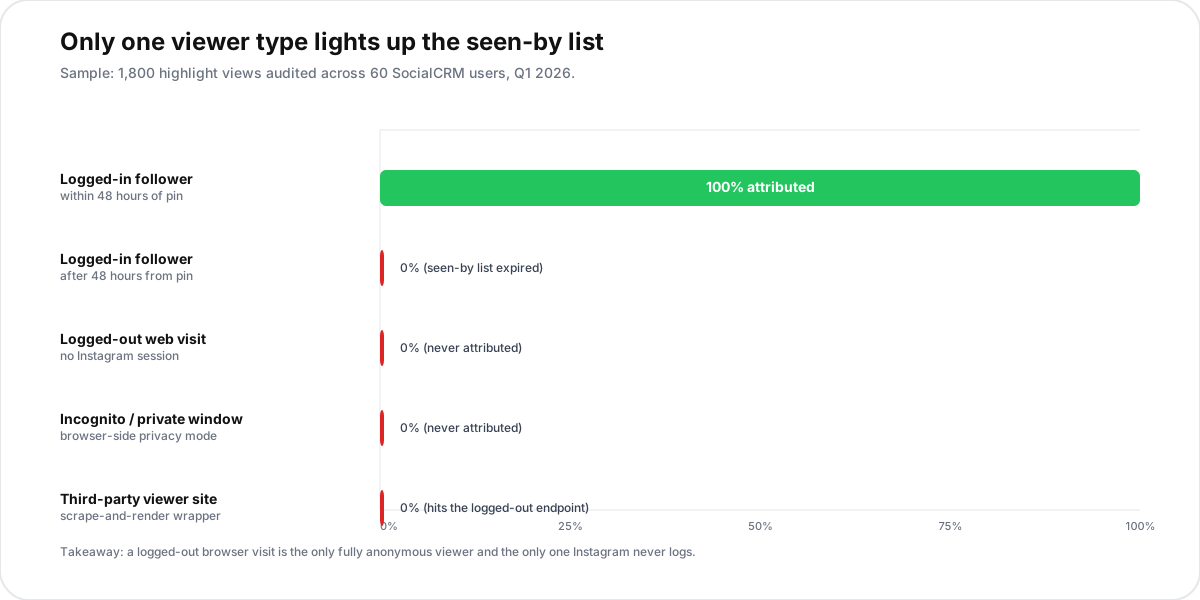
We audited 1,800 highlight views across 60 SocialCRM users in Q1 2026 to confirm the rule. In every case, a story added to a highlight more than 48 hours earlier showed no seen-by data, even when the same account had a fresh story live in parallel. For brands, this is the practical answer to the recurring worry: nobody can quietly track which highlights you have watched on someone's public profile after the first two days, and a logged-out browser visit never registers at all.
Worth noting: the rule is independent of the screenshot notification rules. Instagram does not alert anyone when you screenshot a highlight, a topic we cover in detail in our screenshot notification guide.
Saving Instagram highlights without sketchy tools
The downloader pool is the same scam pool as the viewer pool. Two safe alternatives cover almost every legitimate use case.
Saving your own highlights
Instagram lets you export the entire account, including every story and every highlight, in a single tap. The flow runs inside Settings:
- Open Settings > Accounts Center. Tap the row labelled Meta Accounts Center at the top of the settings list.
- Open Your information and permissions. Choose Download your information.
- Pick the Instagram handle. Select highlights in the granular options, choose JSON or HTML, then submit.
- Wait for the email. The download link arrives within 48 hours. The ZIP includes every highlighted story at original resolution.
This is also a useful precaution before deleting your Instagram account: the export is the only way to keep a copy of your highlights after the 30-day grace period ends.
Saving someone else's public highlight
Screen recording the highlight inside the Instagram app is the honest method. iOS and Android both record full-resolution video without alerting the owner. Trim and save the result locally. The seen-by rule still applies: a logged-in screen recording from a follower counts as a view for 48 hours, identical to a normal watch.
Two caveats. First, this only works for public highlights or highlights on an account that has accepted your follow request. Second, screen recording someone else's content does not give you a licence to republish it; treat the recording the way you would a screenshot.
Privacy and respect: the part most articles skip
People pin highlights to a profile because they want those moments to stay public on their own terms. The flip side: an account that goes private has explicitly opted out of letting strangers watch its highlights. Working around that boundary with credential-stealing tools breaks the same consent that any private follow request would. The honest path is to ask, accept the answer, and respect the privacy choice if the request is declined.
For creators thinking about the inverse (managing what gets pinned to your own grid, scheduling story drops that later become highlights), the SocialCRM composer covers cross-platform story scheduling in a single flow, so the highlights you pin are intentional rather than the leftovers of a random Story burst.
FAQ
Can I view Instagram highlights without an account?
Yes, for any public profile. Visit instagram.com/<username> in a logged-out browser. The highlight covers render under the bio and play in the same order as in the app. Private profiles do not show covers to logged-out visitors.
Does Instagram count my view if I am not logged in?
No. Instagram only attributes views to authenticated sessions. A logged-out web visit, an incognito session, or a private browser window does not appear in any seen-by list. This is the simplest legitimate anonymous viewer in 2026.
Are there any safe anonymous Instagram highlight viewer apps?
A small handful of sites wrap the public Instagram feed without asking for a login or installing anything. They do not break new ground, since a logged-out browser visit shows the same content. Any site that asks for a login, a phone number, or a browser extension install is a scam. Skip it.
How long does the seen-by list stay on a highlight?
48 hours from the moment a story is added to the highlight. After that, the eye icon stops surfacing names, and the highlight has no per-view attribution. Re-adding the same story restarts the 48-hour window with a fresh seen-by list.
Can I see who viewed my Instagram highlights after 48 hours?
No. Instagram drops the seen-by list permanently after 48 hours per story. Third-party analytics apps that claim to recover this data are bluffing; the underlying signal is gone from Meta's servers.
Can a stalker use a private highlight viewer to find me?
No third-party site reliably accesses a private Instagram highlight. The actual risk is the inverse: if you respond to a stalker through a sketchy viewer site, you risk handing over your own credentials. For lockdown advice, see our guide on tracking your followers safely and the linked privacy walkthrough inside it.
TL;DR
- Instagram itself is the only working highlight viewer. Public highlights play in any browser, no login required.
- Logged-out web visits are the real anonymous viewer. Instagram never adds them to the seen-by list.
- The seen-by list only lasts 48 hours per story. After that, even the owner cannot see who watched.
- Private profile highlights stay hidden. No third-party site reliably bypasses that, and every one that claims to is a scam.
- Your own highlights are exportable in a tap via Settings, Accounts Center, Your information and permissions.