The short answer: to repost a story on Instagram in 2026, open the DM Instagram sends you when someone tags you with a mention sticker, tap Add this to your story, customize with a sticker or thank-you, and share. If you were not tagged, the polite path is to screenshot the story, DM the creator for permission, and post with an @mention credit. Reposting your own old story from the Archive is one tap, and sharing any feed post or reel to your story uses the paper-plane Sharebutton. Third-party repost apps that ask for your password are a credential trap and break Meta's terms.
How to repost an Instagram story you were tagged in
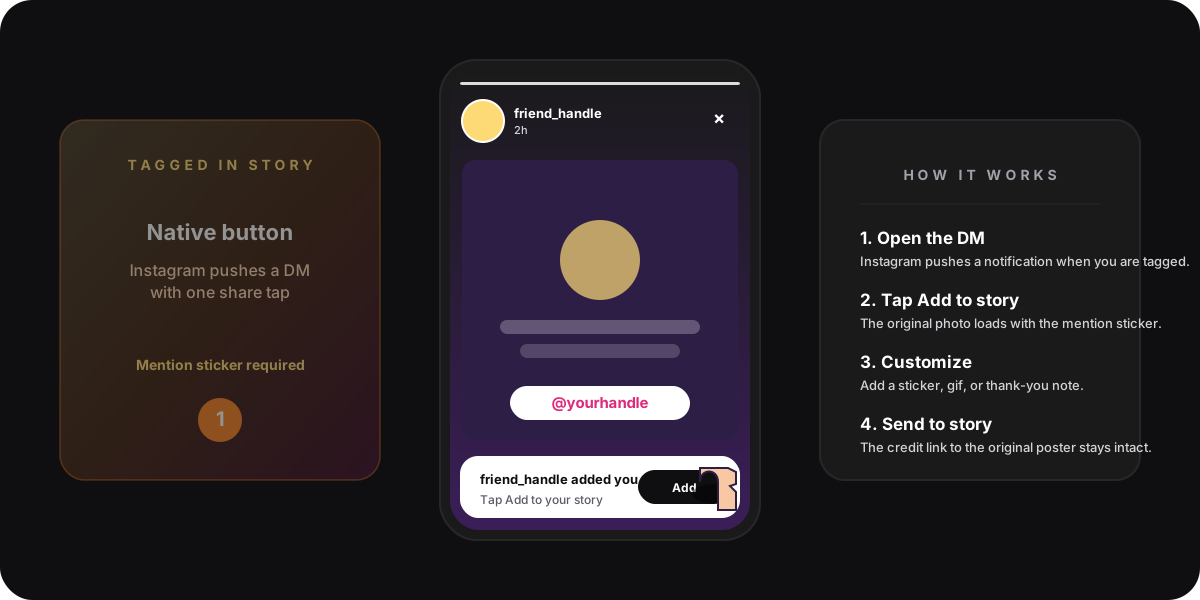
The simplest case is the most common one: a friend or a brand posted a story and pinned a mention sticker with your handle on it. Instagram pushes a DM to your inbox the moment that story goes live, and inside the DM is the one-tap repost button. The flow is identical on iOS, Android, and the mobile web.
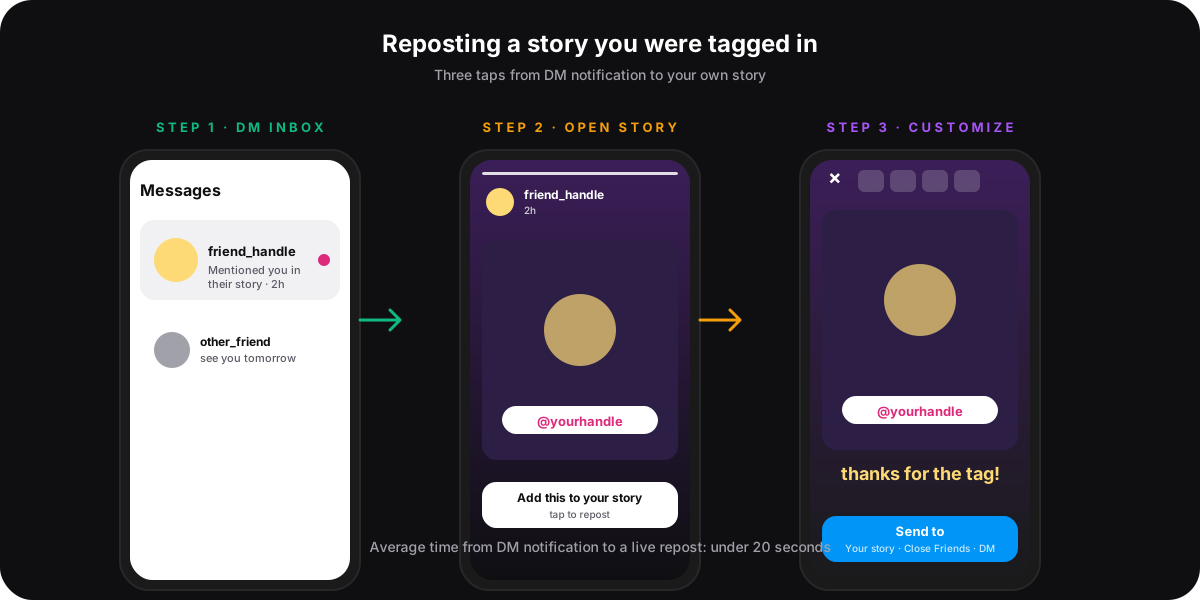
- Open the Instagram app and tap the paper-plane icon in the top-right corner to enter Direct.
- Find the thread labelled Mentioned you in their story. It sits at the top of the inbox while the story is still live (24 hours from the original post).
- Tap the thread. The story preview loads with a floating white button at the bottom: Add this to your story.
- Tap the button. Instagram opens the story editor with the original photo, the friend's mention sticker, and a subtle credit link already in place.
- Customize. Add a sticker, gif, hand-drawn line, or a short caption like "thank you". Resize the mention sticker if it covers something important, but do not delete it.
- Tap Send to, choose Your story, Close Friends, or a specific DM, and publish.
The original poster gets a small notification: so-and-so added your story to theirs. That is the feedback loop Instagram designed the mention-sticker repost flow around, and it is why creators like the feature even though it inflates story view counts. According to Instagram's official mentions help page, a tag with a public mention sticker is the only condition for the DM share button to appear.
How to repost a story you were not tagged in
Instagram does not show a native repost button on stories that do not mention you. There is no hidden setting; the feature was deliberately scoped to tagged content so creators retain control over what gets reshared. If you want to put someone else's story on your own without a mention, the path is manual, and it goes through permission first.
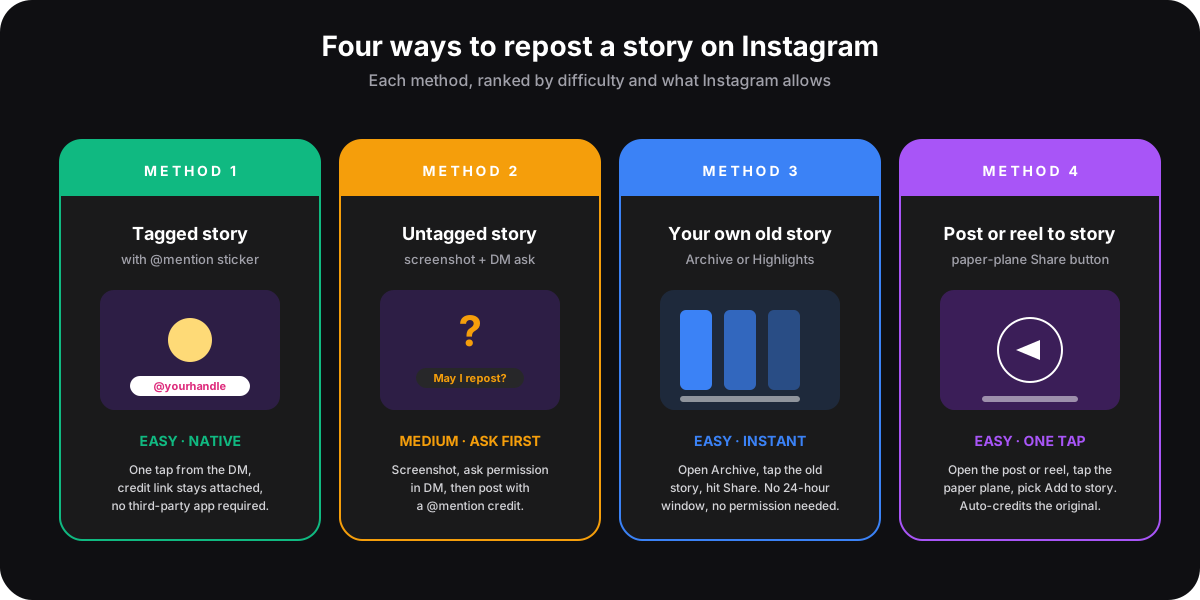
- Screenshot the story. Open the story on your phone, press the volume-down plus power buttons (iOS) or side plus volume-down (most Android phones). Instagram does not notify the poster on a story screenshot in 2026. That rule is the same one we cover in our screenshot notification guide.
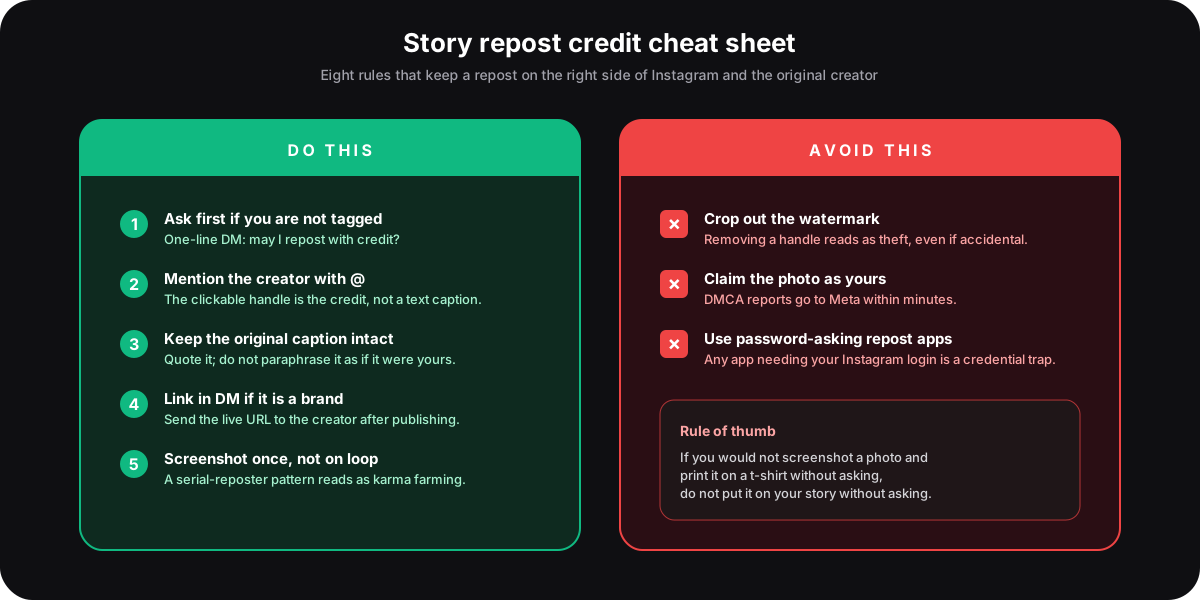
- DM the creator with a one-line ask. "Hey, loved this story, may I repost with credit?" works. Wait for the reply. A green light in writing is what protects the repost if the creator changes their mind a week later.
- Open the story editor. From your profile, tap your avatar to compose a new story, then pick the screenshot from your gallery.
- Add an @mention stickerwith the creator's handle. The clickable mention is the credit; a typed handle in a caption is not enough because the algorithm does not register it as an attribution signal.
- Crop tightlyso the screenshot does not show your phone's status bar, and avoid blurring or removing any watermark the creator had on the original. Publish.
Some creators publish a blanket "reposts welcome with credit" line in their bio or a recent story highlight, which removes step 2. The Instagram bio formula we use for creator accounts puts that policy on the second line for accounts that get reposted weekly. If you cannot find an explicit policy, treat silence as no.
How to repost your own old Instagram story
Stories disappear from your profile after 24 hours, but Instagram saves every one of yours to a private archive unless you turned the feature off. Reposting your own old story to a new 24-hour window is one of the lowest-friction moves on the platform, and it is the right pattern for evergreen content like a sale announcement or a customer testimonial.
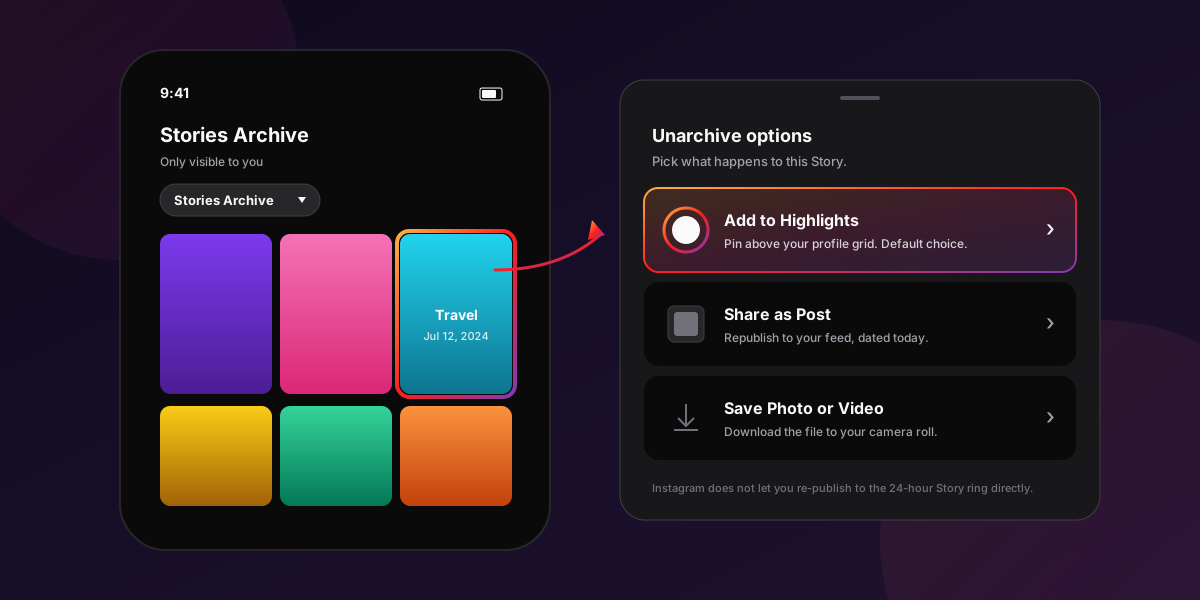
- Open your profile, tap the three-line menu in the top-right, and pick Archive.
- Switch the dropdown at the top to Stories Archive. Instagram sorts by date, newest first.
- Tap the story you want to repost. It plays as if it were live.
- Tap Share at the bottom of the screen, then Share as Story. Instagram opens the editor with the original photo, stickers, and any music you had on the first publish.
- Edit if you want to update a date, change a sticker, or add a fresh sale code. Tap Your story to ship.
The same archive feeds Instagram Highlights, the named story collections that sit above your grid. Tap New above the Highlights row to pull any archived story into a permanent highlight bucket; pinning a story there is the closest Instagram has to an evergreen story format. If you publish two or three highlights per month, the peak posting windows for your audience still apply because Highlights load in order of recent activity on the profile.
How to share a post or reel to your story
Reposting a feed post or reel to your story is a different mechanic with its own one-tap shortcut. Any public post or reel ships an Add to story action under the paper-plane icon, and Instagram auto-credits the original with a clickable handle and a follow link.
- Open the public feed post or reel you want to share.
- Tap the paper-plane icon below the photo or video. A share sheet slides up.
- Pick Add post to story (for feed) or Add reel to story. Instagram drops a styled card of the original onto the story editor with the poster's handle already on it.
- Customize freely. You can move the card, scale it, change the background colour by pinching out, or pin a sticker next to it.
- Tap Send to, then Your story.
Posts that are set to private, or accounts that turned off Allow resharing to stories in their privacy settings, will not show the option at all. That is a creator-side toggle, not a bug. If you publish at scale across Instagram, Threads, X, and LinkedIn, the SocialCRM workflow handles the cross-posting and scheduling on the publishing side, and the in-app story share is what you reach for on the engagement side.
Why the repost button is missing (troubleshooting)
Most missing-repost-button reports come down to one of five causes, each with a quick fix. Work through them in order.
- No mention sticker on the original. A tag in the caption is not enough. Only the visual mention sticker triggers the DM share. Ask the poster to re-share with the sticker, or use the screenshot path above.
- The story is older than 24 hours. The DM thread expires when the source story does. Past that window, the repost ship has sailed; the creator would need to re-post and re-tag.
- The original account is private and you do not follow them. Private-account stories can be mention-shared only between mutual followers. Follow first, or ask the poster to share via DM if they will not approve.
- Your app version is more than a few months old. Instagram rolls the share UI through staged releases. Update from the App Store or Play Store, then force-quit and reopen.
- The poster turned off resharing in their privacy settings. Settings, Privacy, Story, Allow resharing as a story can be flipped off per account. That is final on their end; respect it.
The credit rules every story repost should follow
Repost etiquette is not a vibe; it is a small set of rules that keep your account on the right side of Meta's intellectual-property policy and the creators you depend on. Repeated complaints, DMCA reports, or a serial-reposter pattern can result in a story takedown, a strike on the account, or a temporary repost ban.
Pew Research's 2024 social media use survey found Instagram is now the second-most used platform among US adults after YouTube, which means the reach of a single reposted story has never been higher. Credit etiquette scales with reach. The same Statista monthly-active-user data puts Instagram above two billion accounts, so a missed credit is rarely a private mistake. The original poster will see it eventually.
FAQ
Can people see when you repost their Instagram story?
Yes, when you repost using the native Add this to your story button from a mention DM, Instagram sends a small notification to the original poster letting them know you added their story to yours. Manual screenshot reposts do not generate a notification, but the @mention sticker you add as credit does ping them.
Can you repost an Instagram story without being tagged?
Not natively. Instagram only ships the one-tap repost button on stories where you have been tagged with a public mention sticker. For untagged stories, the workflow is to screenshot, ask the creator for permission in DM, and publish a new story with an @mention sticker credit on the screenshot.
Are third-party repost apps safe?
Apps that only edit screenshots are safe. Apps that ask for your Instagram username and password are not, and they violate Meta's Terms of Use. Most credential-theft cases on Instagram in 2025 and 2026 trace back to login-asking repost helpers. If a tool needs your password to function, skip it.
Why is the Add to story button missing on my friend's post?
The account has resharing turned off in their privacy settings, the post is from a private account you do not follow, or the post is older than 24 hours for stories specifically. Feed posts and reels show the share button indefinitely unless the creator disables resharing globally.
Does reposting count as a story view?
Yes. Opening a story to repost it registers as one view from your account in the original creator's viewer list. Reposting does not double-count the view; the open is what the counter measures.
Can I repost a story to Close Friends only?
Yes. On the Send to screen after editing, pick Close Friends instead of Your story. Close Friends sees the repost; the original poster still receives the "added your story" notification because the mention sticker is the trigger, not the audience setting.
TL;DR
- Reposting an Instagram story is native only when you are tagged with a mention sticker. The DM Instagram pushes carries a one-tap Add this to your story button.
- For untagged stories, screenshot, DM the creator for permission, and credit with an @mention sticker when you publish.
- Your own old stories live in Archive. Open the archive, tap the story, tap Share as Story. No 24-hour rule applies to your own content.
- Feed posts and reels share to story through the paper-plane icon, which auto-credits the original.
- Never install a repost app that asks for your Instagram password. It is the most common credential-theft path on the platform and breaks Meta's Terms of Use.