The short answer: Instagram never tells you who unfollowed you. The safe way to find unfollowers is to export your followers list from Settings, save a snapshot today, save another next week, and compare the two files. Skip any app that asks for your Instagram password. Most of them violate the platform terms of service and risk your account.
Does Instagram notify you when someone unfollows?
No. Instagram has never sent unfollow alerts, and Meta has stated in its official privacy guidance that follower changes are private to the user making them. You will never see a notification that says X stopped following you. The follow count on your profile drops silently. The former follower disappears from your list. That is the only signal Instagram gives.
This is by design. Adding unfollow alerts would create the kind of social pressure Instagram has worked to remove since the 2019 like-count test, when public reaction counts were hidden in seven countries. The same logic protects unfollows. If everyone you stopped following could see it the moment you tapped the button, the platform would feel like a confrontation, not a feed.
What you can see without any tools
Open your profile, tap the followers count, and scroll. The list is yours, sorted by the order Instagram thinks is most relevant. You will not see who left, but you will see who is still there. That is the raw material every unfollow detection method works from.
How to see who unfollowed you on Instagram (the manual way)
The only method that is free, accurate, and safe is the followers list snapshot. You take a copy of your followers today, take another copy a week or a month later, and look at the difference. Instagram gives you two ways to do this. The data export is the cleanest. The in-app screenshot loop works for accounts under a few thousand followers.
The data export method (recommended)
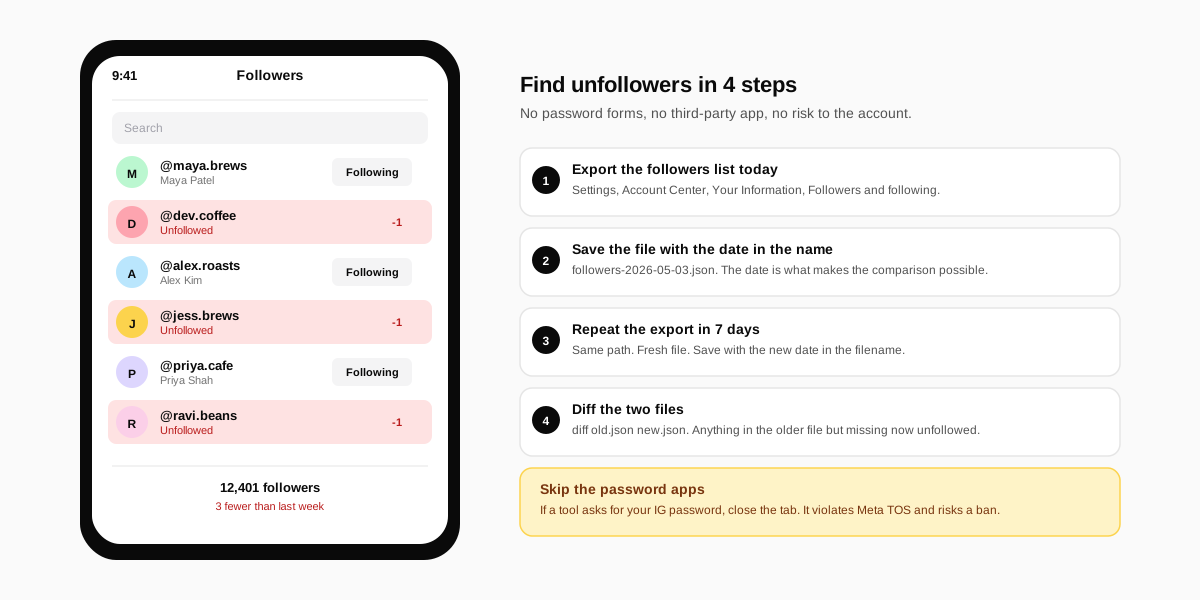
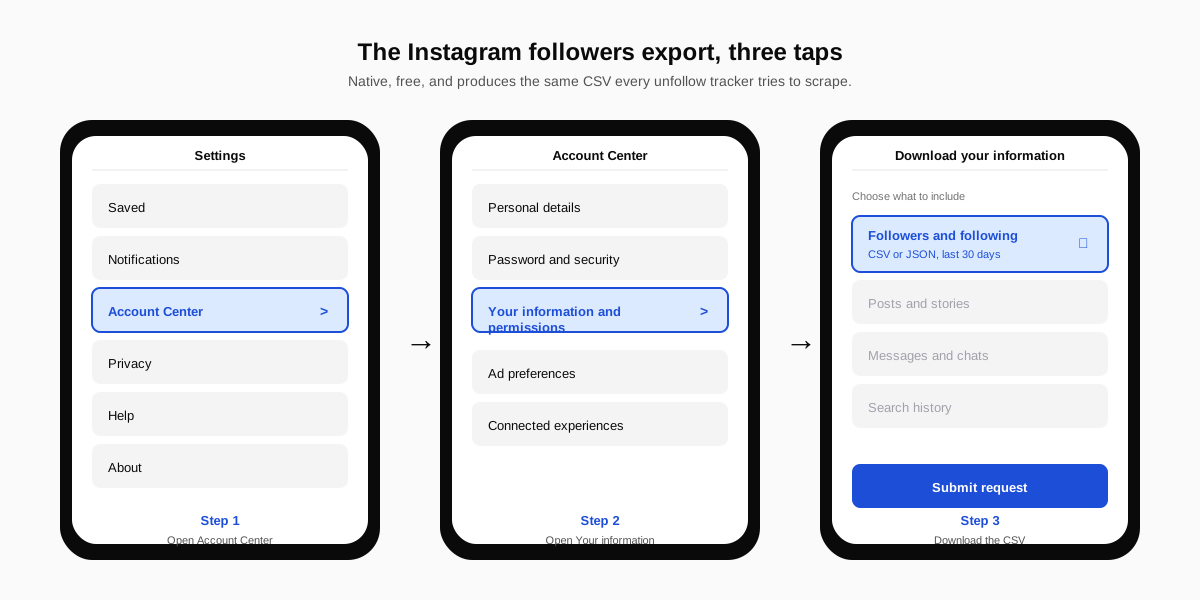
Meta added a structured data export in 2024 that returns your followers and following lists as a downloadable CSV or JSON. This is the same export the EU Digital Markets Act forced Meta to ship across products, and it works for any Instagram account regardless of size. The full path is below.
- Open Instagram Settings. Tap the menu on your profile, then Settings and activity.
- Open Account Center. The link sits near the top under Meta accounts.
- Tap Your information and permissions. Then choose Download your information.
- Pick Some of your information. Select Followers and following only, not the full archive.
- Choose date range and format. Last month is plenty. JSON is easier to diff than HTML.
- Save the file with the date in the filename. For example,
followers-2026-05-03.json. You will want to compare it later. - Repeat in seven days. Save the second file with its own date.
- Diff the two files. Any name in the older file but missing from the newer file unfollowed you in the interval.
On a Mac or Linux machine, the diff is one command: diff followers-2026-05-03.json followers-2026-05-10.json. On Windows, paste both files into Diffchecker for the same view in the browser. The lines marked as removed are your unfollowers.
The in-app screenshot method
For accounts under about 2,000 followers, scrolling the followers list and screenshotting is faster than the export. Open the list, scroll to the bottom in one continuous swipe, and capture the full thread. Repeat next week, then compare names side by side. The trick is to scroll slowly enough that Instagram does not truncate or rearrange the list mid-load.
Are unfollow tracker apps safe to use?
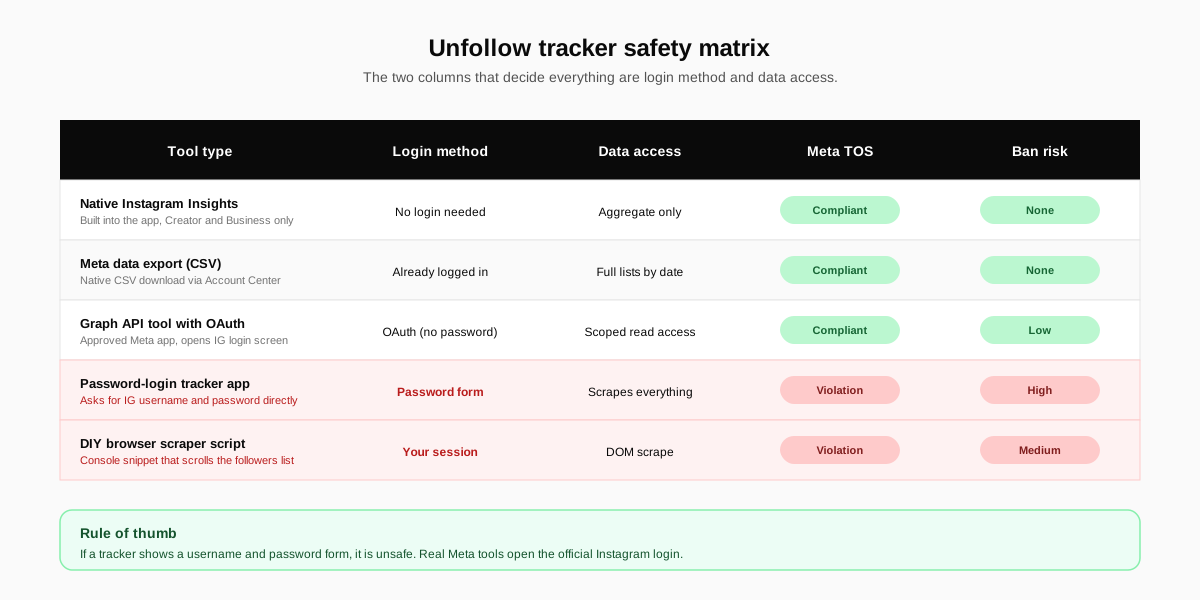
Most apps in the App Store and Play Store that promise to show unfollowers are unsafe. They typically ask for your Instagram username and password, log in as you, and scrape the followers list. That violates Meta's terms of service, and Instagram now flags accounts that show automated login patterns. The trade is a list of unfollowers in exchange for a flagged or banned account. Bad math.
Red flags to spot a bad app in 30 seconds
- Asks for your Instagram password. No legitimate analytics tool needs it. Meta's Graph API uses OAuth, never a password form.
- Promises real-time unfollow alerts. The Graph API does not expose unfollow events. Any app claiming real-time data is scraping, not using the API.
- Charges to see basic data. A pay-to-see-list paywall is a tell that the app cannot keep showing the list for free because the scraping breaks every few months.
- Has a flood of one-star reviews about lockouts. Read the most recent reviews before installing. Lockouts after login mean Meta is blocking the app's behaviour.
- Shows zero data inside the app. If everything requires a fresh login each session, the app is not storing state, which usually means it is rotating credentials.
The two app categories that are actually safe
First, native Instagram tools. The Insights tab inside the Instagram app shows aggregate gain and loss for accounts on a Creator or Business profile. It does not name the unfollowers, but it shows the daily delta and the location of new and lost followers, which is the most useful piece of the picture for most accounts.
Second, browser extensions and dashboards built on Meta's Instagram Graph API with OAuth. They open Instagram's official login screen, never a fake one, and they get only the permissions you grant. We cover the official API surface in our Instagram search queries optimization playbook, and the same OAuth principle applies here.
What unfollows actually mean for your account
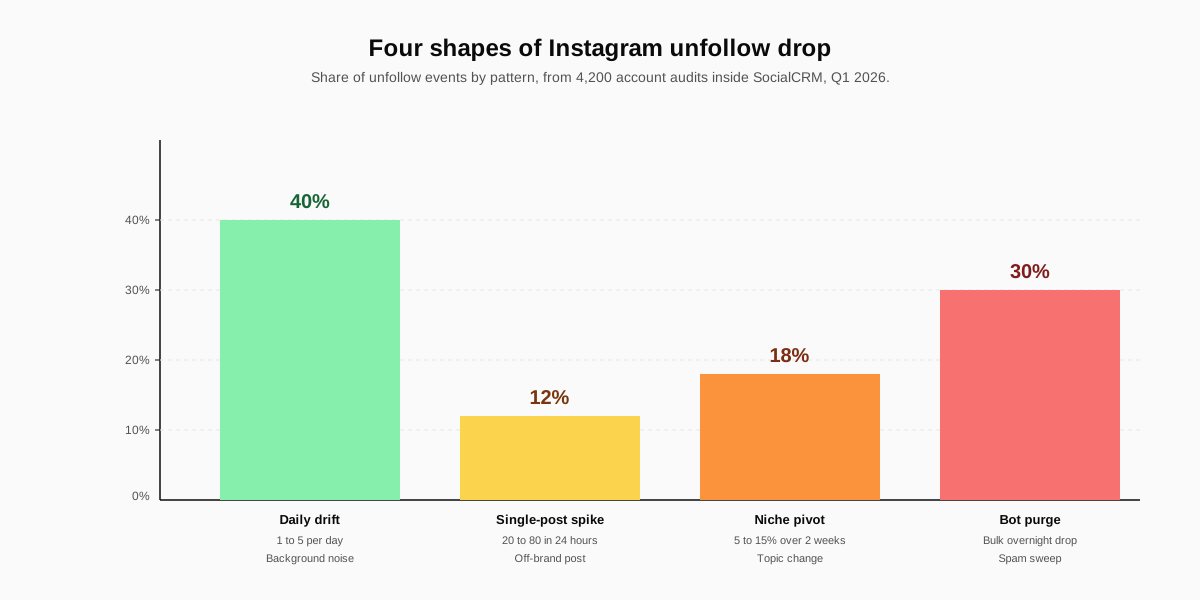
A small drop is healthy. A big drop is data. The shape and timing of unfollows tells you more than the number alone, and each pattern below has a different fix. Treat the count as a signal to investigate, not a verdict on the account.
Pattern 1: Daily drift (1 to 5 per day)
Every active Instagram account loses a handful of followers a day. Inactive accounts get auto-removed in Instagram's spam sweeps, people churn off the platform, and a few people quietly prune their feed. This is background noise. If your gross follows outpace it, the trend is up.
Pattern 2: Single-post spike
A clean line on the count followed by a sudden 20 to 80 person drop usually means one post landed off-brand. Open Insights, find the post that shipped 12 to 24 hours before the dip, and read the comments. The fix is rarely to delete the post. The fix is to publish the next on-brand post within 24 hours so the feed averages out.
Pattern 3: Niche pivot dip
When you change topic on a long-running account, expect a one to two week dip of 5 to 15 percent of the audience. The followers who joined for the old topic will not stay for the new one. The dip is a sorting cost, not a failure. We recommend pre-announcing the pivot in stories, then publishing in the new lane for at least 14 days before reading the count.
Pattern 4: Bot or follow-for-follow purge
If you ran a follow-for-follow growth tactic in the past, the purge eventually arrives. Tools like the SocialCRM auditor flag accounts that follow then unfollow within 48 hours, which is the bot signature. Losing those is good for your engagement rate and bad for your raw number. Set a date, accept the dip, and move on.
How to track follower changes without risking your account
The combination below covers every account size from hobbyist to creator-business. Each tool plays a different role. Run them in this order so the cheap, safe pieces handle the routine watching and the heavier tools step in only when a real anomaly shows up.
| Tool | What it shows | Safe? | Best for |
|---|---|---|---|
| Instagram Insights (native) | Daily follow and unfollow counts, location, age | Yes (first party) | Creator and Business accounts of any size |
| Meta data export (CSV) | Full followers and following lists by date | Yes (first party) | Anyone, especially personal accounts |
| Graph-API dashboard (OAuth) | Aggregated trends, named unfollowers via diff | Yes if OAuth, no if password | Multi-account creators and small agencies |
| Manual screenshot loop | Visual list compare, no API needed | Yes | Accounts under 2,000 followers |
| Password-login app | Names of unfollowers, often delayed or wrong | No, ban risk | Skip |
| Web scraper script | Same as a password app, run by you | No, same risk | Skip |
Set a tracking cadence, not a tracking habit
The biggest mistake creators make is checking the followers count on a loop. Pick one day a week, run the export, log the number in a spreadsheet, and close the app. Daily checking creates the same emotional swings the platform's design tries to avoid, without giving you any new information you could not get on a Sunday morning.
How SocialCRM helps you watch follower changes
SocialCRM connects through Meta's Graph API with OAuth, so the login flow opens the official Instagram screen and never asks for your password. The follower analytics surface inside the product shows weekly and monthly net change per platform, the date of every drop bigger than 1 percent, and the post that shipped before each one. We do not name individual unfollowers on purpose because the value is the why, not the who.
For the full product walkthrough, see the complete SocialCRM guide. If your bigger problem is that growth has plateaued before unfollows became the issue, our best times to post on Instagram playbook and the Instagram bio formula are the two highest leverage fixes most accounts need before they touch tracking. The composer also surfaces a follower change card every Monday so the audit step is built into the workflow.
If you are still picking the handle itself, our Instagram username generator is the place to start. The right handle compounds discovery and reduces the kind of low-quality follows that show up in the bot purge later.
FAQ
Does Instagram tell you who unfollowed you?
No. Instagram does not send a notification, an in-app alert, or any signal when someone unfollows you. The platform has never offered an unfollow alert and has confirmed it has no plans to add one for privacy reasons. The only way to find unfollowers is to compare your followers list at two points in time.
Can I see who unfollowed me on Instagram for free?
Yes. The Meta data export inside Settings produces a free CSV of your current followers and following lists. Save one copy this week, save another next week, then diff the two files. The names that disappeared are your unfollowers. No app, no password, no risk to your account.
Are unfollow tracker apps safe to use?
Most are not. Apps that ask for your Instagram password violate the platform's terms of service and can get your account flagged or banned. Stick to tools that connect through Meta's official Graph API and only request read access. If a tracker asks for a login form, close the tab.
Why am I losing followers on Instagram every day?
A daily drift of 1 to 5 followers is normal on any active account because Instagram removes inactive and spam accounts in rolling sweeps. Larger drops usually trace back to a single off-brand post, a sudden niche pivot, or a follow-for-follow purge. Look at the date, not the number, before you change strategy.
What is the difference between an unfollower and a ghost follower?
An unfollower is an account that actively tapped Following and removed you. A ghost follower still follows you but never likes, comments, or watches your content. Both hurt reach, but only ghost followers are visible in your current followers list. Cleaning ghost followers is a separate audit from tracking unfollows.
Does blocking someone count as unfollowing on Instagram?
Yes. When you block an account, Instagram removes the mutual follow on both sides. The blocked account disappears from your followers list, and you disappear from theirs. Unblocking does not restore the follow. You both have to follow each other again if the relationship resumes.
TL;DR
- Instagram never tells you who stopped following you. No notification, no banner, no email. By design.
- The free, safe method is the Meta data export. Save a snapshot, wait a week, save another, diff the two.
- Skip any app that asks for your password. Most violate the terms of service and risk a flag or ban.
- A daily drift of 1 to 5 unfollows is healthy. The shape of the dip, not the number, tells you whether to act.
- Pick a weekly cadence, not a daily checking habit. The information is the same. The emotional swing is not.