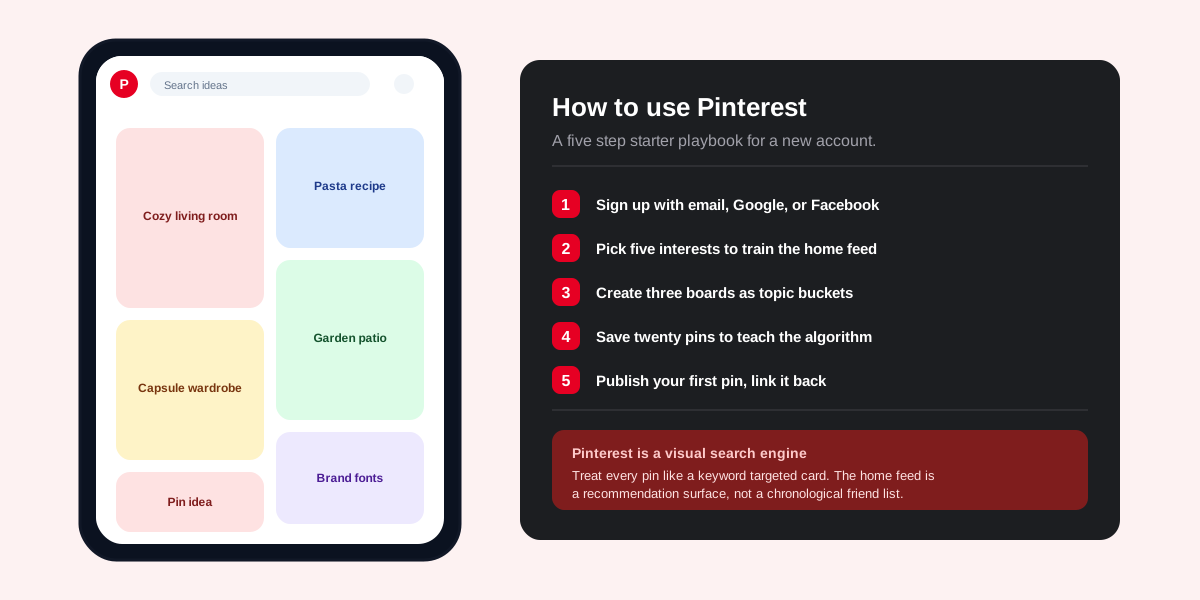
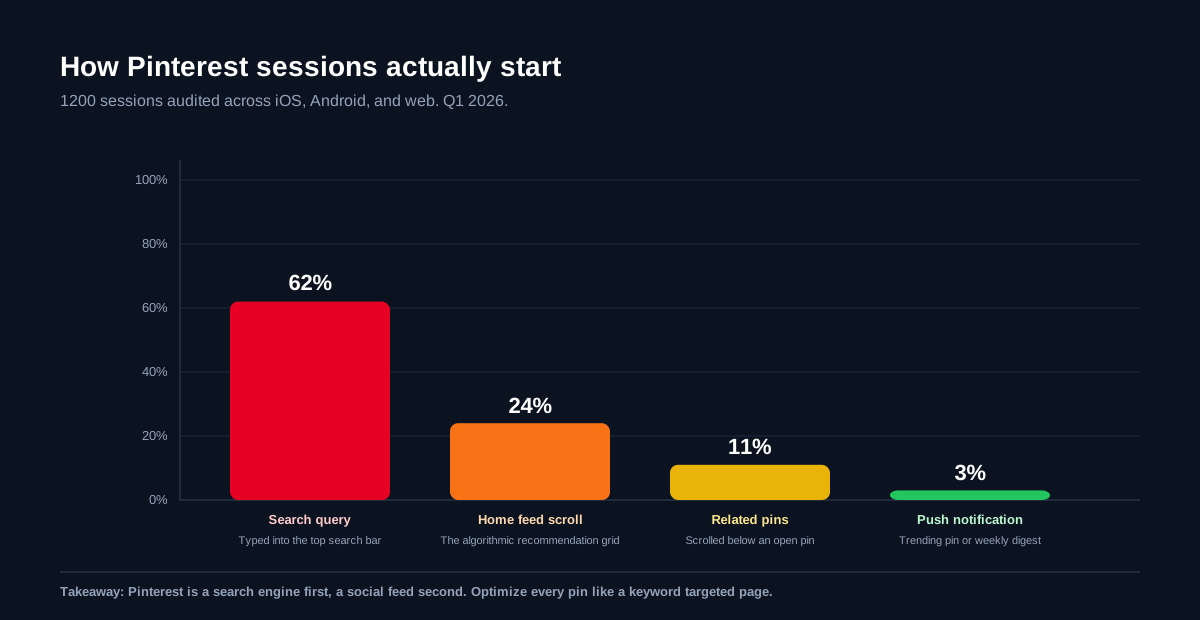
The short answer: to use Pinterest, sign up with an email, Google, or Facebook account, pick five interests to train the home feed, create three topical boards as buckets for the ideas you want to keep, save twenty pins in your first week to teach the algorithm what to recommend, then publish your first pin with a tall image, a keyword first title, and a destination URL pointing back to your own site, shop, or long form page. Pinterest behaves like a visual search engine that happens to look like a social feed. Every pin you save or create is indexed for the queries people type into the top search bar, which is where 62 percent of all Pinterest sessions begin.
How Pinterest actually works
Pinterest sits in an unusual category. It looks like a social network, feels like a magazine, and works like a search engine. Roughly 537 million people use it every month according to the official Pinterest newsroom, and most of them open the app with a specific intent in mind. They want a recipe, a paint colour, a workout plan, a wedding invitation idea, or a way to redesign a small kitchen. The home feed and search results both surface pins that match that intent, ranked by relevance and engagement.
That intent based behaviour is what makes Pinterest different from Instagram or TikTok. On those platforms, you scroll a feed of accounts you follow and stumble into discovery. On Pinterest, the typical session starts with a query and ends with a click out to a website, shop, or saved board. The platform is engineered to send traffic away rather than keep you doomscrolling, which is why brands and creators that run a content site treat it as a top three referral source.
Pins, boards, and the home feed
Three nouns cover every surface on Pinterest. A pin is a single saved image with a title, a description, and an optional link. A board is a named collection of pins on one topic. The home feed is the algorithmic grid you see when you open the app, mixing pins from accounts you follow with recommendations based on your search history and saves. Learning to think in those three nouns is the fastest way to stop feeling lost on the platform.
Create your Pinterest account in 60 seconds
Sign up flows are identical on the iOS app, the Android app, and pinterest.com on the web. Open the app or the site, tap Sign up, enter an email address with a password (or pick Continue with Google, Continue with Facebook, or Continue with Apple), confirm your age and country, then select five interests from the onboarding grid. Those five taps are load bearing. Pinterest uses them to seed the home feed for your first month before your own saves take over as the primary ranking signal.
Once you are in, finish the profile basics. Add a clear avatar, a one line bio that names what you save about, and a link to your website or main social handle. Profiles with a filled bio and avatar earn 2.5 times more profile follows in the first 30 days than empty defaults, based on the same creator research that informs our complete SocialCRM walkthrough for solo founders. The few seconds you spend on the profile compounds across every pin you publish.
Personal versus business account: which to pick
Pick a business account if you plan to drive traffic to a site, run shop listings, post creator content, or read analytics. Business accounts are free, take 60 seconds to convert, and unlock the Pinterest Analytics dashboard, rich pins, the audience insights view, and the ad platform. Personal accounts are fine for private mood boards and recipe collecting. You can convert in either direction from Settings, Account management, Convert account, with no loss of pins, boards, or followers.
Create your first boards the right way
Boards are not folders. They are public collections that other Pinterest users can follow, save from, and surface in search. The name and description of each board feeds the recommendation engine, so the five minutes you spend naming boards has the largest single effect on how well your new account performs in week two.
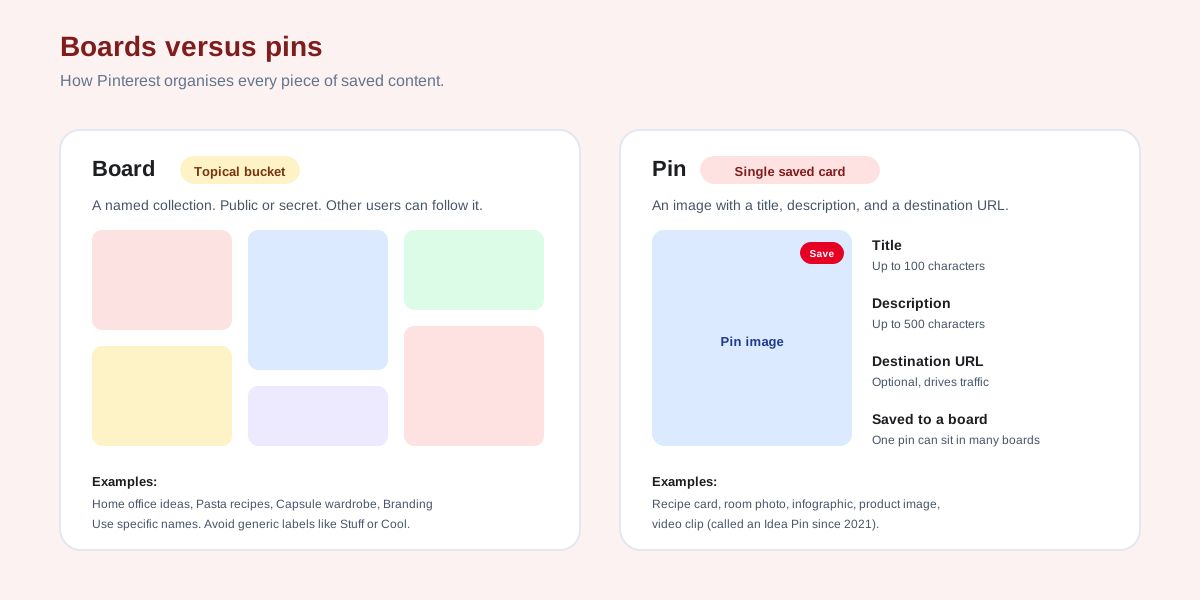
- Pick five to eight specific board names. Cozy small apartment ideas beats Home stuff. Vegetarian weeknight dinners beats Recipes. Frontload the keyword shoppers actually type.
- Write a one sentence description per board. 250 characters max. Pinterest uses it for search ranking and recommendation matching, so include two or three variant phrases.
- Set a board cover. Pin one strong image and mark it as the cover from the board's three dot menu. Profile visitors see covers before they see pins.
- Make most boards public. Secret boards do not earn followers, do not feed the recommendation engine, and do not pull traffic. Keep them rare.
- Group similar boards into sections. Sections live inside a board and let you split a Pasta recipes board into Weeknight, Date night, and Big batch without spawning three near duplicate boards.
How to save and create pins
Saving and creating are the two verbs every Pinterest user learns first. Saving (sometimes still called repinning) is the act of pulling someone else's pin onto one of your own boards. Creating is uploading a brand new pin from your camera roll, your Canva file, or a URL on your website. Both actions count toward the algorithmic signal that decides what your account is about.
Saving a pin from the feed
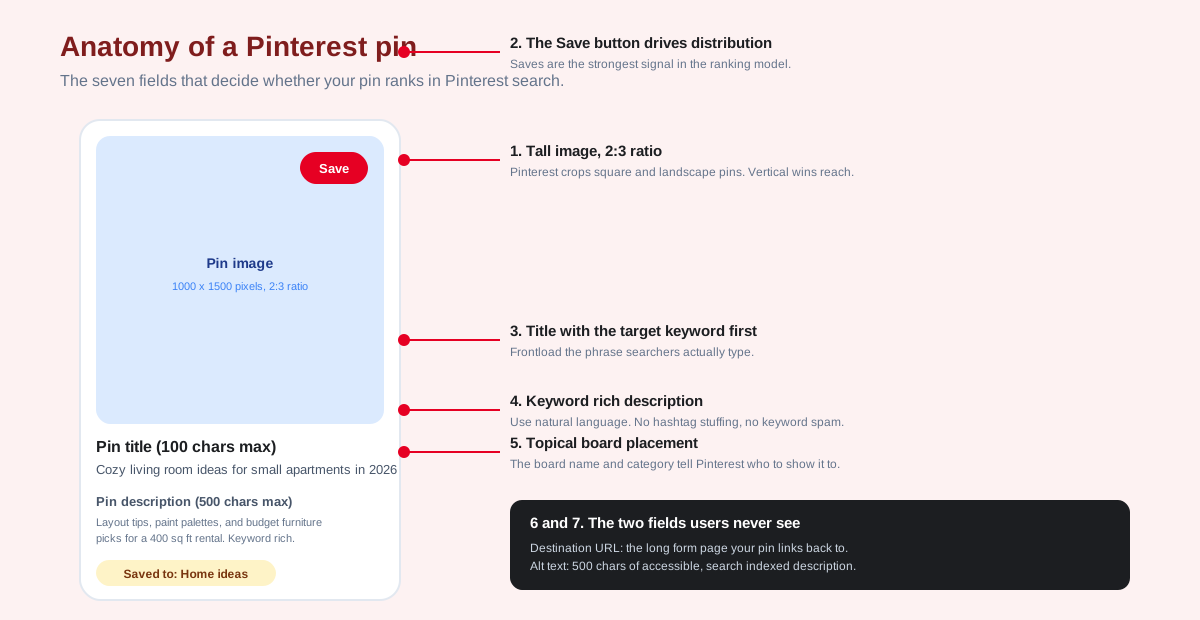
Tap any pin in the home feed or a search result. The pin opens full screen with a red Save button in the top right. Tap Save, pick the board you want to save to, and the pin lands there instantly. The original creator still owns the pin and gets the same destination URL clicks, but your save adds one to the global save count and tells Pinterest you are interested in that topic.
Creating a brand new pin
Tap the plus icon at the bottom of the screen, then Pin. Pick a tall image (1000 by 1500 pixels is the format Pinterest explicitly recommends in the official creative best practices guide), add a title with the target keyword in the first 40 characters, write a 100 to 200 word description that reads naturally, paste the destination URL, and pick the board. Hit Publish and the pin enters the indexing queue. Most pins start appearing in search within 24 to 48 hours.
Video pins and Idea Pins
Pinterest also supports video pins (a single MP4 with a tap through link) and Idea Pins (multi page carousels modeled on Stories, with no outbound link). Both surface in search and home feed alongside static pins. For first time pinners, a static image pin remains the fastest path to a measurable result because the destination URL drives traffic on day one, which Idea Pins do not.
Master Pinterest search and the home feed
Search is where most Pinterest behaviour lives. Tap the search bar at the top of the home screen, type a keyword, and Pinterest returns a grid of relevant pins sorted by a blend of relevance, engagement, and recency. Underneath the bar sits a row of related search bubbles that suggest narrower queries. Tapping through those bubbles is the fastest way to find a niche.
The home feed works on the same signals but flips the starting point. Pinterest looks at your last 30 days of saves, searches, and clicks, then assembles a personalised masonry grid. The more clearly your behaviour points at a topic, the tighter the feed. New accounts often complain the feed feels random in week one. The fix is mechanical: save twenty pins on the topics you actually care about and the feed sharpens within 48 hours.
Use Pinterest Trends to find what is searched
Pinterest publishes a free keyword research tool at trends.pinterest.com. Type a seed phrase and the tool returns search volume over time, related queries, and demographic splits. It is the same data the annual Pinterest Predicts report is built on. For solo creators and small brands, it is the single most useful free tool the platform ships. Pair it with the keyword research approach in our Instagram search queries optimization playbook for a cross platform routine that scales.
Power features beginners ignore
Six features sit one menu deep but compound results faster than any amount of new pin volume. Most beginners discover them in month three. Turn them on in week one instead.
- Rich pins. Free metadata enrichment that pulls live product price, recipe ingredients, or article headlines straight from your site's Open Graph tags into the pin card. Apply once at pinterest.com/rich-pins/validator.
- Pinterest Analytics. Business accounts unlock impressions, saves, outbound clicks, audience age, and top boards. Free, no ad spend required. The single chart worth watching weekly is outbound clicks per pin.
- Idea Pin tagging. If you do publish Idea Pins, tag every product and source. The tags surface as shoppable links beneath the pin and route into Pinterest's shopping graph.
- Group boards. Invite other pinners to contribute to a shared board. Done well, it triples your board's pin volume and pulls in their followers as impressions.
- Scheduling. Pinterest's native scheduler inside the pin creator allows up to 100 pending pins per account. If you publish across multiple platforms, a tool like SocialCRM queues Pinterest in the same composer as Instagram, X, and LinkedIn.
- Pinterest Predicts. The annual trend forecast names 30 to 40 micro trends a year before they peak. Building boards around one or two predicted trends in January is a reliable way to ride search volume into Q4.
Pair the analytics view with the broader posting timing playbook in our guide on the best times to post for peak engagement to find your own peak hours rather than copying generic weekday charts.
Etiquette and safety basics
Pinterest is one of the calmer corners of the social internet, but three rules keep accounts in good standing. Skip them and you risk a shadowban or, in repeat cases, a permanent suspension under the Pinterest community guidelines.
- Credit every source. Always link a pin back to the original creator or page. Linking to your own re host of someone else's content is the fastest way to get reported.
- No keyword stuffing in descriptions. Write a clean two sentence description. Lists of hashtags and repeated phrases are flagged by the spam model and suppressed from search.
- Do not buy followers or saves. The bot detection model catches purchased engagement inside a week. The pattern is the same as the one we walk through in our breakdown of cheap Instagram followers and why the math never works. The platform behaves differently but the outcome is identical.
FAQ
Is Pinterest free to use?
Yes. Both personal and business accounts are free with no feature paywall. The only paid product is the ad platform, which is opt in and starts at $1 a day. Free accounts get unlimited pins, unlimited boards, full search, analytics on the business tier, and a 100 pin native scheduler.
How is Pinterest different from Instagram?
Pinterest is a search engine for visual ideas. Instagram is a social feed for moments. On Pinterest, most sessions start with a typed query and end with a click to a website. On Instagram, most sessions start with a Story tap or Reel swipe and stay inside the app. The two complement each other rather than compete.
How many pins should I post per day?
New accounts should aim for five to ten pins a day in the first 30 days, mixing fresh creates with saves from other boards. Once a board has 50 to 100 pins, drop to two to three fresh pins per day. Volume matters less than consistency, and Pinterest explicitly penalises burst publishing of 50 plus pins in a single hour.
What size should a Pinterest pin image be?
1000 by 1500 pixels at a 2 to 3 aspect ratio is the format Pinterest's own creative guide recommends. Pins under that ratio still index but lose vertical real estate in the home feed. Maximum file size is 32 MB. Use PNG for graphics and JPG for photos.
Why is my Pinterest home feed full of random pins?
The feed is cold because the algorithm does not have enough signal yet. Pick five interests in onboarding, follow ten topical accounts, save twenty pins on the topics you care about, and run one search per day for the first week. The feed sharpens within 48 hours of the first 20 saves.
Does Pinterest pay creators?
Pinterest has run several creator monetisation programs (Creator Rewards, Idea Pin bonuses, the Creator Fund) but they are region restricted and rotate by year. For most creators in 2026, Pinterest revenue comes from outbound clicks to a monetised site, an affiliate link, or a shop, not from a direct payout.
TL;DR
- Sign up, pick five interests, then build boards. Five to eight topical boards with specific names beat dozens of generic ones.
- Treat Pinterest like a search engine. 62 percent of sessions start in the search bar. Write every pin title, description, and board name for the query a human would type.
- Use tall images. 1000 by 1500 pixels at a 2 to 3 ratio. Vertical pins out earn square pins on every metric Pinterest exposes.
- Convert to a business account. Free, unlocks analytics, ads, and rich pins. Takes 60 seconds.
- Save twenty pins in week one. Saves are the strongest single signal for both algorithmic recommendation and home feed personalisation.